1. Dashboard
  2. Mitglieder
    1. Letzte Aktivitäten
    2. Benutzer online
    3. Team
    4. Mitgliedersuche
  3. Forenregeln
  4. Forum
    1. Unerledigte Themen
  • Anmelden
  • Registrieren
  • Suche
Alles
  • Alles
  • Artikel
  • Seiten
  • Forum
  • Erweiterte Suche
  1. AutoIt.de - Das deutschsprachige Forum.
  2. Mitglieder
  3. Douky

Beiträge von Douky

  • Rollende Kugel mit Textur

    • Douky
    • 28. November 2025 um 17:03
    Zitat von UEZ

    Gleiches Resultat:

    Code
    > _SetupOpenGL: Start
    > MSAA Enabled (Format Index: 39)
    > Selected PixelFormat: 39
    > SetPixelFormat Result: 1
    > wglCreateContext Result: 0x00020000
    > wglMakeCurrent Result: 1
    --- OpenGL Info ---
    Version:  4.6.0 - Build 32.0.101.6881
    Vendor:   Intel
    Renderer: Intel(R) Graphics

    Vielleicht hängt's an den Treibern...

    Das, dass bei dir quasi so gar nichts angezeigt wird, kann ich mir noch nicht so recht erklären.


    Zitat von argumentum

    Code
    > _SetupOpenGL: Start
    > MSAA Enabled (Format Index: 41)
    > Selected PixelFormat: 41
    > SetPixelFormat Result: 1
    > wglCreateContext Result: 0x00020000
    > wglMakeCurrent Result: 1
    --- OpenGL Info ---
    Version:  4.6.0 NVIDIA 576.57
    Vendor:   NVIDIA Corporation
    Renderer: NVIDIA GeForce RTX 3070/PCIe/SSE2

    Das sieht für mich im ersten Moment so aus, als hättest du einfach die Texturen nicht im selben Verzeichnis wie die .au3. In einer alten Version vom Script sind sie in einem Paket enthalten: https://autoit.de/wcf/file-download/302/
  • Rollende Kugel mit Textur

    • Douky
    • 23. November 2025 um 10:48

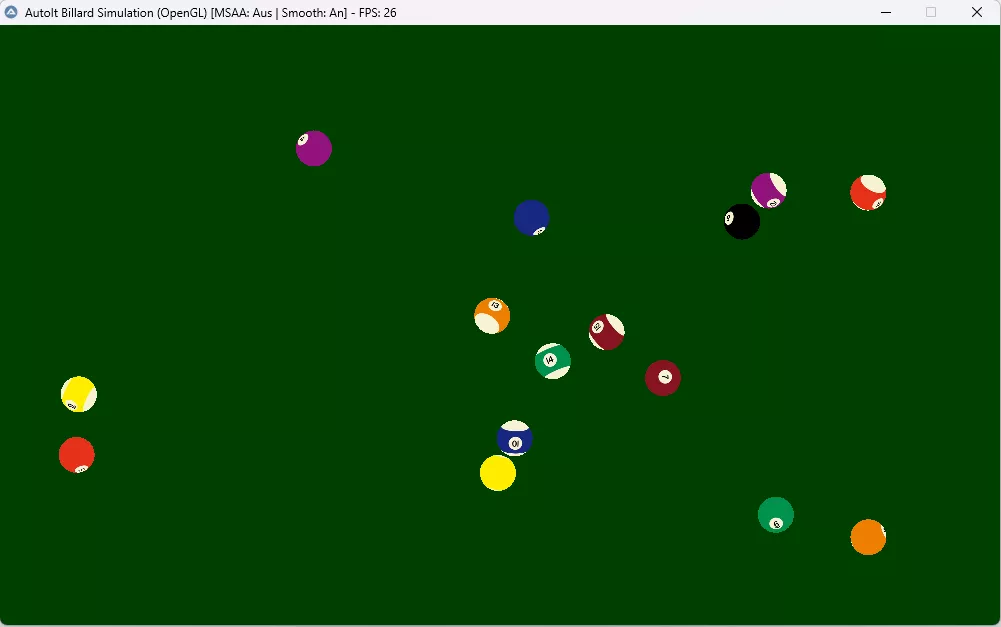
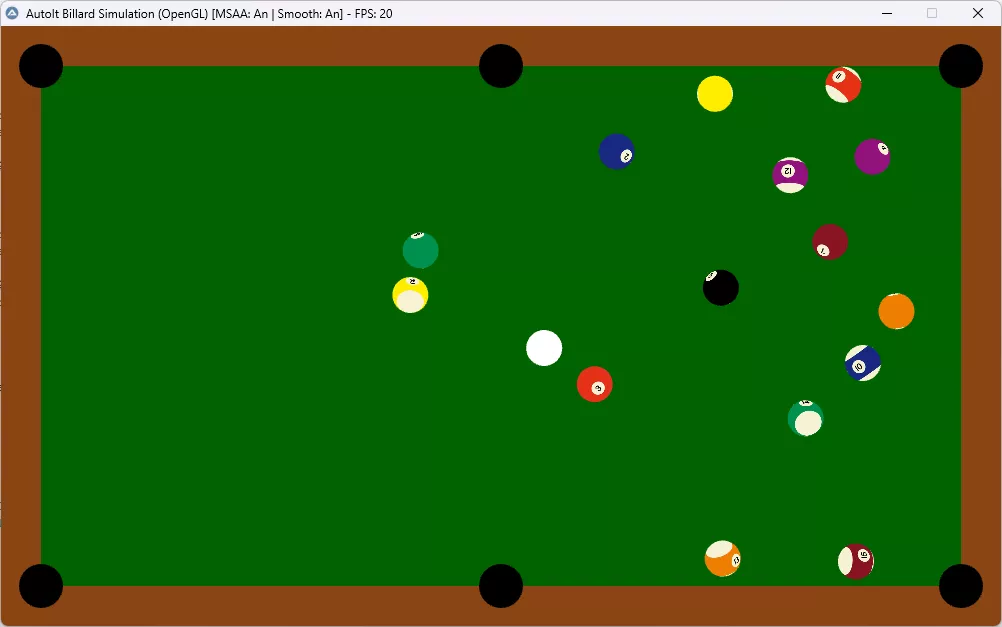
    Ich habe eine Windows-11-VM (25H2) zum Testen eingerichtet. Dort wurden zwar die Kugeln angezeigt, jedoch nicht der Holzrahmen und auch die weiße Kugel nicht.

    Neben den Änderungen wurden auch ein paar Ausgaben in der Konsole ergänzt.

    Vor den Änderungen:

    Nach den Änderungen:

    Umgesetzte Änderungen:

    1. Composition-Flag definieren und setzen

    Code
    Global Const $PFD_SUPPORT_COMPOSITION = 0x00008000

    In beiden Funktionen (_SetupOpenGL und _GetMultisamplePixelFormat) :

    Code
    DllStructSetData($tPFD, "Flags", BitOR($PFD_DRAW_TO_WINDOW, $PFD_SUPPORT_OPENGL, $PFD_DOUBLEBUFFER, $PFD_SUPPORT_COMPOSITION))

    2. Weiße Dummy-Textur statt Textur-Deaktivierung

    Code
    Func _CreateBlankTexture()
        ; ... Generiert eine weiße 1x1 Pixel Textur ...
        _glTexImage2D($GL_TEXTURE_2D, 0, 4, 1, 1, 0, $GL_RGBA, $GL_UNSIGNED_BYTE, DllStructGetPtr($tData))
        Return $iTexID
    EndFunc

    Im Render-Loop (ersetzt _glDisable($GL_TEXTURE_2D)) :

    Code
    _glEnable($GL_TEXTURE_2D)
    _glBindTexture($GL_TEXTURE_2D, $g_iTexBlank)

    3. Dreiecke statt Vierecke verwenden

    Code
    ; In _DrawRect:
    _glBegin($GL_TRIANGLES) ; Statt $GL_QUADS
    ; ... Vertex-Koordinaten für 2 Dreiecke ...

    4. Projektion in jedem Frame neu setzen

    Code
    ; Am Anfang von _Render:
    _glViewport(0, 0, $iWidth, $iHeight)
    _glMatrixMode($GL_PROJECTION)
    _glLoadIdentity()
    _glOrtho(0, $iWidth, $iHeight, 0, -100, 100)


    Billard_OpenGL_Win11.au3:

    C
    #include <GUIConstantsEx.au3>
    #include <WindowsConstants.au3>
    #include <Misc.au3>
    #include <Math.au3>
    #include <GDIPlus.au3> ; Wird benoetigt, um Bilder fuer Texturen zu laden
    
    ; --- OPENGL KONSTANTEN ---
    Global Const $PFD_DOUBLEBUFFER = 0x00000001
    Global Const $PFD_DRAW_TO_WINDOW = 0x00000004
    Global Const $PFD_SUPPORT_OPENGL = 0x00000020
    Global Const $PFD_SUPPORT_COMPOSITION = 0x00008000 ; Wichtig fuer Windows 11 DWM!
    Global Const $PFD_TYPE_RGBA = 0
    Global Const $PFD_MAIN_PLANE = 0
    
    Global Const $GL_COLOR_BUFFER_BIT = 0x00004000
    Global Const $GL_QUADS = 0x0007
    Global Const $GL_TRIANGLE_FAN = 0x0006
    Global Const $GL_TEXTURE_2D = 0x0DE1
    Global Const $GL_TEXTURE_MAG_FILTER = 0x2800
    Global Const $GL_TEXTURE_MIN_FILTER = 0x2801
    Global Const $GL_LINEAR = 0x2601
    Global Const $GL_RGBA = 0x1908
    Global Const $GL_UNSIGNED_BYTE = 0x1401
    Global Const $GL_MODELVIEW = 0x1700
    Global Const $GL_PROJECTION = 0x1701
    Global Const $GL_TEXTURE = 0x1702
    Global Const $GL_BLEND = 0x0BE2
    Global Const $GL_SRC_ALPHA = 0x0302
    Global Const $GL_ONE_MINUS_SRC_ALPHA = 0x0303
    Global Const $GL_COMPILE = 0x1300
    Global Const $GL_POLYGON_SMOOTH = 0x0B42
    Global Const $GL_POLYGON_SMOOTH_HINT = 0x0C53
    Global Const $GL_NICEST = 0x1102
    Global Const $GL_MODELVIEW_MATRIX = 0x0BA6
    Global Const $GL_DEPTH_TEST = 0x0B71
    Global Const $GL_DEPTH_BUFFER_BIT = 0x00000100
    Global Const $GL_NO_ERROR = 0x0
    
    Global Const $GL_CULL_FACE = 0x0B44
    Global Const $GL_TRIANGLES = 0x0004
    
    Global Const $GL_VERSION = 0x1F02
    Global Const $GL_VENDOR = 0x1F00
    Global Const $GL_RENDERER = 0x1F01
    
    ; --- KONFIGURATION ---
    Global $iWidth = 1000
    Global $iHeight = 600
    Global $fFriction = 0.990
    Global $fBallRadius = 18
    Global $iBorder = 40
    Global $sFolder = @ScriptDir
    
    ; Globale Arrays fuer die Kugeln
    Global $iMaxBalls = 16
    Global $aBalls[$iMaxBalls][8]
    Global $aTextures[$iMaxBalls] ; OpenGL Textur-IDs
    Global $aBallMatrices[$iMaxBalls] ; Strukturen fuer 4x4 Rotations-Matrizen
    
    ; Display Listen (Optimierung: Speichert Zeichenbefehle auf der Grafikkarte)
    Global $g_iListTable = 0
    Global $g_iListSphere = 0
    Global $g_iTexBlank = 0
    Global $g_bMSAA = False ; Status fuer Multisampling Anti-Aliasing
    
    ; DLL Handles
    Global $hOpenGL32 = DllOpen("opengl32.dll")
    Global $hGDI32 = DllOpen("gdi32.dll")
    Global $hUser32 = DllOpen("user32.dll")
    
    _Main()
    
    Func _Main()
        _GDIPlus_Startup()
    
        Local $hGui = GUICreate("AutoIt Billard Simulation (OpenGL)", $iWidth, $iHeight)
    
        ; --- OPENGL EINRICHTUNG ---
        Local $hDC = _WinAPI_GetDC($hGui)
        Local $hRC = _SetupOpenGL($hGui, $hDC)
    
        GUISetState(@SW_SHOW)
    
        ; OpenGL Status initialisieren
        _glEnable($GL_TEXTURE_2D) ; Texturierung aktivieren
        _glEnable($GL_BLEND) ; Transparenz aktivieren
        _glBlendFunc($GL_SRC_ALPHA, $GL_ONE_MINUS_SRC_ALPHA)
        _glEnable($GL_POLYGON_SMOOTH) ; Kantenglaettung fuer Polygone
        _glHint($GL_POLYGON_SMOOTH_HINT, $GL_NICEST) ; Beste Qualitaet anfordern
        _glEnable($GL_DEPTH_TEST) ; Tiefentest aktivieren (wichtig fuer 3D-Kugeln)
        _glClearColor(0.0, 0.25, 0.0, 1.0) ; Dunkelgruener Hintergrund (Clear Color)
    
        _CheckOpenGLVersion()
    
        ; Ansichtsbereich & Orthogonale Projektion (2D-Koordinatensystem fuer 3D-Welt)
        _glViewport(0, 0, $iWidth, $iHeight)
        _glMatrixMode($GL_PROJECTION)
        _glLoadIdentity()
        ; Wir setzen den Z-Bereich auf -100 bis 100, damit die Kugeln (Radius 18) nicht abgeschnitten werden.
        _glOrtho(0, $iWidth, $iHeight, 0, -100, 100) ; Ursprung oben-links
        _glMatrixMode($GL_MODELVIEW)
    
        ; Texturen laden
        _LoadBallTextures()
        $g_iTexBlank = _CreateBlankTexture()
    
        ; Rotations-Matrizen initialisieren
        _InitBallMatrices()
    
        ; Display Listen erstellen (Vorkompilierte Geometrie fuer Performance)
        _InitDisplayLists()
    
        ; Simulation starten (Kugeln aufbauen)
        _ResetTable()
    
        Local $hTimer = TimerInit()
        Local $hFpsTimer = TimerInit()
        Local $iFrames = 0
        Local $iFPS = 0
        Local $iIdleCounter = 0
    
        While 1
            Local $iMsg = GUIGetMsg()
            If $iMsg = $GUI_EVENT_CLOSE Then ExitLoop
    
            ; Framerate Begrenzung entfernt fuer maximale Fluessigkeit
            $hTimer = TimerInit()
    
            ; FPS Berechnung (Anzeige im Fenstertitel)
            $iFrames += 1
            If TimerDiff($hFpsTimer) >= 1000 Then
                $iFPS = $iFrames
                Local $sStatus = " [MSAA: " & ($g_bMSAA ? "An" : "Aus") & " | Smooth: An]"
                WinSetTitle($hGui, "", "AutoIt Billard Simulation (OpenGL)" & $sStatus & " - FPS: " & $iFPS)
                $iFrames = 0
                $hFpsTimer = TimerInit()
            EndIf
    
            ; --- 1. PHYSIK BERECHNUNG ---
            Local $bMovement = _UpdatePhysics()
    
            ; --- 1b. 3D ROTATION BERECHNUNG ---
            _UpdateRotations()
    
            ; --- 2. AUTO-RESET (Wenn alles stillsteht) ---
            If Not $bMovement Then
                $iIdleCounter += 1
                If $iIdleCounter > 120 Then
                    _ResetTable()
                    $iIdleCounter = 0
                EndIf
            Else
                $iIdleCounter = 0
            EndIf
    
            ; --- 3. ZEICHNEN (RENDERING) ---
            _Render()
            _SwapBuffers($hDC) ; Puffer tauschen (Double Buffering)
        WEnd
    
        ; Aufraeumen
        _wglMakeCurrent(0, 0)
        _wglDeleteContext($hRC)
        _WinAPI_ReleaseDC($hGui, $hDC)
        DllClose($hOpenGL32)
        DllClose($hGDI32)
        DllClose($hUser32)
        _GDIPlus_Shutdown()
    EndFunc
    
    Func _Render()
        ; Bildschirm und Tiefenpuffer loeschen
        _glClear(BitOR($GL_COLOR_BUFFER_BIT, $GL_DEPTH_BUFFER_BIT))
        _CheckGLError("_Render Clear")
    
        ; --- PROJEKTION NEU SETZEN (Sicherheitshalber fuer jeden Frame) ---
        ; Dies verhindert Probleme, falls die Matrix verloren geht oder der Kontext spinnt.
        _glViewport(0, 0, $iWidth, $iHeight)
        _glMatrixMode($GL_PROJECTION)
        _glLoadIdentity()
        _glOrtho(0, $iWidth, $iHeight, 0, -100, 100)
        _CheckGLError("_Render Projection")
    
        ; --- MODELVIEW ---
        _glMatrixMode($GL_MODELVIEW)
        _glLoadIdentity()
    
        ; --- TISCH ZEICHNEN (Display List) ---
        ; [WIN11 FIX] Display Lists nutzen, da Immediate Mode (glBegin/glEnd) auf Intel/Win11 flackert
        _glDisable($GL_DEPTH_TEST)
        ; [WIN11 FIX] Texturing NICHT deaktivieren (glDisable($GL_TEXTURE_2D) ist buggy).
        ; Stattdessen Texturing anlassen und weisse 1x1 Textur binden.
        _glEnable($GL_TEXTURE_2D)    
        _glBindTexture($GL_TEXTURE_2D, $g_iTexBlank) 
        _glDisable($GL_CULL_FACE)
        
        _glCallList($g_iListTable)
        _CheckGLError("_Render Table List")
    
        ; --- KUGELN ZEICHNEN ---
        _glEnable($GL_DEPTH_TEST)
        _glEnable($GL_TEXTURE_2D)
        _glColor3f(1.0, 1.0, 1.0) ; Farbe zuruecksetzen (Weiss = Originaltextur)
    
        For $i = 0 To $iMaxBalls - 1
            If Not $aBalls[$i][5] Then ContinueLoop
    
            Local $fX = $aBalls[$i][0]
            Local $fY = $aBalls[$i][1]
            Local $iTexID = $aTextures[$i]
    
            _glPushMatrix()
            ; Kugel an ihre 2D-Position verschieben
            _glTranslatef($fX, $fY, 0.0)
    
            If $iTexID <> 0 Then
                _glBindTexture($GL_TEXTURE_2D, $iTexID)
    
                ; 3D ROTATION ANWENDEN
                ; Wir laden die gespeicherte Rotationsmatrix der Kugel.
                ; Diese Matrix enthaelt die akkumulierte Rotation aller vergangenen Frames.
                Local $pMatrix = DllStructGetPtr($aBallMatrices[$i])
                _glMultMatrixf($pMatrix)
    
                ; Kugel zeichnen (3D Sphaere aus der Display List)
                _glCallList($g_iListSphere)
            Else
                ; Fallback fuer fehlende Textur (Weisse Kugel)
                ; [WIN11 FIX] Weisse Textur binden statt Texturing zu deaktivieren
                _glBindTexture($GL_TEXTURE_2D, $g_iTexBlank)
                _glColor3f(1.0, 1.0, 1.0)
                _glCallList($g_iListSphere)
            EndIf
    
            _glPopMatrix()
        Next
        _CheckGLError("_Render Balls")
        
        _glFinish() ; Synchronisation erzwingen
    EndFunc
    
    Func _DrawTableGeometry()
        ; 1. Holzrahmen
        _glColor3f(0.545, 0.27, 0.075) ; Sattelbraun
        _DrawRect(0, 0, $iWidth, $iHeight)
    
        ; 2. Spielflaeche
        _glColor3f(0.0, 0.39, 0.0) ; Dunkelgruen
        _DrawRect($iBorder, $iBorder, $iWidth - 2*$iBorder, $iHeight - 2*$iBorder)
    
        ; 3. Loecher
        _glColor3f(0.0, 0.0, 0.0) ; Schwarz
        Local $iHoleR = 22
        _DrawCircle($iBorder - $iHoleR, $iBorder - $iHoleR, $iHoleR) ; Oben-Links
        _DrawCircle($iWidth - $iBorder - $iHoleR, $iBorder - $iHoleR, $iHoleR) ; Oben-Rechts
        _DrawCircle($iBorder - $iHoleR, $iHeight - $iBorder - $iHoleR, $iHoleR) ; Unten-Links
        _DrawCircle($iWidth - $iBorder - $iHoleR, $iHeight - $iBorder - $iHoleR, $iHoleR) ; Unten-Rechts
        _DrawCircle($iWidth/2 - $iHoleR, $iBorder - $iHoleR, $iHoleR) ; Oben-Mitte
        _DrawCircle($iWidth/2 - $iHoleR, $iHeight - $iBorder - $iHoleR, $iHoleR) ; Unten-Mitte
    EndFunc
    
    Func _InitDisplayLists()
        ; --- LISTE 1: TISCH ---
        ; Erstellt die Geometrie fuer den Billardtisch
        $g_iListTable = _glGenLists(1)
        _glNewList($g_iListTable, $GL_COMPILE)
            _DrawTableGeometry()
        _glEndList()
    
        ; --- LISTE 2: KUGEL (3D Sphaere) ---
        ; Erstellt eine detaillierte 3D-Kugel mit Texturkoordinaten
        $g_iListSphere = _glGenLists(1)
        _glNewList($g_iListSphere, $GL_COMPILE)
            ; Zeichnen einer echten 3D Sphaere mittels Kugelkoordinaten.
            ; Die Textur wird mittels Equirectangular Mapping (Weltkarte) auf die Kugel gelegt.
    
            Local $iStacks = 48 ; Anzahl der horizontalen Scheiben (Breitengrade)
            Local $iSlices = 48 ; Anzahl der vertikalen Segmente (Laengengrade)
            Local $r = $fBallRadius
    
            For $i = 0 To $iStacks - 1
                Local $lat0 = 3.1415926 * (-0.5 + Number($i) / $iStacks)
                Local $z0 = Sin($lat0) * $r
                Local $zr0 = Cos($lat0) * $r
    
                Local $lat1 = 3.1415926 * (-0.5 + Number($i + 1) / $iStacks)
                Local $z1 = Sin($lat1) * $r
                Local $zr1 = Cos($lat1) * $r
    
                _glBegin(0x0008) ; GL_QUAD_STRIP (Streifen aus Vierecken)
                For $j = 0 To $iSlices
                    Local $lng = 2 * 3.1415926 * Number($j) / $iSlices
                    Local $x = Cos($lng)
                    Local $y = Sin($lng)
    
                    ; Texturkoordinaten und Vertexposition berechnen
                    _glTexCoord2f(Number($j) / $iSlices, Number($i) / $iStacks)
                    _glVertex3f($x * $zr0, $y * $zr0, $z0)
    
                    _glTexCoord2f(Number($j) / $iSlices, Number($i + 1) / $iStacks)
                    _glVertex3f($x * $zr1, $y * $zr1, $z1)
                Next
                _glEnd()
            Next
        _glEndList()
    EndFunc
    
    Func _DrawRect($x, $y, $w, $h)
        ; Wir nutzen GL_TRIANGLES statt GL_QUADS fuer maximale Kompatibilitaet
        _glBegin($GL_TRIANGLES)
        ; Dreieck 1
        _glVertex3f($x, $y, 0.0)
        _glVertex3f($x + $w, $y, 0.0)
        _glVertex3f($x, $y + $h, 0.0)
        ; Dreieck 2
        _glVertex3f($x + $w, $y, 0.0)
        _glVertex3f($x + $w, $y + $h, 0.0)
        _glVertex3f($x, $y + $h, 0.0)
        _glEnd()
    EndFunc
    
    Func _DrawCircle($x, $y, $r)
        Local $iSegments = 32
        _glBegin($GL_TRIANGLE_FAN)
        _glVertex2f($x + $r, $y + $r) ; Center
        For $i = 0 To $iSegments
            Local $fAngle = $i * 2.0 * 3.14159 / $iSegments
            _glVertex2f($x + $r + Cos($fAngle) * $r, $y + $r + Sin($fAngle) * $r)
        Next
        _glEnd()
    EndFunc
    
    Func _DrawCircleTextured($x, $y, $r)
        Local $iSegments = 32
        _glBegin($GL_TRIANGLE_FAN)
        _glTexCoord2f(0.5, 0.5)
        _glVertex2f($x + $r, $y + $r) ; Center
    
        For $i = 0 To $iSegments
            Local $fAngle = $i * 2.0 * 3.14159 / $iSegments
            Local $tx = 0.5 + 0.5 * Cos($fAngle)
            Local $ty = 0.5 + 0.5 * Sin($fAngle)
            _glTexCoord2f($tx, $ty)
            _glVertex2f($x + $r + Cos($fAngle) * $r, $y + $r + Sin($fAngle) * $r)
        Next
        _glEnd()
    EndFunc
    
    Func _LoadBallTextures()
        For $i = 0 To 15
            Local $sPath = $sFolder & "\" & $i & ".bmp"
            If FileExists($sPath) Then
                $aTextures[$i] = _LoadTexture($sPath)
            Else
                $aTextures[$i] = 0
            EndIf
        Next
    EndFunc
    
    Func _LoadTexture($sFile)
        Local $hImage = _GDIPlus_ImageLoadFromFile($sFile)
        Local $iW = _GDIPlus_ImageGetWidth($hImage)
        Local $iH = _GDIPlus_ImageGetHeight($hImage)
    
        ; Bits sperren, um an die Rohdaten zu kommen
        Local $tBitmapData = _GDIPlus_BitmapLockBits($hImage, 0, 0, $iW, $iH, $GDIP_ILMREAD, $GDIP_PXF32ARGB)
        Local $pScan0 = DllStructGetData($tBitmapData, "Scan0")
    
        Local $iTexID = _glGenTextures()
        _glBindTexture($GL_TEXTURE_2D, $iTexID)
        _glTexParameteri($GL_TEXTURE_2D, $GL_TEXTURE_MAG_FILTER, $GL_LINEAR)
        _glTexParameteri($GL_TEXTURE_2D, $GL_TEXTURE_MIN_FILTER, $GL_LINEAR)
    
        ; Textur hochladen
        ; Wir nutzen hier 0x80E1 (GL_BGRA_EXT), damit die Farben (Rot/Blau) korrekt sind.
        _glTexImage2D($GL_TEXTURE_2D, 0, 4, $iW, $iH, 0, 0x80E1, $GL_UNSIGNED_BYTE, $pScan0) ; 0x80E1 = GL_BGRA
    
        _GDIPlus_BitmapUnlockBits($hImage, $tBitmapData)
        _GDIPlus_ImageDispose($hImage)
    
        Return $iTexID
    EndFunc
    
    Func _CreateBlankTexture()
        Local $iTexID = _glGenTextures()
        _glBindTexture($GL_TEXTURE_2D, $iTexID)
        _glTexParameteri($GL_TEXTURE_2D, $GL_TEXTURE_MAG_FILTER, $GL_LINEAR)
        _glTexParameteri($GL_TEXTURE_2D, $GL_TEXTURE_MIN_FILTER, $GL_LINEAR)
        
        Local $tData = DllStructCreate("byte[4]")
        DllStructSetData($tData, 1, 255, 1) ; R
        DllStructSetData($tData, 1, 255, 2) ; G
        DllStructSetData($tData, 1, 255, 3) ; B
        DllStructSetData($tData, 1, 255, 4) ; A
        
        _glTexImage2D($GL_TEXTURE_2D, 0, 4, 1, 1, 0, $GL_RGBA, $GL_UNSIGNED_BYTE, DllStructGetPtr($tData))
        
        Return $iTexID
    EndFunc
    
    ; --- OPENGL WRAPPERS ---
    
    Func _SetupOpenGL($hWnd, $hDC)
        ConsoleWrite("> _SetupOpenGL: Start" & @CRLF)
        
        ; --- WINDOWS 11 OPTIMIERUNG ---
        ; Windows 11: PFD_SUPPORT_COMPOSITION ist Pflicht fuer DWM!
        ; Wir versuchen MSAA zu aktivieren, falls moeglich.
        $g_bMSAA = False
        Local $iPixelFormat = 0
    
        Local $tPFD = DllStructCreate("ushort Size;ushort Version;dword Flags;byte PixelType;byte ColorBits;byte RedBits;byte RedShift;byte GreenBits;byte GreenShift;byte BlueBits;byte BlueShift;byte AlphaBits;byte AlphaShift;byte AccumBits;byte AccumRedBits;byte AccumGreenBits;byte AccumBlueBits;byte AccumAlphaBits;byte DepthBits;byte StencilBits;byte AuxBuffers;byte LayerType;byte Reserved;dword LayerMask;dword VisibleMask;dword DamageMask")
        DllStructSetData($tPFD, "Size", DllStructGetSize($tPFD))
        DllStructSetData($tPFD, "Version", 1)
        ; [WIN11 FIX] $PFD_SUPPORT_COMPOSITION (0x00008000) ist zwingend notwendig fuer Fenster-Modus
        DllStructSetData($tPFD, "Flags", BitOR($PFD_DRAW_TO_WINDOW, $PFD_SUPPORT_OPENGL, $PFD_DOUBLEBUFFER, $PFD_SUPPORT_COMPOSITION))
        DllStructSetData($tPFD, "PixelType", $PFD_TYPE_RGBA)
        DllStructSetData($tPFD, "ColorBits", 32)
        DllStructSetData($tPFD, "DepthBits", 24)
        DllStructSetData($tPFD, "LayerType", $PFD_MAIN_PLANE)
    
        ; Standard-Format waehlen
        ; Zuerst versuchen wir, ein Multisampling-Format (MSAA) zu bekommen
        Local $iPixelFormatMSAA = _GetMultisamplePixelFormat()
        
        If $iPixelFormatMSAA > 0 Then
            $iPixelFormat = $iPixelFormatMSAA
            $g_bMSAA = True
            ConsoleWrite("> MSAA Enabled (Format Index: " & $iPixelFormat & ")" & @CRLF)
        Else
            ConsoleWrite("> MSAA Not Available, using standard format." & @CRLF)
            $iPixelFormat = DllCall($hGDI32, "int", "ChoosePixelFormat", "handle", $hDC, "struct*", $tPFD)[0]
        EndIf
        
        ConsoleWrite("> Selected PixelFormat: " & $iPixelFormat & @CRLF)
    
        If $iPixelFormat = 0 Then
            MsgBox(16, "Fehler", "Kein passendes PixelFormat gefunden!")
            Return 0
        EndIf
    
        Local $iSetRes = DllCall($hGDI32, "int", "SetPixelFormat", "handle", $hDC, "int", $iPixelFormat, "struct*", $tPFD)[0]
        ConsoleWrite("> SetPixelFormat Result: " & $iSetRes & @CRLF)
    
        Local $hRC = DllCall($hOpenGL32, "handle", "wglCreateContext", "handle", $hDC)[0]
        ConsoleWrite("> wglCreateContext Result: " & $hRC & @CRLF)
        
        If $hRC = 0 Then
            MsgBox(16, "Fehler", "OpenGL Kontext konnte nicht erstellt werden!")
            Return 0
        EndIf
    
        Local $iMakeCurrentRes = DllCall($hOpenGL32, "int", "wglMakeCurrent", "handle", $hDC, "handle", $hRC)[0]
        ConsoleWrite("> wglMakeCurrent Result: " & $iMakeCurrentRes & @CRLF)
        
        If $g_bMSAA Then
            _glEnable(0x809D) ; GL_MULTISAMPLE_ARB
        EndIf
    
        _CheckGLError("_SetupOpenGL End")
    
        Return $hRC
    EndFunc
    
    Func _GetMultisamplePixelFormat()
        ; Erstellt ein Dummy-Fenster & Kontext, um Zugriff auf erweiterte OpenGL-Funktionen zu erhalten.
        Local $hDummyGui = GUICreate("Dummy", 10, 10, -1000, -1000)
        Local $hDummyDC = _WinAPI_GetDC($hDummyGui)
    
        Local $tPFD = DllStructCreate("ushort Size;ushort Version;dword Flags;byte PixelType;byte ColorBits;byte RedBits;byte RedShift;byte GreenBits;byte GreenShift;byte BlueBits;byte BlueShift;byte AlphaBits;byte AlphaShift;byte AccumBits;byte AccumRedBits;byte AccumGreenBits;byte AccumBlueBits;byte AccumAlphaBits;byte DepthBits;byte StencilBits;byte AuxBuffers;byte LayerType;byte Reserved;dword LayerMask;dword VisibleMask;dword DamageMask")
        DllStructSetData($tPFD, "Size", DllStructGetSize($tPFD))
        DllStructSetData($tPFD, "Version", 1)
        ; [WIN11 FIX] Auch das Dummy-Fenster braucht PFD_SUPPORT_COMPOSITION
        DllStructSetData($tPFD, "Flags", BitOR($PFD_DRAW_TO_WINDOW, $PFD_SUPPORT_OPENGL, $PFD_DOUBLEBUFFER, $PFD_SUPPORT_COMPOSITION))
        DllStructSetData($tPFD, "PixelType", $PFD_TYPE_RGBA)
        DllStructSetData($tPFD, "ColorBits", 32)
        DllStructSetData($tPFD, "DepthBits", 24)
        DllStructSetData($tPFD, "LayerType", $PFD_MAIN_PLANE)
    
        Local $iPF = DllCall($hGDI32, "int", "ChoosePixelFormat", "handle", $hDummyDC, "struct*", $tPFD)[0]
        DllCall($hGDI32, "int", "SetPixelFormat", "handle", $hDummyDC, "int", $iPF, "struct*", $tPFD)
        Local $hDummyRC = DllCall($hOpenGL32, "handle", "wglCreateContext", "handle", $hDummyDC)[0]
        _wglMakeCurrent($hDummyDC, $hDummyRC)
    
        ; Pruefen, ob wglChoosePixelFormatARB verfuegbar ist
        Local $pChoosePixelFormatARB = _wglGetProcAddress("wglChoosePixelFormatARB")
        Local $iRetFormat = 0
    
        If $pChoosePixelFormatARB Then
            ; Attribute fuer 4x MSAA definieren
            Local $tIntAttribs = DllStructCreate("int[22]")
            Local $i = 1
            
            ; WGL_DRAW_TO_WINDOW_ARB = GL_TRUE
            DllStructSetData($tIntAttribs, 1, 0x2001, $i) 
            DllStructSetData($tIntAttribs, 1, 1, $i+1)
            $i+=2
            
            ; WGL_SUPPORT_OPENGL_ARB = GL_TRUE
            DllStructSetData($tIntAttribs, 1, 0x2010, $i)
            DllStructSetData($tIntAttribs, 1, 1, $i+1)
            $i+=2
            
            ; WGL_DOUBLE_BUFFER_ARB = GL_TRUE
            DllStructSetData($tIntAttribs, 1, 0x2011, $i)
            DllStructSetData($tIntAttribs, 1, 1, $i+1)
            $i+=2
            
            ; WGL_PIXEL_TYPE_ARB = WGL_TYPE_RGBA_ARB
            DllStructSetData($tIntAttribs, 1, 0x2013, $i)
            DllStructSetData($tIntAttribs, 1, 0x202B, $i+1)
            $i+=2
            
            ; WGL_COLOR_BITS_ARB = 32
            DllStructSetData($tIntAttribs, 1, 0x2014, $i)
            DllStructSetData($tIntAttribs, 1, 32, $i+1)
            $i+=2
            
            ; WGL_DEPTH_BITS_ARB = 24
            DllStructSetData($tIntAttribs, 1, 0x2022, $i)
            DllStructSetData($tIntAttribs, 1, 24, $i+1)
            $i+=2
            
            ; WGL_SAMPLE_BUFFERS_ARB = 1 (MSAA an)
            DllStructSetData($tIntAttribs, 1, 0x2041, $i)
            DllStructSetData($tIntAttribs, 1, 1, $i+1)
            $i+=2
            
            ; WGL_SAMPLES_ARB = 4 (4x Samples)
            DllStructSetData($tIntAttribs, 1, 0x2042, $i)
            DllStructSetData($tIntAttribs, 1, 4, $i+1)
            $i+=2
            
            ; Ende (0, 0)
            DllStructSetData($tIntAttribs, 1, 0, $i)
            DllStructSetData($tIntAttribs, 1, 0, $i+1)
    
            Local $tFloatAttribs = DllStructCreate("float[2]")
            DllStructSetData($tFloatAttribs, 1, 0, 1)
            DllStructSetData($tFloatAttribs, 1, 0, 2)
    
            Local $tPixelFormats = DllStructCreate("int[1]")
            Local $tNumFormats = DllStructCreate("uint")
    
            ; wglChoosePixelFormatARB aufrufen
            Local $aRet = DllCallAddress("int", $pChoosePixelFormatARB, "handle", $hDummyDC, "ptr", DllStructGetPtr($tIntAttribs), "ptr", DllStructGetPtr($tFloatAttribs), "uint", 1, "ptr", DllStructGetPtr($tPixelFormats), "ptr", DllStructGetPtr($tNumFormats))
    
            If $aRet[0] And DllStructGetData($tNumFormats, 1) > 0 Then
                $iRetFormat = DllStructGetData($tPixelFormats, 1)
            EndIf
        EndIf
    
        ; Dummy aufraeumen
        _wglMakeCurrent(0, 0)
        _wglDeleteContext($hDummyRC)
        _WinAPI_ReleaseDC($hDummyGui, $hDummyDC)
        GUIDelete($hDummyGui)
    
        Return $iRetFormat
    EndFunc
    
    Func _wglGetProcAddress($proc)
        Local $aRet = DllCall($hOpenGL32, "ptr", "wglGetProcAddress", "str", $proc)
        Return $aRet[0]
    EndFunc
    
    Func _wglMakeCurrent($hDC, $hRC)
        DllCall($hOpenGL32, "int", "wglMakeCurrent", "handle", $hDC, "handle", $hRC)
    EndFunc
    
    Func _wglDeleteContext($hRC)
        DllCall($hOpenGL32, "int", "wglDeleteContext", "handle", $hRC)
    EndFunc
    
    Func _SwapBuffers($hDC)
        DllCall($hGDI32, "int", "SwapBuffers", "handle", $hDC)
    EndFunc
    
    Func _glClearColor($r, $g, $b, $a)
        DllCall($hOpenGL32, "none", "glClearColor", "float", $r, "float", $g, "float", $b, "float", $a)
    EndFunc
    
    Func _glClear($mask)
        DllCall($hOpenGL32, "none", "glClear", "uint", $mask)
    EndFunc
    
    Func _glViewport($x, $y, $w, $h)
        DllCall($hOpenGL32, "none", "glViewport", "int", $x, "int", $y, "int", $w, "int", $h)
    EndFunc
    
    Func _glMatrixMode($mode)
        DllCall($hOpenGL32, "none", "glMatrixMode", "uint", $mode)
    EndFunc
    
    Func _glLoadIdentity()
        DllCall($hOpenGL32, "none", "glLoadIdentity")
    EndFunc
    
    Func _glOrtho($l, $r, $b, $t, $n, $f)
        DllCall($hOpenGL32, "none", "glOrtho", "double", $l, "double", $r, "double", $b, "double", $t, "double", $n, "double", $f)
    EndFunc
    
    Func _glEnable($cap)
        DllCall($hOpenGL32, "none", "glEnable", "uint", $cap)
    EndFunc
    
    Func _glDisable($cap)
        DllCall($hOpenGL32, "none", "glDisable", "uint", $cap)
    EndFunc
    
    Func _glBlendFunc($s, $d)
        DllCall($hOpenGL32, "none", "glBlendFunc", "uint", $s, "uint", $d)
    EndFunc
    
    Func _glColor3f($r, $g, $b)
        DllCall($hOpenGL32, "none", "glColor3f", "float", $r, "float", $g, "float", $b)
    EndFunc
    
    Func _glBegin($mode)
        DllCall($hOpenGL32, "none", "glBegin", "uint", $mode)
    EndFunc
    
    Func _glEnd()
        DllCall($hOpenGL32, "none", "glEnd")
    EndFunc
    
    Func _glVertex2f($x, $y)
        DllCall($hOpenGL32, "none", "glVertex2f", "float", $x, "float", $y)
    EndFunc
    
    Func _glTexCoord2f($s, $t)
        DllCall($hOpenGL32, "none", "glTexCoord2f", "float", $s, "float", $t)
    EndFunc
    
    Func _glGenTextures()
        Local $tTextures = DllStructCreate("uint")
        DllCall($hOpenGL32, "none", "glGenTextures", "int", 1, "struct*", $tTextures)
        Return DllStructGetData($tTextures, 1)
    EndFunc
    
    Func _glBindTexture($target, $texture)
        DllCall($hOpenGL32, "none", "glBindTexture", "uint", $target, "uint", $texture)
    EndFunc
    
    Func _glTexParameteri($target, $pname, $param)
        DllCall($hOpenGL32, "none", "glTexParameteri", "uint", $target, "uint", $pname, "int", $param)
    EndFunc
    
    Func _glTexImage2D($target, $level, $internalformat, $width, $height, $border, $format, $type, $pixels)
        DllCall($hOpenGL32, "none", "glTexImage2D", "uint", $target, "int", $level, "int", $internalformat, "int", $width, "int", $height, "int", $border, "uint", $format, "uint", $type, "ptr", $pixels)
    EndFunc
    
    Func _glTranslatef($x, $y, $z)
        DllCall($hOpenGL32, "none", "glTranslatef", "float", $x, "float", $y, "float", $z)
    EndFunc
    
    Func _glScalef($x, $y, $z)
        DllCall($hOpenGL32, "none", "glScalef", "float", $x, "float", $y, "float", $z)
    EndFunc
    
    Func _glMultMatrixf($m)
        DllCall($hOpenGL32, "none", "glMultMatrixf", "ptr", $m)
    EndFunc
    
    Func _glVertex3f($x, $y, $z)
        DllCall($hOpenGL32, "none", "glVertex3f", "float", $x, "float", $y, "float", $z)
    EndFunc
    
    Func _glGetFloatv($pname, $params)
        DllCall($hOpenGL32, "none", "glGetFloatv", "uint", $pname, "ptr", $params)
    EndFunc
    
    Func _glLoadMatrixf($m)
        DllCall($hOpenGL32, "none", "glLoadMatrixf", "ptr", $m)
    EndFunc
    
    Func _glRotatef($angle, $x, $y, $z)
        DllCall($hOpenGL32, "none", "glRotatef", "float", $angle, "float", $x, "float", $y, "float", $z)
    EndFunc
    
    Func _glGenLists($range)
        Local $aRet = DllCall($hOpenGL32, "uint", "glGenLists", "int", $range)
        Return $aRet[0]
    EndFunc
    
    Func _glNewList($list, $mode)
        DllCall($hOpenGL32, "none", "glNewList", "uint", $list, "uint", $mode)
    EndFunc
    
    Func _glEndList()
        DllCall($hOpenGL32, "none", "glEndList")
    EndFunc
    
    Func _glCallList($list)
        DllCall($hOpenGL32, "none", "glCallList", "uint", $list)
    EndFunc
    
    Func _glPushMatrix()
        DllCall($hOpenGL32, "none", "glPushMatrix")
    EndFunc
    
    Func _glPopMatrix()
        DllCall($hOpenGL32, "none", "glPopMatrix")
    EndFunc
    
    Func _glHint($target, $mode)
        DllCall($hOpenGL32, "none", "glHint", "uint", $target, "uint", $mode)
    EndFunc
    
    ; --- PHYSIK  ---
    Func _ResetTable()
        $aBalls[0][0] = $iWidth * 0.25
        $aBalls[0][1] = $iHeight / 2
        Local $fChaos = Random(-0.5, 0.5)
        $aBalls[0][2] = 35
        $aBalls[0][3] = $fChaos
        $aBalls[0][5] = True
        $aBalls[0][6] = 0
        $aBalls[0][7] = 0
    
        Local $fStartX = $iWidth * 0.75
        Local $fStartY = $iHeight / 2
        Local $fD = $fBallRadius * 2 + 1
    
        Local $iBallIdx = 1
        For $col = 0 To 4
            For $row = 0 To $col
                If $iBallIdx >= $iMaxBalls Then ExitLoop
                Local $fX = $fStartX + ($col * ($fD * 0.866))
                Local $fY = ($fStartY - ($col * $fD / 2)) + ($row * $fD)
                $aBalls[$iBallIdx][0] = $fX
                $aBalls[$iBallIdx][1] = $fY
                $aBalls[$iBallIdx][2] = 0
                $aBalls[$iBallIdx][3] = 0
                $aBalls[$iBallIdx][5] = True
                $aBalls[$iBallIdx][6] = 0
                $aBalls[$iBallIdx][7] = 0
                $iBallIdx += 1
            Next
        Next
    EndFunc
    
    Func _InitBallMatrices()
        For $i = 0 To $iMaxBalls - 1
            $aBallMatrices[$i] = DllStructCreate("float[16]")
            ; Identitaetsmatrix setzen (Keine Rotation)
            Local $pMatrix = DllStructGetPtr($aBallMatrices[$i])
            _glLoadIdentity()
            _glGetFloatv($GL_MODELVIEW_MATRIX, $pMatrix)
        Next
    EndFunc
    
    Func _UpdateRotations()
        For $i = 0 To $iMaxBalls - 1
            If Not $aBalls[$i][5] Then ContinueLoop
    
            Local $vx = $aBalls[$i][2]
            Local $vy = $aBalls[$i][3]
            Local $fSpeed = Sqrt($vx*$vx + $vy*$vy)
    
            If $fSpeed > 0.01 Then
                ; Rotationsachse berechnen:
                ; Die Achse steht senkrecht zur Bewegungsrichtung.
                ; Bei Bewegung (vx, vy) ist die Senkrechte (-vy, vx).
                Local $rx = -$vy
                Local $ry = $vx
    
                ; Rotationswinkel berechnen:
                ; Winkel = Zurueckgelegter Weg / Radius (in Radiant)
                ; Weg pro Frame entspricht der Geschwindigkeit ($fSpeed).
                ; Umrechnung in Grad: * (180 / PI)
                Local $fAngle = ($fSpeed / $fBallRadius) * (180.0 / 3.1415926)
    
                ; Matrix Update (Die Magie der 3D-Rotation)
                _glMatrixMode($GL_MODELVIEW)
                _glLoadIdentity()
    
                ; 1. Neue Rotation anwenden (um die Welt-Achsen)
                ; Wir rotieren zuerst um die berechnete Achse.
                _glRotatef($fAngle, $rx, $ry, 0.0)
    
                ; 2. Alte Rotation anwenden
                ; Dann multiplizieren wir die bestehende Rotation der Kugel dazu.
                ; Dies akkumuliert die Drehungen korrekt, sodass die Kugel "weiterrollt"
                ; anstatt sich nur lokal zu drehen.
                Local $pMatrix = DllStructGetPtr($aBallMatrices[$i])
                _glMultMatrixf($pMatrix)
    
                ; 3. Ergebnis speichern
                ; Die kombinierte Matrix wird fuer den naechsten Frame gespeichert.
                _glGetFloatv($GL_MODELVIEW_MATRIX, $pMatrix)
            EndIf
        Next
    EndFunc
    
    Func _UpdatePhysics()
        Local $bAnyMovement = False
        Local $fSpeedThreshold = 0.08
    
        For $i = 0 To $iMaxBalls - 1
            If Not $aBalls[$i][5] Then ContinueLoop
            Local $vx = $aBalls[$i][2]
            Local $vy = $aBalls[$i][3]
            $aBalls[$i][0] += $vx
            $aBalls[$i][1] += $vy
            $vx *= $fFriction
            $vy *= $fFriction
            Local $fSpeed = Sqrt($vx*$vx + $vy*$vy)
            If $fSpeed > $fSpeedThreshold Then
                $bAnyMovement = True
                $aBalls[$i][6] += $vx
                $aBalls[$i][7] += $vy
            Else
                $vx = 0
                $vy = 0
            EndIf
            $aBalls[$i][2] = $vx
            $aBalls[$i][3] = $vy
    
            If $aBalls[$i][0] - $fBallRadius < $iBorder Then
                $aBalls[$i][0] = $iBorder + $fBallRadius
                $aBalls[$i][2] *= -1
            ElseIf $aBalls[$i][0] + $fBallRadius > $iWidth - $iBorder Then
                $aBalls[$i][0] = $iWidth - $iBorder - $fBallRadius
                $aBalls[$i][2] *= -1
            EndIf
            If $aBalls[$i][1] - $fBallRadius < $iBorder Then
                $aBalls[$i][1] = $iBorder + $fBallRadius
                $aBalls[$i][3] *= -1
            ElseIf $aBalls[$i][1] + $fBallRadius > $iHeight - $iBorder Then
                $aBalls[$i][1] = $iHeight - $iBorder - $fBallRadius
                $aBalls[$i][3] *= -1
            EndIf
    
            For $j = $i + 1 To $iMaxBalls - 1
                 If $aBalls[$j][5] Then _CheckCollision($i, $j)
            Next
        Next
        Return $bAnyMovement
    EndFunc
    
    Func _CheckCollision($i1, $i2)
        Local $dx = $aBalls[$i2][0] - $aBalls[$i1][0]
        Local $dy = $aBalls[$i2][1] - $aBalls[$i1][1]
        Local $distSq = $dx*$dx + $dy*$dy
        Local $minDist = $fBallRadius * 2
        If $distSq < ($minDist * $minDist) Then
            Local $dist = Sqrt($distSq)
            If $dist = 0 Then $dist = 0.01
            Local $overlap = ($minDist - $dist) / 2
            Local $nx = $dx / $dist
            Local $ny = $dy / $dist
            $aBalls[$i1][0] -= $nx * $overlap
            $aBalls[$i1][1] -= $ny * $overlap
            $aBalls[$i2][0] += $nx * $overlap
            $aBalls[$i2][1] += $ny * $overlap
            Local $tx = -$ny
            Local $ty = $nx
            Local $dpTan1 = $aBalls[$i1][2] * $tx + $aBalls[$i1][3] * $ty
            Local $dpTan2 = $aBalls[$i2][2] * $tx + $aBalls[$i2][3] * $ty
            Local $dpNorm1 = $aBalls[$i1][2] * $nx + $aBalls[$i1][3] * $ny
            Local $dpNorm2 = $aBalls[$i2][2] * $nx + $aBalls[$i2][3] * $ny
            Local $v1n = $dpNorm2
            Local $v2n = $dpNorm1
            $aBalls[$i1][2] = $tx * $dpTan1 + $nx * $v1n
            $aBalls[$i1][3] = $ty * $dpTan1 + $ny * $v1n
            $aBalls[$i2][2] = $tx * $dpTan2 + $nx * $v2n
            $aBalls[$i2][3] = $ty * $dpTan2 + $ny * $v2n
        EndIf
    EndFunc
    
    Func _CheckGLError($sLocation)
        Local $iErr = _glGetError()
        If $iErr <> $GL_NO_ERROR Then
            ConsoleWrite("! OpenGL Error at " & $sLocation & ": " & $iErr & " (0x" & Hex($iErr, 4) & ")" & @CRLF)
            Return True
        EndIf
        Return False
    EndFunc
    
    Func _glGetError()
        Local $aRet = DllCall($hOpenGL32, "uint", "glGetError")
        Return $aRet[0]
    EndFunc
    
    Func _CheckOpenGLVersion()
        Local $sVersion = _glGetString($GL_VERSION)
        Local $sVendor = _glGetString($GL_VENDOR)
        Local $sRenderer = _glGetString($GL_RENDERER)
        
        ConsoleWrite("--- OpenGL Info ---" & @CRLF)
        ConsoleWrite("Version:  " & $sVersion & @CRLF)
        ConsoleWrite("Vendor:   " & $sVendor & @CRLF)
        ConsoleWrite("Renderer: " & $sRenderer & @CRLF)
        
        If StringInStr($sVersion, "Core") Then
            MsgBox(16, "Error", "You are in a CORE Profile context! Immediate mode (glBegin) will not work.")
        EndIf
    EndFunc
    
    Func _glGetString($iName)
        Local $aRet = DllCall($hOpenGL32, "str", "glGetString", "uint", $iName)
        If @error Then Return "Error"
        Return $aRet[0]
    EndFunc
    
    Func _glFinish()
        DllCall($hOpenGL32, "none", "glFinish")
    EndFunc
    Alles anzeigen

    Durch die Nutzung von Display Lists (statt des direkten Zeichnens im Immediate Mode) sollte sich die Performance unter Windows 10 erhöhen. Unter Windows 10 laufen bei mir beide Versionen.

    Ich bin gespannt, ob es nun auch auf anderen Geräten funktioniert :)

    Dateien

    Billard_OpenGL_Win11.au3 32,6 kB – 148 Downloads
  • Rollende Kugel mit Textur

    • Douky
    • 22. November 2025 um 22:53

    Getestet habe ich es unter Windows 10.

    Da du den Tisch siehst (der ohne Tiefentest gezeichnet wird), aber die Kugeln nicht (die den Tiefentest nutzen), liegt das Problem fast sicher daran, dass kein Tiefenpuffer (Depth Buffer) erstellt wurde.

    Lösungsansätze

    1. MSAA deaktivieren

    Ändere in der Funktion _SetupOpenGL die Zeile:

    Code
    Local $iPixelFormat = _GetMultisamplePixelFormat()

    zu:

    Code
    Local $iPixelFormat = 0 ; _GetMultisamplePixelFormat()

    Hier ist die vollständige, angepasste Funktion:

    Code
    Func _SetupOpenGL($hWnd, $hDC)
        ; Dies sorgt für glatte Kanten an den Kugeln.
        
        ; ÄNDERUNG
        Local $iPixelFormat = 0 ; _GetMultisamplePixelFormat()
    
        If $iPixelFormat <> 0 Then
            $g_bMSAA = True
        EndIf
    
        Local $tPFD = DllStructCreate("ushort Size;ushort Version;dword Flags;byte PixelType;byte ColorBits;byte RedBits;byte RedShift;byte GreenBits;byte GreenShift;byte BlueBits;byte BlueShift;byte AlphaBits;byte AlphaShift;byte AccumBits;byte AccumRedBits;byte AccumGreenBits;byte AccumBlueBits;byte AccumAlphaBits;byte DepthBits;byte StencilBits;byte AuxBuffers;byte LayerType;byte Reserved;dword LayerMask;dword VisibleMask;dword DamageMask")
        DllStructSetData($tPFD, "Size", DllStructGetSize($tPFD))
        DllStructSetData($tPFD, "Version", 1)
        DllStructSetData($tPFD, "Flags", BitOR($PFD_DRAW_TO_WINDOW, $PFD_SUPPORT_OPENGL, $PFD_DOUBLEBUFFER))
        DllStructSetData($tPFD, "PixelType", $PFD_TYPE_RGBA)
        DllStructSetData($tPFD, "ColorBits", 32)
        DllStructSetData($tPFD, "DepthBits", 24)
        DllStructSetData($tPFD, "LayerType", $PFD_MAIN_PLANE)
    
        If $iPixelFormat = 0 Then
            ; Fallback auf Standard-Format, falls MSAA nicht verfügbar ist
            $iPixelFormat = DllCall($hGDI32, "int", "ChoosePixelFormat", "handle", $hDC, "struct*", $tPFD)[0]
        EndIf
    
        DllCall($hGDI32, "int", "SetPixelFormat", "handle", $hDC, "int", $iPixelFormat, "struct*", $tPFD)
    
        Local $hRC = DllCall($hOpenGL32, "handle", "wglCreateContext", "handle", $hDC)[0]
        _wglMakeCurrent($hDC, $hRC)
    
        Return $hRC
    EndFunc
    Alles anzeigen

    2. Tiefentest temporär deaktivieren

    Kommentiere dazu in der _Main-Funktion diese Zeile aus:

    Code
    ; _glEnable($GL_DEPTH_TEST)

    Hier ist die angepasste _Main-Funktion:

    Code
    Func _Main()
        _GDIPlus_Startup()
    
        Local $hGui = GUICreate("AutoIt Billard Simulation (OpenGL)", $iWidth, $iHeight)
    
        ; --- OPENGL EINRICHTUNG ---
        Local $hDC = _WinAPI_GetDC($hGui)
        Local $hRC = _SetupOpenGL($hGui, $hDC)
    
        GUISetState(@SW_SHOW)
    
        ; OpenGL Status initialisieren
        _glEnable($GL_TEXTURE_2D) ; Texturierung aktivieren
        _glEnable($GL_BLEND) ; Transparenz aktivieren
        _glBlendFunc($GL_SRC_ALPHA, $GL_ONE_MINUS_SRC_ALPHA)
        _glEnable($GL_POLYGON_SMOOTH) ; Kantenglättung für Polygone
        _glHint($GL_POLYGON_SMOOTH_HINT, $GL_NICEST) ; Beste Qualität anfordern
        
        ; ÄNDERUNG:
        ; _glEnable($GL_DEPTH_TEST) 
        
        _glClearColor(0.0, 0.25, 0.0, 1.0) ; Dunkelgrüner Hintergrund (Clear Color)
    
        ; Ansichtsbereich & Orthogonale Projektion (2D-Koordinatensystem für 3D-Welt)
        _glViewport(0, 0, $iWidth, $iHeight)
        _glMatrixMode($GL_PROJECTION)
        _glLoadIdentity()
        ; Wir setzen den Z-Bereich auf -100 bis 100, damit die Kugeln (Radius 18) nicht abgeschnitten werden.
        _glOrtho(0, $iWidth, $iHeight, 0, -100, 100) ; Ursprung oben-links
        _glMatrixMode($GL_MODELVIEW)
    
        ; Texturen laden
        _LoadBallTextures()
    
        ; Rotations-Matrizen initialisieren
        _InitBallMatrices()
    
        ; Display Listen erstellen (Vorkompilierte Geometrie für Performance)
        _InitDisplayLists()
    
        ; Simulation starten (Kugeln aufbauen)
        _ResetTable()
    
        Local $hTimer = TimerInit()
        Local $hFpsTimer = TimerInit()
        Local $iFrames = 0
        Local $iFPS = 0
        Local $iIdleCounter = 0
    
        While 1
            Local $iMsg = GUIGetMsg()
            If $iMsg = $GUI_EVENT_CLOSE Then ExitLoop
    
            ; Framerate Begrenzung entfernt für maximale Flüssigkeit
            $hTimer = TimerInit()
    
            ; FPS Berechnung (Anzeige im Fenstertitel)
            $iFrames += 1
            If TimerDiff($hFpsTimer) >= 1000 Then
                $iFPS = $iFrames
                Local $sStatus = " [MSAA: " & ($g_bMSAA ? "An" : "Aus") & " | Smooth: An]"
                WinSetTitle($hGui, "", "AutoIt Billard Simulation (OpenGL)" & $sStatus & " - FPS: " & $iFPS)
                $iFrames = 0
                $hFpsTimer = TimerInit()
            EndIf
    
            ; --- 1. PHYSIK BERECHNUNG ---
            Local $bMovement = _UpdatePhysics()
    
            ; --- 1b. 3D ROTATION BERECHNUNG ---
            _UpdateRotations()
    
            ; --- 2. AUTO-RESET (Wenn alles stillsteht) ---
            If Not $bMovement Then
                $iIdleCounter += 1
                If $iIdleCounter > 120 Then
                    _ResetTable()
                    $iIdleCounter = 0
                EndIf
            Else
                $iIdleCounter = 0
            EndIf
    
            ; --- 3. ZEICHNEN (RENDERING) ---
            _Render()
            _SwapBuffers($hDC) ; Puffer tauschen (Double Buffering)
        WEnd
    
        ; Aufräumen
        _wglMakeCurrent(0, 0)
        _wglDeleteContext($hRC)
        _WinAPI_ReleaseDC($hGui, $hDC)
        DllClose($hOpenGL32)
        DllClose($hGDI32)
        DllClose($hUser32)
        _GDIPlus_Shutdown()
    EndFunc
    Alles anzeigen

    3. Könnte an den Texturen liegen, eher sehr unwahrscheinlich.


    Die Ansätze funktionieren unabhängig voneinander. Ich würde mit 1. anfangen. :)


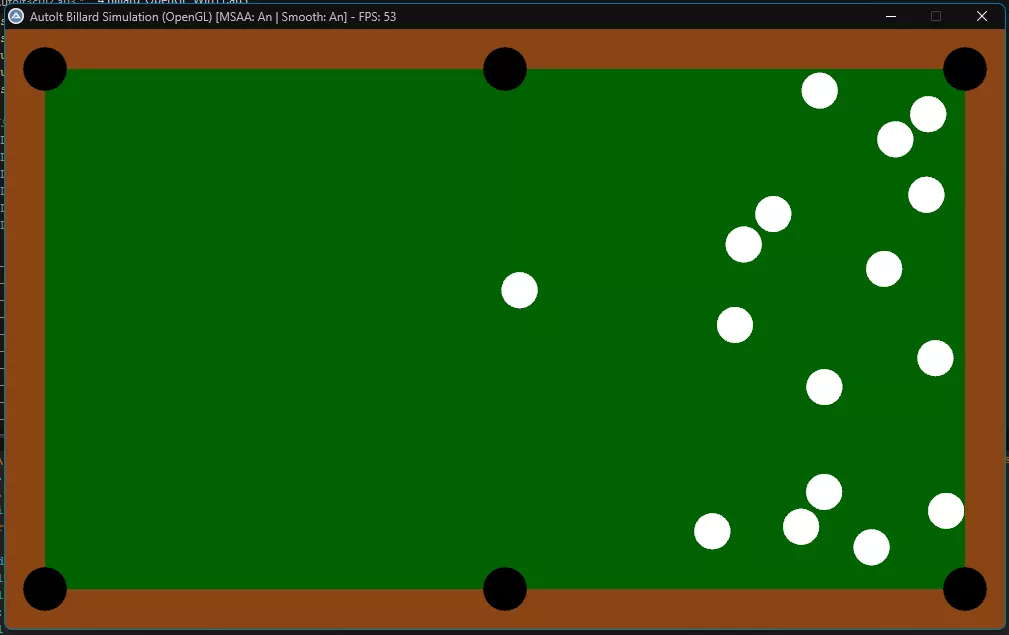
    So sieht es bei mir aus (habe keinen freien Videorekorder):

  • Rollende Kugel mit Textur

    • Douky
    • 22. November 2025 um 18:16

    Hallo, 👋

    mein Ansatz hat zwar nichts mit FreeBasic zu tun, aber ich fand die Idee der texturierten, rollenden Kugeln interessant und habe eine Version in Verbindung mit OpenGL geschrieben. Als Textur nutze ich die BMP von UEZ aus der "Simple 2D Ball Collision - Billiard Opening2.7z" aus Post #5 in diesem Thread.


    Billard_OpenGL.au3:

    C
    #include <GUIConstantsEx.au3>
    #include <WindowsConstants.au3>
    #include <Misc.au3>
    #include <Math.au3>
    #include <GDIPlus.au3> ; Wird benoetigt, um Bilder fuer Texturen zu laden
    
    ; --- OPENGL KONSTANTEN ---
    Global Const $PFD_DOUBLEBUFFER = 0x00000001
    Global Const $PFD_DRAW_TO_WINDOW = 0x00000004
    Global Const $PFD_SUPPORT_OPENGL = 0x00000020
    Global Const $PFD_TYPE_RGBA = 0
    Global Const $PFD_MAIN_PLANE = 0
    
    Global Const $GL_COLOR_BUFFER_BIT = 0x00004000
    Global Const $GL_QUADS = 0x0007
    Global Const $GL_TRIANGLE_FAN = 0x0006
    Global Const $GL_TEXTURE_2D = 0x0DE1
    Global Const $GL_TEXTURE_MAG_FILTER = 0x2800
    Global Const $GL_TEXTURE_MIN_FILTER = 0x2801
    Global Const $GL_LINEAR = 0x2601
    Global Const $GL_RGBA = 0x1908
    Global Const $GL_UNSIGNED_BYTE = 0x1401
    Global Const $GL_MODELVIEW = 0x1700
    Global Const $GL_PROJECTION = 0x1701
    Global Const $GL_TEXTURE = 0x1702
    Global Const $GL_BLEND = 0x0BE2
    Global Const $GL_SRC_ALPHA = 0x0302
    Global Const $GL_ONE_MINUS_SRC_ALPHA = 0x0303
    Global Const $GL_COMPILE = 0x1300
    Global Const $GL_POLYGON_SMOOTH = 0x0B42
    Global Const $GL_POLYGON_SMOOTH_HINT = 0x0C53
    Global Const $GL_NICEST = 0x1102
    Global Const $GL_MODELVIEW_MATRIX = 0x0BA6
    Global Const $GL_DEPTH_TEST = 0x0B71
    Global Const $GL_DEPTH_BUFFER_BIT = 0x00000100
    
    ; --- KONFIGURATION ---
    Global $iWidth = 1000
    Global $iHeight = 600
    Global $fFriction = 0.990
    Global $fBallRadius = 18
    Global $iBorder = 40
    Global $sFolder = @ScriptDir
    
    ; Globale Arrays fuer die Kugeln
    Global $iMaxBalls = 16
    Global $aBalls[$iMaxBalls][8]
    Global $aTextures[$iMaxBalls] ; OpenGL Textur-IDs
    Global $aBallMatrices[$iMaxBalls] ; Strukturen fuer 4x4 Rotations-Matrizen
    
    ; Display Listen (Optimierung: Speichert Zeichenbefehle auf der Grafikkarte)
    Global $g_iListTable = 0
    Global $g_iListSphere = 0
    Global $g_bMSAA = False ; Status fuer Multisampling Anti-Aliasing
    
    ; DLL Handles
    Global $hOpenGL32 = DllOpen("opengl32.dll")
    Global $hGDI32 = DllOpen("gdi32.dll")
    Global $hUser32 = DllOpen("user32.dll")
    
    _Main()
    
    Func _Main()
        _GDIPlus_Startup()
    
        Local $hGui = GUICreate("AutoIt Billard Simulation (OpenGL)", $iWidth, $iHeight)
    
        ; --- OPENGL EINRICHTUNG ---
        Local $hDC = _WinAPI_GetDC($hGui)
        Local $hRC = _SetupOpenGL($hGui, $hDC)
    
        GUISetState(@SW_SHOW)
    
        ; OpenGL Status initialisieren
        _glEnable($GL_TEXTURE_2D) ; Texturierung aktivieren
        _glEnable($GL_BLEND) ; Transparenz aktivieren
        _glBlendFunc($GL_SRC_ALPHA, $GL_ONE_MINUS_SRC_ALPHA)
        _glEnable($GL_POLYGON_SMOOTH) ; Kantenglaettung fuer Polygone
        _glHint($GL_POLYGON_SMOOTH_HINT, $GL_NICEST) ; Beste Qualitaet anfordern
        _glEnable($GL_DEPTH_TEST) ; Tiefentest aktivieren (wichtig fuer 3D-Kugeln)
        _glClearColor(0.0, 0.25, 0.0, 1.0) ; Dunkelgruener Hintergrund (Clear Color)
    
        ; Ansichtsbereich & Orthogonale Projektion (2D-Koordinatensystem fuer 3D-Welt)
        _glViewport(0, 0, $iWidth, $iHeight)
        _glMatrixMode($GL_PROJECTION)
        _glLoadIdentity()
        ; Wir setzen den Z-Bereich auf -100 bis 100, damit die Kugeln (Radius 18) nicht abgeschnitten werden.
        _glOrtho(0, $iWidth, $iHeight, 0, -100, 100) ; Ursprung oben-links
        _glMatrixMode($GL_MODELVIEW)
    
        ; Texturen laden
        _LoadBallTextures()
    
        ; Rotations-Matrizen initialisieren
        _InitBallMatrices()
    
        ; Display Listen erstellen (Vorkompilierte Geometrie fuer Performance)
        _InitDisplayLists()
    
        ; Simulation starten (Kugeln aufbauen)
        _ResetTable()
    
        Local $hTimer = TimerInit()
        Local $hFpsTimer = TimerInit()
        Local $iFrames = 0
        Local $iFPS = 0
        Local $iIdleCounter = 0
    
        While 1
            Local $iMsg = GUIGetMsg()
            If $iMsg = $GUI_EVENT_CLOSE Then ExitLoop
    
            ; Framerate Begrenzung entfernt fuer maximale Fluessigkeit
            $hTimer = TimerInit()
    
            ; FPS Berechnung (Anzeige im Fenstertitel)
            $iFrames += 1
            If TimerDiff($hFpsTimer) >= 1000 Then
                $iFPS = $iFrames
                Local $sStatus = " [MSAA: " & ($g_bMSAA ? "An" : "Aus") & " | Smooth: An]"
                WinSetTitle($hGui, "", "AutoIt Billard Simulation (OpenGL)" & $sStatus & " - FPS: " & $iFPS)
                $iFrames = 0
                $hFpsTimer = TimerInit()
            EndIf
    
            ; --- 1. PHYSIK BERECHNUNG ---
            Local $bMovement = _UpdatePhysics()
    
            ; --- 1b. 3D ROTATION BERECHNUNG ---
            _UpdateRotations()
    
            ; --- 2. AUTO-RESET (Wenn alles stillsteht) ---
            If Not $bMovement Then
                $iIdleCounter += 1
                If $iIdleCounter > 120 Then
                    _ResetTable()
                    $iIdleCounter = 0
                EndIf
            Else
                $iIdleCounter = 0
            EndIf
    
            ; --- 3. ZEICHNEN (RENDERING) ---
            _Render()
            _SwapBuffers($hDC) ; Puffer tauschen (Double Buffering)
        WEnd
    
        ; Aufraeumen
        _wglMakeCurrent(0, 0)
        _wglDeleteContext($hRC)
        _WinAPI_ReleaseDC($hGui, $hDC)
        DllClose($hOpenGL32)
        DllClose($hGDI32)
        DllClose($hUser32)
        _GDIPlus_Shutdown()
    EndFunc
    
    Func _Render()
        ; Bildschirm und Tiefenpuffer loeschen
        _glClear(BitOR($GL_COLOR_BUFFER_BIT, $GL_DEPTH_BUFFER_BIT))
        _glLoadIdentity()
    
        ; --- TISCH ZEICHNEN (Display List) ---
        ; Wir schalten den Tiefentest fuer den Hintergrund aus,
        ; damit er immer "ganz hinten" ist und nicht mit den Kugeln z-fightet.
        _glDisable($GL_DEPTH_TEST)
        _glDisable($GL_TEXTURE_2D)
        _glCallList($g_iListTable)
        _glEnable($GL_DEPTH_TEST)
    
        ; --- KUGELN ZEICHNEN ---
        _glEnable($GL_TEXTURE_2D)
        _glColor3f(1.0, 1.0, 1.0) ; Farbe zuruecksetzen (Weiss = Originaltextur)
    
        For $i = 0 To $iMaxBalls - 1
            If Not $aBalls[$i][5] Then ContinueLoop
    
            Local $fX = $aBalls[$i][0]
            Local $fY = $aBalls[$i][1]
            Local $iTexID = $aTextures[$i]
    
            _glPushMatrix()
            ; Kugel an ihre 2D-Position verschieben
            _glTranslatef($fX, $fY, 0.0)
    
            If $iTexID <> 0 Then
                _glBindTexture($GL_TEXTURE_2D, $iTexID)
    
                ; 3D ROTATION ANWENDEN
                ; Wir laden die gespeicherte Rotationsmatrix der Kugel.
                ; Diese Matrix enthaelt die akkumulierte Rotation aller vergangenen Frames.
                Local $pMatrix = DllStructGetPtr($aBallMatrices[$i])
                _glMultMatrixf($pMatrix)
    
                ; Kugel zeichnen (3D Sphaere aus der Display List)
                _glCallList($g_iListSphere)
            Else
                ; Fallback fuer fehlende Textur (Weisse Kugel ohne Bild)
                _glDisable($GL_TEXTURE_2D)
                _glColor3f(1.0, 1.0, 1.0)
                _glCallList($g_iListSphere)
                _glEnable($GL_TEXTURE_2D)
            EndIf
    
            _glPopMatrix()
        Next
    EndFunc
    
    Func _InitDisplayLists()
        ; --- LISTE 1: TISCH ---
        ; Erstellt die Geometrie fuer den Billardtisch
        $g_iListTable = _glGenLists(1)
        _glNewList($g_iListTable, $GL_COMPILE)
            ; 1. Holzrahmen
            _glColor3f(0.545, 0.27, 0.075) ; Sattelbraun
            _DrawRect(0, 0, $iWidth, $iHeight)
    
            ; 2. Spielflaeche
            _glColor3f(0.0, 0.39, 0.0) ; Dunkelgruen
            _DrawRect($iBorder, $iBorder, $iWidth - 2*$iBorder, $iHeight - 2*$iBorder)
    
            ; 3. Loecher
            _glColor3f(0.0, 0.0, 0.0) ; Schwarz
            Local $iHoleR = 22
            _DrawCircle($iBorder - $iHoleR, $iBorder - $iHoleR, $iHoleR) ; Oben-Links
            _DrawCircle($iWidth - $iBorder - $iHoleR, $iBorder - $iHoleR, $iHoleR) ; Oben-Rechts
            _DrawCircle($iBorder - $iHoleR, $iHeight - $iBorder - $iHoleR, $iHoleR) ; Unten-Links
            _DrawCircle($iWidth - $iBorder - $iHoleR, $iHeight - $iBorder - $iHoleR, $iHoleR) ; Unten-Rechts
            _DrawCircle($iWidth/2 - $iHoleR, $iBorder - $iHoleR, $iHoleR) ; Oben-Mitte
            _DrawCircle($iWidth/2 - $iHoleR, $iHeight - $iBorder - $iHoleR, $iHoleR) ; Unten-Mitte
        _glEndList()
    
        ; --- LISTE 2: KUGEL (3D Sphaere) ---
        ; Erstellt eine detaillierte 3D-Kugel mit Texturkoordinaten
        $g_iListSphere = _glGenLists(1)
        _glNewList($g_iListSphere, $GL_COMPILE)
            ; Zeichnen einer echten 3D Sphaere mittels Kugelkoordinaten.
            ; Die Textur wird mittels Equirectangular Mapping (Weltkarte) auf die Kugel gelegt.
    
            Local $iStacks = 48 ; Anzahl der horizontalen Scheiben (Breitengrade)
            Local $iSlices = 48 ; Anzahl der vertikalen Segmente (Laengengrade)
            Local $r = $fBallRadius
    
            For $i = 0 To $iStacks - 1
                Local $lat0 = 3.1415926 * (-0.5 + Number($i) / $iStacks)
                Local $z0 = Sin($lat0) * $r
                Local $zr0 = Cos($lat0) * $r
    
                Local $lat1 = 3.1415926 * (-0.5 + Number($i + 1) / $iStacks)
                Local $z1 = Sin($lat1) * $r
                Local $zr1 = Cos($lat1) * $r
    
                _glBegin(0x0008) ; GL_QUAD_STRIP (Streifen aus Vierecken)
                For $j = 0 To $iSlices
                    Local $lng = 2 * 3.1415926 * Number($j) / $iSlices
                    Local $x = Cos($lng)
                    Local $y = Sin($lng)
    
                    ; Texturkoordinaten und Vertexposition berechnen
                    _glTexCoord2f(Number($j) / $iSlices, Number($i) / $iStacks)
                    _glVertex3f($x * $zr0, $y * $zr0, $z0)
    
                    _glTexCoord2f(Number($j) / $iSlices, Number($i + 1) / $iStacks)
                    _glVertex3f($x * $zr1, $y * $zr1, $z1)
                Next
                _glEnd()
            Next
        _glEndList()
    EndFunc
    
    Func _DrawRect($x, $y, $w, $h)
        _glBegin($GL_QUADS)
        _glVertex2f($x, $y)
        _glVertex2f($x + $w, $y)
        _glVertex2f($x + $w, $y + $h)
        _glVertex2f($x, $y + $h)
        _glEnd()
    EndFunc
    
    Func _DrawCircle($x, $y, $r)
        Local $iSegments = 32
        _glBegin($GL_TRIANGLE_FAN)
        _glVertex2f($x + $r, $y + $r) ; Center
        For $i = 0 To $iSegments
            Local $fAngle = $i * 2.0 * 3.14159 / $iSegments
            _glVertex2f($x + $r + Cos($fAngle) * $r, $y + $r + Sin($fAngle) * $r)
        Next
        _glEnd()
    EndFunc
    
    Func _DrawCircleTextured($x, $y, $r)
        Local $iSegments = 32
        _glBegin($GL_TRIANGLE_FAN)
        _glTexCoord2f(0.5, 0.5)
        _glVertex2f($x + $r, $y + $r) ; Center
    
        For $i = 0 To $iSegments
            Local $fAngle = $i * 2.0 * 3.14159 / $iSegments
            Local $tx = 0.5 + 0.5 * Cos($fAngle)
            Local $ty = 0.5 + 0.5 * Sin($fAngle)
            _glTexCoord2f($tx, $ty)
            _glVertex2f($x + $r + Cos($fAngle) * $r, $y + $r + Sin($fAngle) * $r)
        Next
        _glEnd()
    EndFunc
    
    Func _LoadBallTextures()
        For $i = 0 To 15
            Local $sPath = $sFolder & "\" & $i & ".bmp"
            If FileExists($sPath) Then
                $aTextures[$i] = _LoadTexture($sPath)
            Else
                $aTextures[$i] = 0
            EndIf
        Next
    EndFunc
    
    Func _LoadTexture($sFile)
        Local $hImage = _GDIPlus_ImageLoadFromFile($sFile)
        Local $iW = _GDIPlus_ImageGetWidth($hImage)
        Local $iH = _GDIPlus_ImageGetHeight($hImage)
    
        ; Bits sperren, um an die Rohdaten zu kommen
        Local $tBitmapData = _GDIPlus_BitmapLockBits($hImage, 0, 0, $iW, $iH, $GDIP_ILMREAD, $GDIP_PXF32ARGB)
        Local $pScan0 = DllStructGetData($tBitmapData, "Scan0")
    
        Local $iTexID = _glGenTextures()
        _glBindTexture($GL_TEXTURE_2D, $iTexID)
        _glTexParameteri($GL_TEXTURE_2D, $GL_TEXTURE_MAG_FILTER, $GL_LINEAR)
        _glTexParameteri($GL_TEXTURE_2D, $GL_TEXTURE_MIN_FILTER, $GL_LINEAR)
    
        ; Textur hochladen
        ; Wir nutzen hier 0x80E1 (GL_BGRA_EXT), damit die Farben (Rot/Blau) korrekt sind.
        _glTexImage2D($GL_TEXTURE_2D, 0, 4, $iW, $iH, 0, 0x80E1, $GL_UNSIGNED_BYTE, $pScan0) ; 0x80E1 = GL_BGRA
    
        _GDIPlus_BitmapUnlockBits($hImage, $tBitmapData)
        _GDIPlus_ImageDispose($hImage)
    
        Return $iTexID
    EndFunc
    
    ; --- OPENGL WRAPPERS ---
    
    Func _SetupOpenGL($hWnd, $hDC)
        ; 1. Versuchen, MSAA (Multisampling Anti-Aliasing) zu aktivieren
        ; Dies sorgt fuer glatte Kanten an den Kugeln.
        Local $iPixelFormat = _GetMultisamplePixelFormat()
    
        If $iPixelFormat <> 0 Then
            $g_bMSAA = True
        EndIf
    
        Local $tPFD = DllStructCreate("ushort Size;ushort Version;dword Flags;byte PixelType;byte ColorBits;byte RedBits;byte RedShift;byte GreenBits;byte GreenShift;byte BlueBits;byte BlueShift;byte AlphaBits;byte AlphaShift;byte AccumBits;byte AccumRedBits;byte AccumGreenBits;byte AccumBlueBits;byte AccumAlphaBits;byte DepthBits;byte StencilBits;byte AuxBuffers;byte LayerType;byte Reserved;dword LayerMask;dword VisibleMask;dword DamageMask")
        DllStructSetData($tPFD, "Size", DllStructGetSize($tPFD))
        DllStructSetData($tPFD, "Version", 1)
        DllStructSetData($tPFD, "Flags", BitOR($PFD_DRAW_TO_WINDOW, $PFD_SUPPORT_OPENGL, $PFD_DOUBLEBUFFER))
        DllStructSetData($tPFD, "PixelType", $PFD_TYPE_RGBA)
        DllStructSetData($tPFD, "ColorBits", 32)
        DllStructSetData($tPFD, "DepthBits", 24)
        DllStructSetData($tPFD, "LayerType", $PFD_MAIN_PLANE)
    
        If $iPixelFormat = 0 Then
            ; Fallback auf Standard-Format, falls MSAA nicht verfuegbar ist
            $iPixelFormat = DllCall($hGDI32, "int", "ChoosePixelFormat", "handle", $hDC, "struct*", $tPFD)[0]
        EndIf
    
        DllCall($hGDI32, "int", "SetPixelFormat", "handle", $hDC, "int", $iPixelFormat, "struct*", $tPFD)
    
        Local $hRC = DllCall($hOpenGL32, "handle", "wglCreateContext", "handle", $hDC)[0]
        _wglMakeCurrent($hDC, $hRC)
    
        Return $hRC
    EndFunc
    
    Func _GetMultisamplePixelFormat()
        ; Erstellt ein Dummy-Fenster & Kontext, um Zugriff auf erweiterte OpenGL-Funktionen (Extensions) zu erhalten.
        ; Dies ist notwendig, da wglChoosePixelFormatARB eine Extension-Funktion ist.
        Local $hDummyGui = GUICreate("Dummy", 10, 10, -1000, -1000)
        Local $hDummyDC = _WinAPI_GetDC($hDummyGui)
    
        Local $tPFD = DllStructCreate("ushort Size;ushort Version;dword Flags;byte PixelType;byte ColorBits;byte RedBits;byte RedShift;byte GreenBits;byte GreenShift;byte BlueBits;byte BlueShift;byte AlphaBits;byte AlphaShift;byte AccumBits;byte AccumRedBits;byte AccumGreenBits;byte AccumBlueBits;byte AccumAlphaBits;byte DepthBits;byte StencilBits;byte AuxBuffers;byte LayerType;byte Reserved;dword LayerMask;dword VisibleMask;dword DamageMask")
        DllStructSetData($tPFD, "Size", DllStructGetSize($tPFD))
        DllStructSetData($tPFD, "Version", 1)
        DllStructSetData($tPFD, "Flags", BitOR($PFD_DRAW_TO_WINDOW, $PFD_SUPPORT_OPENGL, $PFD_DOUBLEBUFFER))
        DllStructSetData($tPFD, "PixelType", $PFD_TYPE_RGBA)
        DllStructSetData($tPFD, "ColorBits", 32)
        DllStructSetData($tPFD, "DepthBits", 24)
        DllStructSetData($tPFD, "LayerType", $PFD_MAIN_PLANE)
    
        Local $iPF = DllCall($hGDI32, "int", "ChoosePixelFormat", "handle", $hDummyDC, "struct*", $tPFD)[0]
        DllCall($hGDI32, "int", "SetPixelFormat", "handle", $hDummyDC, "int", $iPF, "struct*", $tPFD)
        Local $hDummyRC = DllCall($hOpenGL32, "handle", "wglCreateContext", "handle", $hDummyDC)[0]
        _wglMakeCurrent($hDummyDC, $hDummyRC)
    
        ; Pruefen, ob wglChoosePixelFormatARB verfuegbar ist
        Local $pChoosePixelFormatARB = _wglGetProcAddress("wglChoosePixelFormatARB")
    
        Local $iRetFormat = 0
    
        If $pChoosePixelFormatARB Then
            ; Attribute fuer 4x MSAA definieren
            Local $tIntAttribs = DllStructCreate("int[20]")
            Local $pIntAttribs = DllStructGetPtr($tIntAttribs)
    
            ; Attribute fuellen
            Local $i = 1
            DllStructSetData($tIntAttribs, 1, 0x2001, $i) ; WGL_DRAW_TO_WINDOW_ARB
            DllStructSetData($tIntAttribs, 1, 1, $i+1)      ; GL_TRUE
            $i+=2
            DllStructSetData($tIntAttribs, 1, 0x2010, $i) ; WGL_SUPPORT_OPENGL_ARB
            DllStructSetData($tIntAttribs, 1, 1, $i+1)
            $i+=2
            DllStructSetData($tIntAttribs, 1, 0x2011, $i) ; WGL_DOUBLE_BUFFER_ARB
            DllStructSetData($tIntAttribs, 1, 1, $i+1)
            $i+=2
            DllStructSetData($tIntAttribs, 1, 0x2013, $i) ; WGL_PIXEL_TYPE_ARB
            DllStructSetData($tIntAttribs, 1, 0x202B, $i+1) ; WGL_TYPE_RGBA_ARB
            $i+=2
            DllStructSetData($tIntAttribs, 1, 0x2014, $i) ; WGL_COLOR_BITS_ARB
            DllStructSetData($tIntAttribs, 1, 32, $i+1)
            $i+=2
            DllStructSetData($tIntAttribs, 1, 0x2022, $i) ; WGL_DEPTH_BITS_ARB
            DllStructSetData($tIntAttribs, 1, 24, $i+1)
            $i+=2
            DllStructSetData($tIntAttribs, 1, 0x2041, $i) ; WGL_SAMPLE_BUFFERS_ARB
            DllStructSetData($tIntAttribs, 1, 1, $i+1)
            $i+=2
            DllStructSetData($tIntAttribs, 1, 0x2042, $i) ; WGL_SAMPLES_ARB
            DllStructSetData($tIntAttribs, 1, 4, $i+1)    ; 4x MSAA (4 Samples pro Pixel)
            $i+=2
            DllStructSetData($tIntAttribs, 1, 0, $i)      ; Ende
    
            Local $tFloatAttribs = DllStructCreate("float[2]") ; Leer
            DllStructSetData($tFloatAttribs, 1, 0, 1)
            DllStructSetData($tFloatAttribs, 1, 0, 2)
    
            Local $tPixelFormats = DllStructCreate("int[1]")
            Local $tNumFormats = DllStructCreate("uint")
    
            ; wglChoosePixelFormatARB aufrufen
            Local $aRet = DllCallAddress("int", $pChoosePixelFormatARB, "handle", $hDummyDC, "ptr", $pIntAttribs, "ptr", DllStructGetPtr($tFloatAttribs), "uint", 1, "ptr", DllStructGetPtr($tPixelFormats), "ptr", DllStructGetPtr($tNumFormats))
    
            If $aRet[0] And DllStructGetData($tNumFormats, 1) > 0 Then
                $iRetFormat = DllStructGetData($tPixelFormats, 1)
            EndIf
        EndIf
    
        ; Dummy aufraeumen
        _wglMakeCurrent(0, 0)
        _wglDeleteContext($hDummyRC)
        _WinAPI_ReleaseDC($hDummyGui, $hDummyDC)
        GUIDelete($hDummyGui)
    
        Return $iRetFormat
    EndFunc
    
    Func _wglGetProcAddress($proc)
        Local $aRet = DllCall($hOpenGL32, "ptr", "wglGetProcAddress", "str", $proc)
        Return $aRet[0]
    EndFunc
    
    Func _wglMakeCurrent($hDC, $hRC)
        DllCall($hOpenGL32, "int", "wglMakeCurrent", "handle", $hDC, "handle", $hRC)
    EndFunc
    
    Func _wglDeleteContext($hRC)
        DllCall($hOpenGL32, "int", "wglDeleteContext", "handle", $hRC)
    EndFunc
    
    Func _SwapBuffers($hDC)
        DllCall($hGDI32, "int", "SwapBuffers", "handle", $hDC)
    EndFunc
    
    Func _glClearColor($r, $g, $b, $a)
        DllCall($hOpenGL32, "none", "glClearColor", "float", $r, "float", $g, "float", $b, "float", $a)
    EndFunc
    
    Func _glClear($mask)
        DllCall($hOpenGL32, "none", "glClear", "uint", $mask)
    EndFunc
    
    Func _glViewport($x, $y, $w, $h)
        DllCall($hOpenGL32, "none", "glViewport", "int", $x, "int", $y, "int", $w, "int", $h)
    EndFunc
    
    Func _glMatrixMode($mode)
        DllCall($hOpenGL32, "none", "glMatrixMode", "uint", $mode)
    EndFunc
    
    Func _glLoadIdentity()
        DllCall($hOpenGL32, "none", "glLoadIdentity")
    EndFunc
    
    Func _glOrtho($l, $r, $b, $t, $n, $f)
        DllCall($hOpenGL32, "none", "glOrtho", "double", $l, "double", $r, "double", $b, "double", $t, "double", $n, "double", $f)
    EndFunc
    
    Func _glEnable($cap)
        DllCall($hOpenGL32, "none", "glEnable", "uint", $cap)
    EndFunc
    
    Func _glDisable($cap)
        DllCall($hOpenGL32, "none", "glDisable", "uint", $cap)
    EndFunc
    
    Func _glBlendFunc($s, $d)
        DllCall($hOpenGL32, "none", "glBlendFunc", "uint", $s, "uint", $d)
    EndFunc
    
    Func _glColor3f($r, $g, $b)
        DllCall($hOpenGL32, "none", "glColor3f", "float", $r, "float", $g, "float", $b)
    EndFunc
    
    Func _glBegin($mode)
        DllCall($hOpenGL32, "none", "glBegin", "uint", $mode)
    EndFunc
    
    Func _glEnd()
        DllCall($hOpenGL32, "none", "glEnd")
    EndFunc
    
    Func _glVertex2f($x, $y)
        DllCall($hOpenGL32, "none", "glVertex2f", "float", $x, "float", $y)
    EndFunc
    
    Func _glTexCoord2f($s, $t)
        DllCall($hOpenGL32, "none", "glTexCoord2f", "float", $s, "float", $t)
    EndFunc
    
    Func _glGenTextures()
        Local $tTextures = DllStructCreate("uint")
        DllCall($hOpenGL32, "none", "glGenTextures", "int", 1, "struct*", $tTextures)
        Return DllStructGetData($tTextures, 1)
    EndFunc
    
    Func _glBindTexture($target, $texture)
        DllCall($hOpenGL32, "none", "glBindTexture", "uint", $target, "uint", $texture)
    EndFunc
    
    Func _glTexParameteri($target, $pname, $param)
        DllCall($hOpenGL32, "none", "glTexParameteri", "uint", $target, "uint", $pname, "int", $param)
    EndFunc
    
    Func _glTexImage2D($target, $level, $internalformat, $width, $height, $border, $format, $type, $pixels)
        DllCall($hOpenGL32, "none", "glTexImage2D", "uint", $target, "int", $level, "int", $internalformat, "int", $width, "int", $height, "int", $border, "uint", $format, "uint", $type, "ptr", $pixels)
    EndFunc
    
    Func _glTranslatef($x, $y, $z)
        DllCall($hOpenGL32, "none", "glTranslatef", "float", $x, "float", $y, "float", $z)
    EndFunc
    
    Func _glScalef($x, $y, $z)
        DllCall($hOpenGL32, "none", "glScalef", "float", $x, "float", $y, "float", $z)
    EndFunc
    
    Func _glMultMatrixf($m)
        DllCall($hOpenGL32, "none", "glMultMatrixf", "ptr", $m)
    EndFunc
    
    Func _glVertex3f($x, $y, $z)
        DllCall($hOpenGL32, "none", "glVertex3f", "float", $x, "float", $y, "float", $z)
    EndFunc
    
    Func _glGetFloatv($pname, $params)
        DllCall($hOpenGL32, "none", "glGetFloatv", "uint", $pname, "ptr", $params)
    EndFunc
    
    Func _glLoadMatrixf($m)
        DllCall($hOpenGL32, "none", "glLoadMatrixf", "ptr", $m)
    EndFunc
    
    Func _glRotatef($angle, $x, $y, $z)
        DllCall($hOpenGL32, "none", "glRotatef", "float", $angle, "float", $x, "float", $y, "float", $z)
    EndFunc
    
    Func _glGenLists($range)
        Local $aRet = DllCall($hOpenGL32, "uint", "glGenLists", "int", $range)
        Return $aRet[0]
    EndFunc
    
    Func _glNewList($list, $mode)
        DllCall($hOpenGL32, "none", "glNewList", "uint", $list, "uint", $mode)
    EndFunc
    
    Func _glEndList()
        DllCall($hOpenGL32, "none", "glEndList")
    EndFunc
    
    Func _glCallList($list)
        DllCall($hOpenGL32, "none", "glCallList", "uint", $list)
    EndFunc
    
    Func _glPushMatrix()
        DllCall($hOpenGL32, "none", "glPushMatrix")
    EndFunc
    
    Func _glPopMatrix()
        DllCall($hOpenGL32, "none", "glPopMatrix")
    EndFunc
    
    Func _glHint($target, $mode)
        DllCall($hOpenGL32, "none", "glHint", "uint", $target, "uint", $mode)
    EndFunc
    
    ; --- PHYSIK  ---
    Func _ResetTable()
        $aBalls[0][0] = $iWidth * 0.25
        $aBalls[0][1] = $iHeight / 2
        Local $fChaos = Random(-0.5, 0.5)
        $aBalls[0][2] = 35
        $aBalls[0][3] = $fChaos
        $aBalls[0][5] = True
        $aBalls[0][6] = 0
        $aBalls[0][7] = 0
    
        Local $fStartX = $iWidth * 0.75
        Local $fStartY = $iHeight / 2
        Local $fD = $fBallRadius * 2 + 1
    
        Local $iBallIdx = 1
        For $col = 0 To 4
            For $row = 0 To $col
                If $iBallIdx >= $iMaxBalls Then ExitLoop
                Local $fX = $fStartX + ($col * ($fD * 0.866))
                Local $fY = ($fStartY - ($col * $fD / 2)) + ($row * $fD)
                $aBalls[$iBallIdx][0] = $fX
                $aBalls[$iBallIdx][1] = $fY
                $aBalls[$iBallIdx][2] = 0
                $aBalls[$iBallIdx][3] = 0
                $aBalls[$iBallIdx][5] = True
                $aBalls[$iBallIdx][6] = 0
                $aBalls[$iBallIdx][7] = 0
                $iBallIdx += 1
            Next
        Next
    EndFunc
    
    Func _InitBallMatrices()
        For $i = 0 To $iMaxBalls - 1
            $aBallMatrices[$i] = DllStructCreate("float[16]")
            ; Identitaetsmatrix setzen (Keine Rotation)
            Local $pMatrix = DllStructGetPtr($aBallMatrices[$i])
            _glLoadIdentity()
            _glGetFloatv($GL_MODELVIEW_MATRIX, $pMatrix)
        Next
    EndFunc
    
    Func _UpdateRotations()
        For $i = 0 To $iMaxBalls - 1
            If Not $aBalls[$i][5] Then ContinueLoop
    
            Local $vx = $aBalls[$i][2]
            Local $vy = $aBalls[$i][3]
            Local $fSpeed = Sqrt($vx*$vx + $vy*$vy)
    
            If $fSpeed > 0.01 Then
                ; Rotationsachse berechnen:
                ; Die Achse steht senkrecht zur Bewegungsrichtung.
                ; Bei Bewegung (vx, vy) ist die Senkrechte (-vy, vx).
                Local $rx = -$vy
                Local $ry = $vx
    
                ; Rotationswinkel berechnen:
                ; Winkel = Zurueckgelegter Weg / Radius (in Radiant)
                ; Weg pro Frame entspricht der Geschwindigkeit ($fSpeed).
                ; Umrechnung in Grad: * (180 / PI)
                Local $fAngle = ($fSpeed / $fBallRadius) * (180.0 / 3.1415926)
    
                ; Matrix Update (Die Magie der 3D-Rotation)
                _glMatrixMode($GL_MODELVIEW)
                _glLoadIdentity()
    
                ; 1. Neue Rotation anwenden (um die Welt-Achsen)
                ; Wir rotieren zuerst um die berechnete Achse.
                _glRotatef($fAngle, $rx, $ry, 0.0)
    
                ; 2. Alte Rotation anwenden
                ; Dann multiplizieren wir die bestehende Rotation der Kugel dazu.
                ; Dies akkumuliert die Drehungen korrekt, sodass die Kugel "weiterrollt"
                ; anstatt sich nur lokal zu drehen.
                Local $pMatrix = DllStructGetPtr($aBallMatrices[$i])
                _glMultMatrixf($pMatrix)
    
                ; 3. Ergebnis speichern
                ; Die kombinierte Matrix wird fuer den naechsten Frame gespeichert.
                _glGetFloatv($GL_MODELVIEW_MATRIX, $pMatrix)
            EndIf
        Next
    EndFunc
    
    Func _UpdatePhysics()
        Local $bAnyMovement = False
        Local $fSpeedThreshold = 0.08
    
        For $i = 0 To $iMaxBalls - 1
            If Not $aBalls[$i][5] Then ContinueLoop
            Local $vx = $aBalls[$i][2]
            Local $vy = $aBalls[$i][3]
            $aBalls[$i][0] += $vx
            $aBalls[$i][1] += $vy
            $vx *= $fFriction
            $vy *= $fFriction
            Local $fSpeed = Sqrt($vx*$vx + $vy*$vy)
            If $fSpeed > $fSpeedThreshold Then
                $bAnyMovement = True
                $aBalls[$i][6] += $vx
                $aBalls[$i][7] += $vy
            Else
                $vx = 0
                $vy = 0
            EndIf
            $aBalls[$i][2] = $vx
            $aBalls[$i][3] = $vy
    
            If $aBalls[$i][0] - $fBallRadius < $iBorder Then
                $aBalls[$i][0] = $iBorder + $fBallRadius
                $aBalls[$i][2] *= -1
            ElseIf $aBalls[$i][0] + $fBallRadius > $iWidth - $iBorder Then
                $aBalls[$i][0] = $iWidth - $iBorder - $fBallRadius
                $aBalls[$i][2] *= -1
            EndIf
            If $aBalls[$i][1] - $fBallRadius < $iBorder Then
                $aBalls[$i][1] = $iBorder + $fBallRadius
                $aBalls[$i][3] *= -1
            ElseIf $aBalls[$i][1] + $fBallRadius > $iHeight - $iBorder Then
                $aBalls[$i][1] = $iHeight - $iBorder - $fBallRadius
                $aBalls[$i][3] *= -1
            EndIf
    
            For $j = $i + 1 To $iMaxBalls - 1
                 If $aBalls[$j][5] Then _CheckCollision($i, $j)
            Next
        Next
        Return $bAnyMovement
    EndFunc
    
    Func _CheckCollision($i1, $i2)
        Local $dx = $aBalls[$i2][0] - $aBalls[$i1][0]
        Local $dy = $aBalls[$i2][1] - $aBalls[$i1][1]
        Local $distSq = $dx*$dx + $dy*$dy
        Local $minDist = $fBallRadius * 2
        If $distSq < ($minDist * $minDist) Then
            Local $dist = Sqrt($distSq)
            If $dist = 0 Then $dist = 0.01
            Local $overlap = ($minDist - $dist) / 2
            Local $nx = $dx / $dist
            Local $ny = $dy / $dist
            $aBalls[$i1][0] -= $nx * $overlap
            $aBalls[$i1][1] -= $ny * $overlap
            $aBalls[$i2][0] += $nx * $overlap
            $aBalls[$i2][1] += $ny * $overlap
            Local $tx = -$ny
            Local $ty = $nx
            Local $dpTan1 = $aBalls[$i1][2] * $tx + $aBalls[$i1][3] * $ty
            Local $dpTan2 = $aBalls[$i2][2] * $tx + $aBalls[$i2][3] * $ty
            Local $dpNorm1 = $aBalls[$i1][2] * $nx + $aBalls[$i1][3] * $ny
            Local $dpNorm2 = $aBalls[$i2][2] * $nx + $aBalls[$i2][3] * $ny
            Local $v1n = $dpNorm2
            Local $v2n = $dpNorm1
            $aBalls[$i1][2] = $tx * $dpTan1 + $nx * $v1n
            $aBalls[$i1][3] = $ty * $dpTan1 + $ny * $v1n
            $aBalls[$i2][2] = $tx * $dpTan2 + $nx * $v2n
            $aBalls[$i2][3] = $ty * $dpTan2 + $ny * $v2n
        EndIf
    EndFunc
    Alles anzeigen

    Dateien

    Billard.7z 56,02 kB – 145 Downloads
  • Datenrettung programmierung

    • Douky
    • 29. November 2013 um 17:26

    Hallo community,

    ich habe in letzter Zeit etwas bei google recherchiert wie es möglich ist, bzw welche Ansätze es gibt um eine Datenrettung zu programmieren.
    Ich hoffe ich poste das nun nicht ins falsche Forum weil dieses hier ja eigentlich auf Autoit beschränkt ist.
    Aus meinen Erfahrungen die ich mit diesem Forum machen konnte ist mir aber bewusst das hier im Forum viele kompetente Programmierer unterwegs sind.

    Meine Frage konkret lautet im grunde:

    Wie setze ich dazu an ein Programm zu entwickelt welches dafür ausgelegt, bereits gelöschte Daten wiederherzustellen(NTFS).

    Das muss nicht in Autoit relisierbar sein sondern kann auch in VB.net erfolgen.
    Ich suche weder nach Script Schnipseln noch nach fertigen Programmen. Eher suche ich eine Grundsätzliche erklärung wie man eine Datenrettung realisieren kann.

    Ich hoffe nun das ich genügend beschreiben konnte was ich versuche umzusetzen.

    Falls ich nun das falsche Forum erwischt habe bitte ich um eine korrekte verschiebung des Treads.

    Grüße
    Douky :)

  • ControlSend & ControlClick funktioniert nicht

    • Douky
    • 19. September 2013 um 14:43

    Evtl. so?

    [autoit]

    $title = "Speichern unter"
    $hwin = WinGetHandle($title)
    WinWaitActive($hwin)
    If WinExists($hwin) Then
    WinWaitActive($hwin)
    Local $sText = ControlGetText($hwin, "", "[CLASS:Edit; INSTANCE:1]")
    If $sText = "UPS_CSV_EXPORT.csv" Then
    ControlSetText($hwin, "", "[CLASS:Edit; INSTANCE:1]", "test")
    ControlSend($hwin, "", "[CLASS:Button; INSTANCE:1]", "{ENTER}")
    MsgBox(0, "Test", "test " & $sText)
    EndIf
    EndIf

    [/autoit]
  • lokale WLAN / LAN Adresse mit Autoit ändern

    • Douky
    • 18. September 2013 um 13:28

    Ich verwende dazu immer Windows Boardmittel.

    Schau dir mal die netsh.exe an.

    Die CMD kannst du dann mit folgenden Mitteln ansprechen.

    [autoit]

    Run(@ComSpec&"\c BEFEHL")
    ;oder
    StdinWrite
    ;oder
    Run("NameDerBatDatei")

    [/autoit]

    Oder auch

    [autoit]

    _RunDOS("befehl")

    [/autoit]

    Oder

    [autoit]

    ShellExecute()

    [/autoit]
  • Netzwerk Adapter Informationen nach Adapthername

    • Douky
    • 16. September 2013 um 14:46

    Die WMI Lösung gefällt mir schon ganz gut. Bei der Lösung von UEZ fehlen mir leider ein paar Informationen.

    Ich füge mal ein Bild an welche Informationen mein Programm ausgeben soll.
    An diese WMI funktion sollte man dann den selbst änderbaren Adapthernamen(z.B.: LAN-Adapther) übergeben können.

    Bilder

    • Unbenannt.png
      • 6,95 kB
      • 247 × 290
  • Probleme mit AIDA64 Automatisierung

    • Douky
    • 12. August 2013 um 10:10

    Hi,

    ich habe folgendes problem.
    Ich würde gerne automatisch einen AIDA64 Bericht erstellen. Einen einfachen. Dafür gibt es ein Wizzard bei dem man einfach nur auf Weiter klicken muss. Das funktioniert alles eigentlich auch schon, nur hin und wieder wenn der Wizzard den Fokus verliert funktioniert Controlklick nicht. Leider kann ich auch das Handle von dem Fenster nicht bekommen. Ich bekomme immer das Fenster der Hauptform zurück.

    Hier mein Script:

    Spoiler anzeigen
    [autoit]

    #RequireAdmin
    #include <SendMessage.au3>
    #include <WindowsConstants.au3>

    [/autoit] [autoit][/autoit] [autoit]

    Opt("WinTitleMatchMode", 2)

    [/autoit] [autoit][/autoit] [autoit]

    ShellExecute("AIDA64beta.exe")
    WinWait("AIDA64 Extreme Edition")
    $hwnd_Aida64 = WinGetHandle("AIDA64 Extreme Edition")

    [/autoit] [autoit][/autoit] [autoit]

    Do

    [/autoit] [autoit][/autoit] [autoit]

    Sleep(200)
    Until IsVisible($hwnd_Aida64) = 2

    [/autoit] [autoit][/autoit] [autoit]

    ControlClick($hwnd_Aida64, "", "[CLASS:TToolBar; INSTANCE:2]", "left", 1, 2)

    [/autoit] [autoit][/autoit] [autoit]

    Local $hwnd_bericht_assi = WinGetHandle("[CLASS:TForm_ReportWizard1];[INSTANCE:2]", "")
    WinSetOnTop($hwnd_bericht_assi, "", 1)

    [/autoit] [autoit][/autoit] [autoit][/autoit] [autoit]

    Do
    WinActivate($hwnd_bericht_assi)
    Sleep(200)
    Until IsVisible($hwnd_bericht_assi) = 2
    WinActivate($hwnd_bericht_assi)
    ControlClick($hwnd_bericht_assi, "", "[CLASS:TButton; INSTANCE:2]", "left", 2)

    [/autoit] [autoit][/autoit] [autoit]

    Do
    WinActivate($hwnd_bericht_assi)
    Sleep(200)
    Until IsVisible($hwnd_bericht_assi) = 2
    WinActivate($hwnd_bericht_assi)
    ControlClick($hwnd_bericht_assi, "", "[CLASS:TButton; INSTANCE:2]", "left", 2)

    [/autoit] [autoit][/autoit] [autoit]

    Do
    WinActivate($hwnd_bericht_assi)
    Sleep(200)
    Until IsVisible($hwnd_bericht_assi) = 2
    WinActivate($hwnd_bericht_assi)
    ControlClick($hwnd_bericht_assi, "", "[CLASS:TButton; INSTANCE:4]", "left", 2)

    [/autoit] [autoit][/autoit] [autoit]

    Do
    WinActivate($hwnd_bericht_assi)
    Sleep(200)
    Until IsVisible($hwnd_bericht_assi) = 2
    WinActivate($hwnd_bericht_assi)
    ControlClick($hwnd_bericht_assi, "", "[CLASS:TButton; INSTANCE:2]", "left", 2)

    [/autoit] [autoit][/autoit] [autoit]

    Sleep(500)

    [/autoit] [autoit][/autoit] [autoit]

    $hwnd_bericht = WinGetHandle("Bericht - AIDA64")

    [/autoit] [autoit][/autoit] [autoit]

    Do
    Sleep(100)
    Until ControlGetText($hwnd_bericht, "", "[CLASS:TStatusBar; INSTANCE:1]") = "Fertig"
    Sleep(200)

    [/autoit] [autoit][/autoit] [autoit]

    ControlClick($hwnd_bericht, "", "[CLASS:TToolBar; INSTANCE:1]", "left", 1, 26, 10)

    [/autoit] [autoit][/autoit] [autoit]

    $hwnd_save_dialog = WinGetHandle("[CLASS:#32770; TITLE:Bericht speichern]")

    [/autoit] [autoit][/autoit] [autoit]

    Do
    WinActivate($hwnd_save_dialog)
    Sleep(200)
    Until IsVisible($hwnd_save_dialog) = 2

    [/autoit] [autoit][/autoit] [autoit]

    Sleep(1500)

    [/autoit] [autoit][/autoit] [autoit]

    ControlSetText($hwnd_save_dialog, "", "[CLASS:Edit; INSTANCE:1]", @ScriptDir & "\" & @ComputerName)

    [/autoit] [autoit][/autoit] [autoit]

    ControlClick($hwnd_bericht_assi, "", "[CLASS:Button; INSTANCE:1]", "left", 2)

    [/autoit] [autoit][/autoit] [autoit]

    Sleep(1000)
    ControlClick("Erfolgreich", "", "[CLASS:Button; INSTANCE:1]", "left", 2)

    [/autoit] [autoit][/autoit] [autoit]

    ProcessClose("aida64beta.exe")

    [/autoit] [autoit][/autoit] [autoit][/autoit] [autoit]

    Func IsVisible($handle)
    Return BitAND(WinGetState($handle), 2)
    EndFunc ;==>IsVisible

    [/autoit]

    Gibt es noch etwas zuverlässigeres zur Fenster bestimmung? Oder besserer Hintergrund Klick. Oder sonst etwas um durch das Wizzard zu navigieren?
    Lg
    Douky

  • Netzwerk Adapter Informationen nach Adapthername

    • Douky
    • 6. August 2013 um 11:23
    Code
    Verbindungsspezifisches DNS-Suffix:
    Beschreibung. . . . . . . . . . . :
    Physikalische Adresse . . . . . . :
    DHCP aktiviert. . . . . . . . . . :
    Autokonfiguration aktiviert . . . :
    IPv4-Adresse  . . . . . . . . . . :
    Subnetzmaske  . . . . . . . . . . :
    Standardgateway . . . . . . . . . :
    DNS-Server  . . . . . . . . . . . :
    NetBIOS über TCP/IP . . . . . . . :

    Diese Infos hätte ich gerne zu den jeweiligen Netzwerk Adapthern.
    Am liebsten eine Funktion der man den Adapthernamen übergibt um die passenden infos zurück zu geben.
    Muss nicht auf Ipconfig /all basieren.

    edit:

    Habe ein Script gefunden das meinen Anforderungen gerecht wird.
    Falls jemand anders Interesse daran hat, ich habe es im Englischen Forum gefunden.
    http://www.autoitscript.com/forum/topic/12…-servers/page-3

    Spoiler anzeigen
    [autoit]

    #AutoIt3Wrapper_Au3Check_Parameters=-d -w 1 -w 2 -w 3 -w 4 -w 5 -w 6
    #include <Array.au3>

    [/autoit] [autoit][/autoit] [autoit]

    Global $aArray = _IPDetails(), $sData
    _ArrayDisplay($aArray)

    [/autoit] [autoit][/autoit] [autoit]

    For $A = 1 To $aArray[0][0]
    $sData &= "Description: " & $aArray[$A][0] & @CRLF & "IP Address: " & $aArray[$A][1] & @CRLF & "MAC: " & $aArray[$A][2] & _
    @CRLF & "Default Gateway: " & $aArray[$A][3] & @CRLF & "DNS Servers: " & $aArray[$A][4] & @CRLF & "Obtain DNS Automatically: " & $aArray[$A][5] & _
    @CRLF & "Auto IP: " & $aArray[$A][6] & @CRLF & @CRLF
    Next
    $sData = StringTrimRight($sData, 4)

    [/autoit] [autoit][/autoit] [autoit]

    MsgBox(0, "_IPDetails()", $sData)

    [/autoit] [autoit][/autoit] [autoit]

    Func _IPDetails()
    Local $iCount = 0
    Local $oWMIService = ObjGet("winmgmts:{impersonationLevel = impersonate}!\\" & "." & "\root\cimv2")
    Local $oColItems = $oWMIService.ExecQuery("Select * From Win32_NetworkAdapterConfiguration Where IPEnabled = True", "WQL", 0x30), $aReturn[1][7] = [[0, 7]]
    If IsObj($oColItems) Then
    For $oObjectItem In $oColItems
    $aReturn[0][0] += 1
    $iCount += 1

    [/autoit] [autoit][/autoit] [autoit]

    If $aReturn[0][0] <= $iCount + 1 Then
    ReDim $aReturn[$aReturn[0][0] * 2][$aReturn[0][1]]
    EndIf

    [/autoit] [autoit][/autoit] [autoit]

    $aReturn[$iCount][0] = _IsString($oObjectItem.Description)
    $aReturn[$iCount][1] = _IsString($oObjectItem.IPAddress(0))
    $aReturn[$iCount][2] = _IsString($oObjectItem.MACAddress)
    $aReturn[$iCount][3] = _IsString($oObjectItem.DefaultIPGateway(0))
    $aReturn[$iCount][4] = _WMIArrayToString($oObjectItem.DNSServerSearchOrder(), " - ") ; You could use _ArrayToString() but I like creating my own Functions especially when I don't need alot of error checking.
    $aReturn[$iCount][5] = _WMIRegRead($oObjectItem.SettingID)
    $aReturn[$iCount][6] = _IsString($oObjectItem.DHCPEnabled)
    Next
    ReDim $aReturn[$aReturn[0][0] + 1][$aReturn[0][1]]
    Return $aReturn
    EndIf
    Return SetError(1, 0, $aReturn)
    EndFunc ;==>_IPDetails

    [/autoit] [autoit][/autoit] [autoit]

    Func _WMIRegRead($iGUID)
    If RegRead("HKEY_LOCAL_MACHINE\SYSTEM\CurrentControlSet\Services\Tcpip\Parameters\Interfaces\" & $iGUID & "\", "NameServer") = "" Then
    Return True
    EndIf
    Return False
    EndFunc ;==>_WMIRegRead

    [/autoit] [autoit][/autoit] [autoit]

    Func _IsString($sString)
    If IsString($sString) Or IsBool($sString) Then
    Return $sString
    EndIf
    Return "Not Available"
    EndFunc ;==>_IsString

    [/autoit] [autoit][/autoit] [autoit]

    Func _WMIArrayToString($aArray, $sDelimeter = "|")
    If IsArray($aArray) = 0 Then
    Return SetError(1, 0, "Not Available")
    EndIf
    Local $iUbound = UBound($aArray) - 1, $sString
    For $A = 0 To $iUbound
    $sString &= $aArray[$A] & $sDelimeter
    Next
    Return StringTrimRight($sString, StringLen($sDelimeter))
    EndFunc ;==>_WMIArrayToString

    [/autoit]
  • Netzwerk Adapter Informationen nach Adapthername

    • Douky
    • 6. August 2013 um 10:43

    Ja grundsätzlich ist das schon richtig. Danke.
    Diese Funktion habe ich auch schon gefunden.
    Ich habe nur Probleme mit dem Parsen des Strings(Bekomme das mit RegEXP leider nciht so hin)
    Und zudem wollte ich ja auch nach Adaptername (LAN-Verbindung) Filtern

  • Netzwerk Adapter Informationen nach Adapthername

    • Douky
    • 6. August 2013 um 10:27

    Hallo,

    ich brauche eine Funktion der man den Ethernet Adapternamen(z.B.: "LAN-Verbindung") übergibt und darüber dann Informationen zurück bekommt.

    Mich interessieren im Grunde alles was "IPconfig /all" ausgibt.

    Code
    Verbindungsspezifisches DNS-Suffix:
    Beschreibung. . . . . . . . . . . :
    Physikalische Adresse . . . . . . :
    DHCP aktiviert. . . . . . . . . . :
    Autokonfiguration aktiviert . . . :
    IPv4-Adresse  . . . . . . . . . . :
    Subnetzmaske  . . . . . . . . . . :
    Standardgateway . . . . . . . . . :
    DNS-Server  . . . . . . . . . . . :
    NetBIOS über TCP/IP . . . . . . . :

    Diese Funktion von veronesi Funktioniert heute noch gut aber liefert leider nicht geügend Infos. Hat jemand von euch eine Idee wie bzw ob man diese dahingehend erweitern kann um alle Infos zu bekommen? Und wie man dieser Funktion den Adapthernamen übergeben kann?

    [autoit]

    #include <Array.au3>

    [/autoit][autoit][/autoit][autoit]

    Global $Info = _GetNetworkInformations()
    Global $NumberOfAdapters = @extended
    Global $sTitle = "Index "
    For $i = 1 To $NumberOfAdapters
    $sTitle &= "| Adapter " & $i
    Next
    _ArrayDisplay($Info, "Network Informations", -1, 0, "", "", $sTitle)

    [/autoit][autoit][/autoit][autoit]

    For $Adapter = 0 To UBound($Info, 2) - 2
    MsgBox(64, "Beschreibung von Adapter " & $Adapter + 1, $Info[1][$Adapter])
    MsgBox(64, "MAC von Adapter " & $Adapter + 1, $Info[2][$Adapter])
    MsgBox(64, "DHCP von Adapter " & $Adapter + 1, $Info[3][$Adapter])
    MsgBox(64, "IP (DHCP) von Adapter " & $Adapter + 1, $Info[4][$Adapter])
    For $i = 5 To $Info[0][$Adapter]
    MsgBox(64, "IP " & $i - 4 & " von Adapter " & $Adapter + 1, $Info[$i][$Adapter])
    Next
    Next

    [/autoit][autoit][/autoit][autoit][/autoit][autoit][/autoit][autoit][/autoit][autoit]

    ;==================================================================================
    ; Function: _GetNetworkInformations()
    ; Description: Returns an array with some informations about all network cards
    ; Parameter(s): -
    ;
    ; Return Value(s): On Success: Return Array
    ; Column 0 Column 1 Column 2...
    ; Index 0 : Number of Indexes in this column
    ; Index 1 : Network Card Description
    ; Index 2 : MAC Address
    ; Index 3 : DHCP Enabled?
    ; Index 4 : IP of DHCP Server
    ; Index 5 : IP-Address 1
    ; Index 6 : IP-Address 2
    ; Index n : IP-Address n
    ;
    ; @Extended = Number of Adapters found
    ;
    ; On Failure: Sets @ERROR to none zero
    ; Author(s): Veronesi
    ; Note(s):
    ;==================================================================================

    [/autoit][autoit][/autoit][autoit]

    #include-once

    [/autoit][autoit][/autoit][autoit]

    Func _GetNetworkInformations()

    [/autoit][autoit][/autoit][autoit]

    Local $oWMI = ObjGet("Winmgmts:\\.\root\cimv2")
    If Not IsObj($oWMI) Or @error Then Return SetError(1, 1, 0)
    Local $oInstances = $oWMI.ExecQuery("SELECT * FROM Win32_NetworkAdapterConfiguration WHERE IPEnabled=TRUE")
    Local $aNetworkAdapter[1][1], $aIP, $Row = 1, $Column = 0, $MaxRow = 0

    [/autoit][autoit][/autoit][autoit]

    For $oInstance In $oInstances
    With $oInstance
    $Row = 1
    ReDim $aNetworkAdapter[100][$Column + 1]
    $aNetworkAdapter[$Row][$Column] = .Description
    $Row += 1
    ReDim $aNetworkAdapter[100][$Column + 1]

    [/autoit][autoit][/autoit][autoit]

    $aNetworkAdapter[$Row][$Column] = .MACAddress
    $aNetworkAdapter[$Row + 1][$Column] = .DHCPEnabled
    $aNetworkAdapter[$Row + 2][$Column] = .DHCPServer

    [/autoit][autoit][/autoit][autoit]

    $Row += 3
    $aIP = .IPAddress
    For $i = 0 To UBound($aIP) - 1
    ReDim $aNetworkAdapter[100][$Column + 1]
    $aNetworkAdapter[$Row][$Column] = $aIP[$i]
    $Row += 1
    Next

    [/autoit][autoit][/autoit][autoit]

    If $MaxRow < $Row Then $MaxRow = $Row
    $aNetworkAdapter[0][$Column] = $Row - 1
    $Column += 1
    EndWith
    Next
    ReDim $aNetworkAdapter[$MaxRow][$Column + 1]
    $oInstance = 0
    $oInstances = 0
    $oWMI = 0
    Return SetError(0, $Column, $aNetworkAdapter)
    EndFunc ;==>_GetNetworkInformations

    [/autoit]
  • Sind Sie sicher? Dialog Beendet (Firefox)

    • Douky
    • 8. September 2012 um 21:32

    Wie kann ich "Enter" direkt an das Fenster senden?
    Es kann durchaus mal vorkommen das es sich nicht direkt in den Vordergrund schiebt.

  • Sind Sie sicher? Dialog Beendet (Firefox)

    • Douky
    • 8. September 2012 um 04:11

    Guten abend,

    gibt es eine möglichkeit dieses Fenster hier mit einem klick auf "Seite verlassen" zu schliessen?

    Es erscheint auf manchen Websites wenn man eine Seite welcheln möchte.
    Ich habe schonmal eine Lösung gehabt in der ich einfach ein Return an das Fenster sende. Das funktioniert aber leider nicht mehr.

    [autoit]


    Func CloseUnwantedWindows()
    $fenstertitel = "Sind Sie sicher?"
    If WinExists($fenstertitel) Then
    _JSend($fenstertitel, 0x0D) ; Enter
    EndIf
    EndFunc ;==>CloseUnwantedWindows

    [/autoit][autoit][/autoit][autoit][/autoit][autoit]

    Func _JSend($sTitle, $vKey)
    $hWnd = WinGetHandle($sTitle)
    If @error Then Return SetError(@error, 0, 0)
    _SendMessage($hWnd, $WM_SETFOCUS)
    _SendMessage($hWnd, $WM_CHAR, $vKey)
    _SendMessage($hWnd, $WM_KILLFOCUS)
    EndFunc ;==>_JSend

    [/autoit]

    Bilder

    • sindsiesicher.png
      • 36,31 kB
      • 617 × 131
  • Führende nullen hinzufügen

    • Douky
    • 8. Juli 2012 um 09:54

    Danke :)

    genau was ich gesucht habe.

  • Führende nullen hinzufügen

    • Douky
    • 7. Juli 2012 um 21:04

    Hallo,

    wie muss stringformat aussehen um führende nullen hinzuzufügen?

    Aus 1 soll 001 werden
    Aus 2 soll 002 werden usw...

    Aus 12 soll 012 werden...


    Danke :)

  • Nummer aus String extrahieren

    • Douky
    • 7. Juli 2012 um 18:56

    Gibt es eine einfache möglichkeit aus einem String eine nummer zu Extrahieren??
    Ein Patter oder so?

    Stringbeispiele:

    "Mein strin - Betreff - 002 - alles okay"
    "Mein strin - Betreff - 005 - alles okay"
    "Mein strin - Betreff - 306 - alles okay"

    mfg

    Edit:

    Als Ergebnis hätte ich gerne dann 002, 005 und 306 halt. Jeh nach Dateiname halt.

  • Großes _FFSearch prob

    • Douky
    • 19. Juni 2012 um 10:04

    Hi,

    Ja _ffsearch durchsucht auch Frames.

    _FFSearch <<< Hilfe

    Ich hab jetzt schon öfters mit dieser Funktion gearbeitet und musste feststellen das sie nicht zuverlässig funktioniert.
    Mal ja mal nein, drauf verlassen würde ich mich nicht.
    Lies am besten einfach den Quelltext der Seite aus und durchsuch diesen.

    _FFReadHTML
    _FFReadText
    StringInStr

    Lg :)

  • Bestimmte Dateitypen ohne Nachfrage downloaden.

    • Douky
    • 7. April 2012 um 14:15

    hallo,

    ich würde gerne wissen ist ob es möglich ist mit hilfe von Autoit Firefox so zu konfigurieren das ein bestimmter Dateityp immer automatisch ohne nachfrage herruntergeladen wird.
    Ich weiß das soetwas manuel konfigurierbar ist. (Einstellungen>Anwendungen) Kann ich das auch mit autoit automatisieren? Ich würde gerne das jede Datei vom Typ .pdf herruntergeladen wird ohne nachfrage.

    Hier
    http://kb.mozillazine.org/About:config_entries
    und hier
    https://developer.mozilla.org/en/nsIPrefBranch
    Konnte ich leider dazu nichts finden. Hat vieleicht jemand von euch eine Idee?

    Ich kann auch kein Code zur verfügung stellen weil ich noch keinen habe. Ich wüsste leider nicht wie ich anfangen soll. Mir reichts auch schon wenn mich jemand so ein wenig in die Richtung schubst :)

    Lg Douky

  • Beendenoptionen beim Prozess, etc.?

    • Douky
    • 5. Februar 2012 um 14:43

    Ich habe ein Workaround gebastelt. Allerdings braucht man dafür dann eine 2 Exe die, die erste überwacht.

    Beide Scripte MÜSSEN kompiliert werden.

    Programm exe:

    Spoiler anzeigen
    [autoit]

    #include <ButtonConstants.au3>
    #include <GUIConstantsEx.au3>
    #include <WindowsConstants.au3>

    [/autoit] [autoit][/autoit] [autoit][/autoit] [autoit]

    Opt("TrayMenuMode", 1) ; Default tray menu items (Script Paused/Exit) will not be shown.
    $trayexit = TrayCreateItem("Mein Programm beenden")

    [/autoit] [autoit][/autoit] [autoit]

    #region ### START Koda GUI section ### Form=
    $Form1 = GUICreate("Form1", 625, 445, 192, 124)
    $Button1 = GUICtrlCreateButton("exit", 176, 144, 75, 25, $WS_GROUP)
    GUISetState(@SW_SHOW)
    #endregion ### END Koda GUI section ###
    $prozesschecker = "Prozesschecker.exe"

    [/autoit] [autoit][/autoit] [autoit]

    If FileExists($prozesschecker) Then
    ShellExecute($prozesschecker, @ScriptName)
    Else
    MsgBox(0, "", $prozesschecker & " nicht gefunden.")
    EndIf

    [/autoit] [autoit][/autoit] [autoit]

    While 1
    $nMsg = GUIGetMsg()
    Switch $nMsg
    Case $GUI_EVENT_CLOSE
    MsgBox(0, "", "exit by X")
    _exit()
    Case $Button1
    MsgBox(0, "", "exit by Button")
    _exit()
    EndSwitch
    If TrayGetMsg() = $trayexit Then
    MsgBox(0, "", "exit by Tray")
    _exit()
    EndIf
    WEnd

    [/autoit] [autoit][/autoit] [autoit]

    Func _exit()
    If ProcessExists($prozesschecker) Then ProcessClose($prozesschecker)
    Exit
    EndFunc ;==>_exit

    [/autoit]

    Prozesschecker exe

    Spoiler anzeigen
    [autoit]

    #region ;**** Directives created by AutoIt3Wrapper_GUI ****
    #AutoIt3Wrapper_Res_requestedExecutionLevel=asInvoker
    #endregion ;**** Directives created by AutoIt3Wrapper_GUI ****
    If $CmdLine[0] = 0 Then Exit
    While 1
    If ProcessExists($CmdLine[1]) Then
    Sleep(50)
    Else
    MsgBox(0, "Error", $CmdLine[1] & " wurde beendet")
    Exit
    EndIf
    WEnd

    [/autoit] [autoit][/autoit] [autoit][/autoit]

    So kann man zwar auch nicht genau sagen ob es der Taskmanager oder ein Programmabsturz war. Aber du kannst bedingt reagieren.

    Edit:
    Noch ein wenig kürzerer code für den Checker.

    Spoiler anzeigen
    [autoit]

    If $CmdLine[0] = 0 Then Exit
    While ProcessExists($CmdLine[1])
    Sleep(50)
    WEnd
    MsgBox(0, "Error", $CmdLine[1] & " wurde beendet")
    Exit

    [/autoit]

    Edit2: (Misterspeeds Optimierungsvorschläge)

    Spoiler anzeigen
    [autoit]

    #include <ButtonConstants.au3>
    #include <GUIConstantsEx.au3>
    #include <WindowsConstants.au3>

    [/autoit] [autoit][/autoit] [autoit][/autoit] [autoit]

    Opt("TrayMenuMode", 1) ; Default tray menu items (Script Paused/Exit) will not be shown.
    $trayexit = TrayCreateItem("Mein Programm beenden")

    [/autoit] [autoit][/autoit] [autoit]

    #region ### START Koda GUI section ### Form=
    $Form1 = GUICreate("Form1", 625, 445, 192, 124)
    $Button1 = GUICtrlCreateButton("exit", 176, 144, 75, 25, $WS_GROUP)
    GUISetState(@SW_SHOW)
    #endregion ### END Koda GUI section ###
    $prozesschecker = "Prozesschecker.exe"

    [/autoit] [autoit][/autoit] [autoit]

    If FileExists($prozesschecker) Then
    $PID_checker = Run($prozesschecker & " " & @AutoItPID)
    ;ShellExecute($prozesschecker, @ScriptName)
    Else
    MsgBox(0, "", $prozesschecker & " nicht gefunden.")
    EndIf

    [/autoit] [autoit][/autoit] [autoit]

    While 1
    $nMsg = GUIGetMsg()
    Switch $nMsg
    Case $GUI_EVENT_CLOSE
    MsgBox(0, "", "exit by X")
    _exit()
    Exit
    Case $Button1
    MsgBox(0, "", "exit by Button")
    _exit()
    EndSwitch
    If TrayGetMsg() = $trayexit Then
    MsgBox(0, "", "exit by Tray")
    _exit()
    EndIf
    WEnd

    [/autoit] [autoit][/autoit] [autoit]

    Func _exit()
    If ProcessExists($PID_checker) Then ProcessClose($PID_checker)
    Exit
    EndFunc ;==>_exit

    [/autoit]

    Dateien

    Exen.zip 586,71 kB – 517 Downloads

Spenden

Jeder Euro hilft uns, Euch zu helfen.

Download

AutoIt Tutorial
AutoIt Buch
Onlinehilfe
AutoIt Entwickler
  1. Datenschutzerklärung
  2. Impressum
  3. Shoutbox-Archiv
Community-Software: WoltLab Suite™