


möchte einen script Recorder für die maus Bewegung selbst machen für ein spiel damit ich mich 360 grad drehe für Video schnit wenn ich mich 360 grad drehe dann jemand töte das ich das Video bearbeite
wollte fragen ob es so etwas gibt dann würd ich mir einen script selber schreiben und was ich herunterladen muss ich habe schon macros probiert wie pulovers macro und macro Recorder nur im spiel wird es nicht durchgeführt auf dem destop macht er die Bewegungen im spiel aber nicht
please i need your help to add usb manufacturer or brand name in this picture added to combobox
when i inset 2 usb either (removable and removable) or (removable and fixed) to show real usb manufacturer
look please at those pictures:
One of them is : Generic mass storage usb device and second one is jetflash transend 8GB usb device
what i need is a function to add to combobox easily the Manufacturer or model of usb so when i click on combobox it will show
real or related brand model
Thank you in advance
please i need your help to add usb manufacturer or brand name in this picture added to combobox
when i inset 2 usb either (removable and removable) or (removable and fixed) to show real usb manufacturer
look please at those pictures:
One of them is: Generic mass storage usb device and second one is jetflash transend 8GB usb device
what i need is a function to add to combobox easily the Manufacturer or model of usb so when i click on combobox it will show
real or related brand model
please apply it to combobox here :
Thanks in advance
Dear Musashi
Thanks so much for your kindness and for your attention
i'm new here and i'm very happy to be among all good poeople here
i already wrote a topic in Help & Support Section Thanks again for you

i already wrote a topic in Help & Support Section
I saw you do that in the meantime  .
.
Next request:
Could you please post the source code you have already created (if any). This would make it easier for other users to help you. Use the code tag </> from the header of the message area.
Musashi
Dear Musashi
Thanks again and again for informing me about the correct way to get help
i already get the excellent code code from Dear: Oscar
and the code is written here:
so, i need only to show USB Model to combobox as i tried but it show only one Brand for both USb
You can use the WMI for that! Specifically the caption is the attribute you're looking for.
Local $objWMI = ObjGet('winmgmts:root\cimv2')
Local $objClass = $objWMI.ExecQuery("SELECT * FROM Win32_DiskDrive")

Local $sCaptions = ''

For $objItem In $objClass
    $sCaptions &= 'DeviceID = ' & $objItem.DeviceID & @CRLF
    $sCaptions &= 'Caption = ' & $objItem.Caption & @CRLF
    $sCaptions &= @CRLF
Next

MsgBox(0, '', $sCaptions)
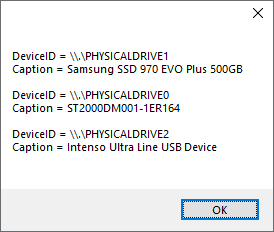
There are also other attributes to only query the specific device you're looking for. This was just a more generic query.
Dear alpine
thanks a lot for your help
the code is working but the same problem as it shows only in combobox one model for all drives
so my request is to apply the code to combobox to show on selection the correct model of drive
look to the excellent code here and apply on it :
the code is working but the same problem as it shows only in combobox one model for all drives
so my request is to apply the code to combobox to show on selection the correct model of drive
You haven't provided any script for us to work on it. I only showed you the way to retrieve the information about the plugged in hard drives.
If you want any help regarding the comboboxes you'd have to give us a script or make a blank one where you have isolated the problem so we don't need to bother going through the whole script if it is too complicated.
Try checking the WMI query for any further information to distinguish better between the devices. Maybe they all just have the same branding?
You can query the information by running wbemtest.exe on your local machine. Click 'connect' and then 'connect' on the new window and then hit 'query' on the first window.
Type in the query I put in the script there and run it, you'll see all the available information for each device.
Sorry for that, it's an excellent code from Oscar and here is :
#Region ;**** Directives created by AutoIt3Wrapper_GUI ****
#AutoIt3Wrapper_Icon=prog.ico
#AutoIt3Wrapper_Outfile=FlashTest.exe
#AutoIt3Wrapper_Outfile_x64=FlashTest64.exe
#AutoIt3Wrapper_Compile_Both=y
#AutoIt3Wrapper_UseX64=y
#AutoIt3Wrapper_Res_Description=FlashTest
#AutoIt3Wrapper_Res_Fileversion=1.1.0.0
#AutoIt3Wrapper_Res_ProductName=FlashTest
#AutoIt3Wrapper_Res_ProductVersion=1.1.0.0
#AutoIt3Wrapper_Res_LegalCopyright=Gorathan (admin@technik-hobby.de)
#AutoIt3Wrapper_Res_Language=1031
#EndRegion ;**** Directives created by AutoIt3Wrapper_GUI ****
#NoTrayIcon
#include <APIFilesConstants.au3>
#include <APIProcConstants.au3>
#include <Array.au3>
#include <AutoItConstants.au3>
#include <ComboConstants.au3>
#include <Date.au3>
#include <EditConstants.au3>
#include <File.au3>
#include <FileConstants.au3>
#include <GDIPlus.au3>
#include <GUIConstantsEx.au3>
#include <GuiEdit.au3>
#include <Misc.au3>
#include <ProgressConstants.au3>
#include <SendMessage.au3>
#include <StaticConstants.au3>
#include <StringConstants.au3>
#include <Timers.au3>
#include <WinAPIConv.au3>
#include <WinAPIFiles.au3>
#include <WinAPIHObj.au3>
#include <WinAPIInternals.au3>
#include <WinAPIMem.au3>
#include <WinAPIProc.au3>
#include <WinAPISys.au3>
#include <WinAPISysInternals.au3>
#include <WindowsConstants.au3>

#include 'includes\MailSlot.au3'

#Region *** Optionen ***
Opt('GUIOnEventMode', 1)
Opt('MustDeclareVars', 1)
Opt('GUICloseOnESC', 0)
#EndRegion *** Optionen ***

_WinAPI_SetPriorityClass($HIGH_PRIORITY_CLASS)
_GDIPlus_Startup()
OnAutoItExitRegister('_OnExit')

#Region *** Konstanten deklarieren ***
Global Const $DBT_DEVICEARRIVAL = 0x8000 ; A device or piece of media has been inserted and is now available.
Global Const $DBT_DEVICEREMOVECOMPLETE = 0x8004 ; A device or piece of media has been removed.
Global Const $tagDEV_BROADCAST_HDR = 'dword dbch_size; dword dbch_devicetype; dword dbch_reserved'
Global Const $tagDEV_BROADCAST_VOLUME = 'dword dbcv_size; dword dbcv_devicetype; dword dbcv_reserved; dword dbcv_unitmask; dword dbcv_flags'
Global Const $DBT_DEVTYP_VOLUME = 0x00000002
Global Const $sAppTitle = 'FlashTest'
Global Const $sAppVersion = '1.1.0.0'
Global Const $sAppDate = '29.12.2018'
Global Const $sAppAuthor = 'Gorathan / Oscar'
Global Const $sAppAuthorEMail = 'mailto:admin@technik-hobby.de'
Global Const $sAppURL = 'https://forum.technik-hobby.de'
Global Const $sLicence = 'Das Programm steht unter der "CC BY-NC-ND 4.0" Lizenz\n- freie Weitergabe mit Namensnennung\n- nicht kommerziell\n- keine Bearbeitung'
Global Const $sAppIcon = @Compiled ? @AutoItExe : @ScriptDir & '\prog.ico'
Global Const $iAppDPI = RegRead('HKEY_CURRENT_USER\Control Panel\Desktop\WindowMetrics', 'AppliedDPI')
Global Const $sMailSlotServer = '\\.\mailslot\FlashTestServer'
Global Const $sMailSlotSlave = '\\.\mailslot\FlashTestSlave'
#EndRegion *** Konstanten deklarieren ***
_Singleton($sAppTitle)

#Region globale Variablen
Global $hMailSlot = _MailSlotCreate($sMailSlotServer)
If @error Then Exit MsgBox(48 + 262144, 'MailSlotServer', 'Failed to create new account!' & @CRLF & 'Probably one using that "address" already exists.')
Global $g_sFlashDrive, $g_sDisplay, $g_sWriteData, $g_sReadData, $g_bStop = False, $g_bStart = False, $g_bRun = False, $g_iBytesDiff, $g_bReadWrite = True
Global $g_iSlavePID = 0
#EndRegion globale Variablen

#Region *** Hauptfenster erstellen ***
Global $hMainGui = GUICreate(StringFormat('%s - v%3.3s - © 2018 by Gorathan (admin@technik-hobby.de)', $sAppTitle, $sAppVersion), 1020, 560)
GUISetOnEvent($GUI_EVENT_CLOSE, '_CloseMainGui')
GUISetBkColor(0xD0D0D0)
GUISetFont(11 / $iAppDPI * 96, 400, 0, 'Verdana')
GUISetIcon($sAppIcon)

GUICtrlCreateGroup('Test-Laufwerk auswählen', 5, 10, 260, 70)
GUICtrlSetFont(-1, 10 / $iAppDPI * 96)
Global $idFlashDrive = GUICtrlCreateCombo('', 25, 35, 220, 20, $CBS_DROPDOWNLIST)
GUICtrlSetFont(-1, 14 / $iAppDPI * 96, 400, 0, 'Courier New')
GUICtrlSetData(-1, _ReadFlashDrives())
GUICtrlSetOnEvent(-1, '_SwitchDrive')
GUICtrlCreateGroup('', -99, -99, 1, 1)

GUICtrlCreateGroup('Test-Speicherplatz', 5, 90, 260, 90)
GUICtrlSetFont(-1, 10 / $iAppDPI * 96)
Global $idTestSpaceAll = GUICtrlCreateRadio('gesamter freier Speicher', 25, 115, 200, 20)
GUICtrlSetState(-1, $GUI_CHECKED)
Global $idTestSpaceSel = GUICtrlCreateRadio('nur', 25, 145, 45, 20)
GUICtrlSetOnEvent(-1, '_SelectSpace')
Global $idTestSpaceInp = GUICtrlCreateInput('', 80, 143, 80, 22, BitOR($ES_NUMBER, $ES_RIGHT))
Global $idTestSpaceLabel = GUICtrlCreateLabel('GB', 165, 145, 50, 20)
GUICtrlCreateGroup('', -99, -99, 1, 1)
_CtrlSetState($idTestSpaceAll, $idTestSpaceLabel, $GUI_DISABLE)

GUICtrlCreateGroup('Laufwerksinformationen', 280, 10, 460, 180)
GUICtrlSetFont(-1, 10 / $iAppDPI * 96)
GUICtrlCreateLabel('Bezeichnung:', 300, 35, 120, 20)
GUICtrlSetFont(-1, 11 / $iAppDPI * 96, 400, 2, 'Verdana')
Global $idDriveLabel = GUICtrlCreateLabel('', 420, 35, 280, 20)
GUICtrlCreateLabel('Typ:', 300, 65, 120, 20)
GUICtrlSetFont(-1, 11 / $iAppDPI * 96, 400, 2, 'Verdana')
Global $idDriveTyp = GUICtrlCreateLabel('', 420, 65, 280, 20)
GUICtrlCreateLabel('Anschluß:', 300, 95, 120, 20)
GUICtrlSetFont(-1, 11 / $iAppDPI * 96, 400, 2, 'Verdana')
Global $idBusTyp = GUICtrlCreateLabel('', 420, 95, 280, 20)
GUICtrlCreateLabel('Dateisystem:', 300, 125, 120, 20)
GUICtrlSetFont(-1, 11 / $iAppDPI * 96, 400, 2, 'Verdana')
Global $idFileSystem = GUICtrlCreateLabel('', 420, 125, 280, 20)
GUICtrlCreateLabel('Speicherplatz:', 300, 155, 120, 20)
GUICtrlSetFont(-1, 11 / $iAppDPI * 96, 400, 2, 'Verdana')
Global $idDriveSpace = GUICtrlCreateLabel('', 420, 155, 280, 20)
GUICtrlCreateGroup('', -99, -99, 1, 1)

Global $idProgressGroup = GUICtrlCreateGroup('Fortschritt', 5, 190, 260, 50)
GUICtrlSetFont(-1, 10 / $iAppDPI * 96)
Global $idProgress = GUICtrlCreateLabel('', 15, 212, 90, 20, $SS_RIGHT)
GUICtrlSetFont(-1, 11 / $iAppDPI * 96, 400, 0, 'Verdana')
Global $idProgressAll = GUICtrlCreateLabel('', 110, 212, 120, 20)
GUICtrlSetFont(-1, 11 / $iAppDPI * 96, 400, 0, 'Verdana')
GUICtrlCreateGroup('', -99, -99, 1, 1)

Global $idTestStartRW = GUICtrlCreateButton('Schreib-/Lesetest', 300, 200, 200, 26)
GUICtrlSetState(-1, $GUI_DISABLE)
GUICtrlSetOnEvent(-1, '_StartTest')
Global $idTestStartR = GUICtrlCreateButton('Nur Lesetest', 300, 227, 200, 26)
GUICtrlSetState(-1, $GUI_DISABLE)
GUICtrlSetOnEvent(-1, '_StartTest')
Global $idTestCancel = GUICtrlCreateButton('abbrechen', 520, 200, 200, 53)
GUICtrlSetState(-1, $GUI_DISABLE)
GUICtrlSetOnEvent(-1, '_StopTest')

Global $idTestProgress = GUICtrlCreateGroup('Testverlauf (schreiben)', 5, 250, 735, 245)
GUICtrlSetFont(-1, 10)
Global $idStartTime = GUICtrlCreateLabel('Start:', 140, 270, 140, 20)
GUICtrlSetFont(-1, 11 / $iAppDPI * 96, 400, 0, 'Verdana')
Global $idEndTime = GUICtrlCreateLabel('Ende:', 437, 270, 140, 20, $SS_RIGHT)
GUICtrlSetFont(-1, 11 / $iAppDPI * 96, 400, 0, 'Verdana')
Global $idTestDisplay = GUICtrlCreatePic('', 100, 290, 512, 160)
Global $aidTestLabel[7]
For $i = 0 To UBound($aidTestLabel) - 1
    $aidTestLabel[$i] = GUICtrlCreateLabel('0 MB/s', 15, 440 - $i * 26, 70, 16, $SS_RIGHT)
    GUICtrlSetFont(-1, 9 / $iAppDPI * 96, 400, 0, 'Verdana')
Next
Global $aidTestTime[11]
For $i = 0 To 8
    $aidTestTime[$i] = GUICtrlCreateLabel($i * 2, 85 + $i * 64, 460, 32, 16, $SS_CENTER)
    GUICtrlSetFont(-1, 9 / $iAppDPI * 96, 400, 0, 'Verdana')
Next
For $i = 0 To 512 Step 8
    GUICtrlCreateLabel('', 100 + $i, 450, 1, 5 + (Mod($i, 16) ? 0 : 5), $SS_BLACKFRAME)
Next
GUICtrlCreateLabel('Speicherplatz (in GigaByte)', 280, 474, 200, 16)
GUICtrlSetFont(-1, 9 / $iAppDPI * 96, 400, 0, 'Verdana')

Global $idSpeedMax = GUICtrlCreateLabel('< 0.0 MB/s', 625, 296, 100, 20)
GUICtrlSetFont(-1, 9 / $iAppDPI * 96, 400, 0, 'Verdana')
Global $idSpeedAvg = GUICtrlCreateLabel('Ø 0.0 MB/s', 625, 360, 100, 20)
GUICtrlSetFont(-1, 9 / $iAppDPI * 96, 400, 0, 'Verdana')
Global $idSpeedMin = GUICtrlCreateLabel('> 0.0 MB/s', 625, 426, 100, 20)
GUICtrlSetFont(-1, 9 / $iAppDPI * 96, 400, 0, 'Verdana')
GUICtrlCreateGroup('', -99, -99, 1, 1)

GUICtrlCreateGroup('Testbericht', 750, 10, 265, 485)
GUICtrlSetFont(-1, 10 / $iAppDPI * 96)
Global $idConsole = GUICtrlCreateEdit('', 760, 30, 245, 455, BitOR($ES_READONLY, $ES_WANTRETURN, $WS_VSCROLL, $ES_AUTOVSCROLL))
GUICtrlSetFont(-1, 9 / $iAppDPI * 96, 400, 0, 'Verdana')
GUICtrlSetBkColor(-1, 0xFFFFFF)
GUICtrlCreateGroup('', -99, -99, 1, 1)

GUICtrlCreateGroup('CPU-Auslastung', 5, 500, 735, 55)
GUICtrlSetFont(-1, 10 / $iAppDPI * 96)
Global $idCPUCycle = GUICtrlCreateProgress(15, 520, 710, 25)
DllCall('UxTheme.dll', 'int', 'SetWindowTheme', 'hwnd', GUICtrlGetHandle(-1), 'wstr', '', 'wstr', '') ; old Style
GUICtrlSetColor(-1, 0x66DD88)
GUICtrlSetBkColor(-1, 0xF8F8F8)
Global $idCPUCycleLabel = GUICtrlCreateLabel('', 15, 522, 710, 20, $SS_CENTER)
GUICtrlSetFont(-1, 12 / $iAppDPI * 96, 400, 0, 'Verdana')
GUICtrlSetColor(-1, 0x000000)
GUICtrlSetBkColor(-1, $GUI_BKCOLOR_TRANSPARENT)
GUICtrlCreateGroup('', -99, -99, 1, 1)

GUICtrlCreateGroup('RAM-Belegung', 750, 500, 265, 55)
GUICtrlSetFont(-1, 10 / $iAppDPI * 96)
Global $idRAMfree = GUICtrlCreateProgress(760, 520, 240, 25)
DllCall('UxTheme.dll', 'int', 'SetWindowTheme', 'hwnd', GUICtrlGetHandle(-1), 'wstr', '', 'wstr', '') ; old Style
GUICtrlSetColor(-1, 0x99BBFF)
GUICtrlSetBkColor(-1, 0xF8F8F8)
Global $idRAMfreeLabel = GUICtrlCreateLabel('', 760, 523, 240, 20, $SS_CENTER)
GUICtrlSetFont(-1, 12 / $iAppDPI * 96, 400, 0, 'Verdana')
GUICtrlSetColor(-1, 0x000000)
GUICtrlSetBkColor(-1, $GUI_BKCOLOR_TRANSPARENT)
GUICtrlCreateGroup('', -99, -99, 1, 1)
#EndRegion *** Hauptfenster erstellen ***

GUIRegisterMsg($WM_COMMAND, '_WM_COMMAND')
GUIRegisterMsg($WM_DEVICECHANGE, '_WM_DEVICECHANGE')
GUIRegisterMsg($WM_NCLBUTTONDOWN, '_WM_NCLBUTTONDOWN')
HotKeySet('{ESC}', '_StopTest')
_Timer_SetTimer($hMainGui, 500, '_CPUCycleTime')
_DrawPath($idTestDisplay, '')
GUISetState(@SW_SHOW, $hMainGui)

While Sleep(50)
    If $g_bStart Then _RunTest()
WEnd

Func _OnExit()
    _Timer_KillAllTimers($hMainGui)
    _GDIPlus_Shutdown()
EndFunc   ;==>_OnExit

Func _CloseMainGui()
    If ProcessExists($g_iSlavePID) Then ProcessClose($g_iSlavePID)
    GUIDelete($hMainGui)
    Exit
EndFunc   ;==>_CloseMainGui

Func _CPUCycleTime($hWnd, $iMsg, $iIDTimer, $iTime)
    #forceref $hWnd, $iMsg, $iIDTimer, $iTime
    Local Static $iOldTime = 0, $aOldData[13]
    Local $iPercent = _GetCPUUsage()
    If Not @error And $iPercent > 0 And $iPercent <= 100 Then
        GUICtrlSetData($idCPUCycle, $iPercent)
        GUICtrlSetData($idCPUCycleLabel, $iPercent & '%')
    EndIf
    Local $aData = _WinAPI_GetPerformanceInfo()
    If Not @error And $aOldData[4] <> $aData[4] And $iTime - $iOldTime > 1000 Then
        $iOldTime = $iTime
        $aOldData = $aData
        GUICtrlSetData($idRAMfree, Int(100 / $aData[3] * ($aData[3] - $aData[4])))
        GUICtrlSetData($idRAMfreeLabel, _WinAPI_StrFormatByteSize($aData[3] - $aData[4]) & ' / ' & _WinAPI_StrFormatByteSize($aData[3]))
    EndIf
EndFunc

Func _GetCPUUsage()
    Local Static $aOld[3], $iTicksOld, $aSystemInfo
    Local $aRet, $iTime1, $iTime2, $iPercent, $iTicks
    $iTicks = _WinAPI_GetTickCount64()
    $aRet = _WinAPI_GetSystemTimes()
    If @error Then Return SetError(@error, @extended, 0)
    If $aOld[0] = 0 Then ; beim ersten Aufruf die Static-Variablen fuellen
        $aSystemInfo = _WinAPI_GetSystemInfo() ; $aSystemInfo[5] = Number of physical processors
        If @error Then Return SetError(@error, @extended, 0)
        $iTicksOld = $iTicks
        $aOld = $aRet
        Return 0
    EndIf
    $iTime1 = $aRet[1] - $aRet[0] + $aRet[2] ; [0] = idle-time, [1] = kernel-time, [2] = user-time
    $iTime2 = $aOld[1] - $aOld[0] + $aOld[2] ; [0] = idle-time, [1] = kernel-time, [2] = user-time
    $iPercent = Int(($iTime1 - $iTime2) / (($iTicks - $iTicksOld) * 100) / $aSystemInfo[5])
    $iTicksOld = $iTicks
    $aOld = $aRet
    Return $iPercent
EndFunc

Func _SelectSpace()
    GUICtrlSetState($idTestSpaceInp, $GUI_FOCUS)
EndFunc   ;==>_SelectSpace

Func _CtrlSetState($iStart, $iEnd, $iState)
    For $iCtrl = $iStart To $iEnd
        GUICtrlSetState($iCtrl, $iState)
    Next
EndFunc   ;==>_CtrlSetState

Func _StopTest()
    GUICtrlSetState($idTestCancel, $GUI_DISABLE)
    $g_bStop = True
    _MailSlotWrite($sMailSlotSlave, 'CA', 1)
EndFunc   ;==>_StopTest

Func _StartTest()
    $g_bReadWrite = (@GUI_CtrlId == $idTestStartRW)
    $g_bStart = True
EndFunc   ;==>_StartTest

Func _ConsoleWrite($sMsg)
    _GUICtrlEdit_AppendText($idConsole, $sMsg)
EndFunc   ;==>_ConsoleWrite

Func _SaveTestData()
    Local $hFile, $sFilename
    $sFilename = StringFormat('%s\\results\\%04i_%02i_%02i__%02i_%02i_%02i.ftr', @ScriptDir, @YEAR, @MON, @MDAY, @HOUR, @MIN, @SEC)
    $hFile = FileOpen($sFilename, BitOR($FO_UTF8, $FO_CREATEPATH, $FO_OVERWRITE))
    If $hFile = -1 Then Return
    FileWrite($hFile, GUICtrlRead($idConsole))
    FileWriteLine($hFile, 'Daten vom Schreibtest:')
    FileWriteLine($hFile, $g_sWriteData)
    FileWriteLine($hFile, 'Daten vom Lesetest:')
    FileWriteLine($hFile, $g_sReadData)
    FileClose($hFile)
EndFunc   ;==>_SaveTestData

Func _CheckIfSlaveExist()
    If ProcessExists($g_iSlavePID) Then Return True
    $g_iSlavePID = Run(StringFormat('%s\FlashTest-Slave%s.exe', @ScriptDir, (@AutoItX64 ? '64' : '')))
    Sleep(250)
    If Not ProcessExists($g_iSlavePID) Then Exit MsgBox(16, $sAppTitle, 'Fehler! FlashTest-Slave konnte nicht gestartet werden!', 0, $hMainGui)
EndFunc

Func _RunTest()
    Local $aSpace, $iTestCount, $sTestFile, $sTestDir, $iMillis, $hFile, $nBytes, $iBytesDiff, $iDiff, $aRet, $iError, $iTimer, $iTimer1, $iTimer2
    Local $tBuffer, $pBuffer, $iBufferSize, $iSize, $sReadData
    $sTestDir = $g_sFlashDrive & '\FlashTest\'
    If Not FileExists($sTestDir) Then ; wenn Verzeichnis nicht vorhanden, dann erstellen
        If Not DirCreate($sTestDir) Then ; wenn das erstellen nicht geklappt hat, dann...
            _ConsoleWrite(StringFormat('Fehler: "Konnte Verzeichnis nicht erstellen!"\r\n'))
            Return
        EndIf
    EndIf
    GUICtrlSetState($idTestStartRW, $GUI_DISABLE)
    GUICtrlSetState($idTestStartR, $GUI_DISABLE)
    GUICtrlSetData($idConsole, '')
    _ConsoleWrite(StringFormat('%s v%3.3s  (%s)\r\n', $sAppTitle, $sAppVersion, (@AutoItX64 ? '64 Bit' : '32 Bit')))
    _ConsoleWrite(StringFormat('Datum: %s\r\n', _NowCalc()))
    _ConsoleWrite(StringFormat('Starte Test mit Laufwerk "%s"\r\n', $g_sFlashDrive))
    _ConsoleWrite(StringFormat('Anschluss: %s\r\n', GUICtrlRead($idBusTyp)))
    _ConsoleWrite(StringFormat('Dateisystem: %s\r\n', GUICtrlRead($idFileSystem)))
    _ConsoleWrite(StringFormat('Speicher: %s\r\n', GUICtrlRead($idDriveSpace)))
    _DrawPath($idTestDisplay, '')
    $g_bStart = False
    $g_sWriteData = ''
    $g_sReadData = ''
    $g_iBytesDiff = 0
    GUICtrlSetState($idTestCancel, $GUI_ENABLE)
    GUICtrlSetData($idStartTime, 'Start: ' & _NowTime(5))
    GUICtrlSetData($idEndTime, 'Ende:')
    GUICtrlSetData($idProgress, _WinAPI_StrFormatByteSize(0))
    If $g_bReadWrite Then
        GUICtrlSetData($idProgressGroup, 'Fortschritt (schreiben)')
        GUICtrlSetData($idTestProgress, 'Testverlauf (schreiben)')
        $aSpace = _WinAPI_GetDiskFreeSpaceEx($g_sFlashDrive)
        If BitAND(GUICtrlRead($idTestSpaceSel), $GUI_CHECKED) Then
            $iTestCount = GUICtrlRead($idTestSpaceInp)
            If $iTestCount > Int($aSpace[2] / 1073741824) Then $iTestCount = Int($aSpace[2] / 1073741824)
        Else
            $iTestCount = Int($aSpace[2] / 1073741824) ; Anzahl der vollen 1-GB-Dateien
        EndIf
    Else
        Local $aFiles = _FileListToArray($sTestDir, '*.ft' & (@AutoItX64 ? '64' : '32'), $FLTA_FILES)
        If @error Then Return
        $iTestCount = $aFiles[0]
    EndIf
    GUICtrlSetData($idProgressAll, ' von ' & _WinAPI_StrFormatByteSize($iTestCount * 1073741824))
    _ConsoleWrite(StringFormat('Zum Test ausgewählt: %s\r\n', _WinAPI_StrFormatByteSize($iTestCount * 1073741824)))
    $g_bRun = True
    #Region Testdaten schreiben
    If $g_bReadWrite Then
        $iTimer = _WinAPI_GetTickCount64()
        $iTimer1 = $iTimer
        For $iCount = 1 To $iTestCount ; Anzahl der 1 GB grossen Testdateien
            $sTestFile = StringFormat('%s%06i.ft%s', $sTestDir, $iCount, (@AutoItX64 ? '64' : '32'))
            ; $sTestFile an Slave schicken, Slave schreibt die Datei und schickt die einzelnen Daten zurueck
            _CheckIfSlaveExist()
            _MailSlotWrite($sMailSlotSlave, 'W1' & $sTestFile, 1)
            $iTimer2 = _WinAPI_GetTickCount64()
            While Sleep(10)
                $iSize = _MailSlotCheckForNextMessage($hMailSlot)
                If $iSize Then
                    $sReadData = _MailSlotRead($hMailSlot, $iSize, 1)
                    Switch StringLeft($sReadData, 2)
                        Case 'CA'
                            ExitLoop 2
                        Case 'EN'
                            ExitLoop
                        Case 'E1'
                            _ConsoleWrite(StringFormat('Fehler: "Konnte Datei "%s" nicht öffnen!"\r\n', $sTestFile))
                            ExitLoop
                        Case 'E2'
                            _ConsoleWrite(StringFormat('Fehler: Ein Teil (%s) der Datei konnte nicht geschrieben werden!\r\n', StringMid($sReadData, 3)))
                            ExitLoop
                        Case 'RE'
                            $nBytes = Number(StringMid($sReadData, 3))
                            $g_iBytesDiff += $nBytes
                            $iMillis = _WinAPI_GetTickCount64()
                            $iDiff = $iMillis - $iTimer2
                            $g_sWriteData &= ($nBytes / 1048576) / ($iDiff / 1000) & '|'
                            If $iMillis - $iTimer1 > 500 Then
                                $iTimer1 = $iMillis
                                GUICtrlSetData($idProgress, _WinAPI_StrFormatByteSize($g_iBytesDiff))
                                GUICtrlSetData($idSpeedAvg, StringFormat('Ø %.1f MB/s', ($g_iBytesDiff / 1048576) / (($iMillis - $iTimer) / 1000)))
                            EndIf
                            _DrawPath($idTestDisplay, $g_sWriteData, 0xFF6622)
                            $iTimer2 = $iMillis
                    EndSwitch
                EndIf
            WEnd
        Next
        If $g_bStop Then
            _ConsoleWrite(StringFormat('Schreibtest abgebrochen.\r\n'))
            GUICtrlSetData($idEndTime, 'Ende: ' & _NowTime(5))
            $g_bStop = False
            $g_bRun = False
            $tBuffer = 0
            MsgBox(0, $sAppTitle, 'Schreibtest abgebrochen!', 0, $hMainGui)
            GUICtrlSetState($idTestStartRW, $GUI_ENABLE)
            GUICtrlSetState($idTestStartR, FileExists($g_sFlashDrive & '\FlashTest\000001.ft' & (@AutoItX64 ? '64' : '32')) ? $GUI_ENABLE : $GUI_DISABLE)
            Return
        EndIf
        Local $iTestSize = $iTestCount * 1073741824, $iTestMillis = _WinAPI_GetTickCount64() - $iTimer
        _ConsoleWrite(StringFormat('Zeit: %s\r\nSchreibrate: %s\r\n', _Ticks2Time($iTestMillis), GUICtrlRead($idSpeedAvg)))
        GUICtrlSetData($idProgress, _WinAPI_StrFormatByteSize($iTestSize))
;~         MsgBox(0, $sAppTitle, 'Schreibtest beendet!' & @CRLF & 'Mit Lesetest beginnen...', 3, $hMainGui)
        #EndRegion Testdaten schreiben
    EndIf
    #Region Testdaten lesen
    _DrawPath($idTestDisplay, '')
    GUICtrlSetData($idProgressGroup, 'Fortschritt (lesen)')
    GUICtrlSetData($idTestProgress, 'Testverlauf (lesen)')
    GUICtrlSetData($idProgress, _WinAPI_StrFormatByteSize(0))
    $g_iBytesDiff = 0
    $iTimer = _WinAPI_GetTickCount64()
    $iTimer1 = $iTimer
    For $iCount = 1 To $iTestCount ; Anzahl der 1 GB grossen Testdateien
        $sTestFile = StringFormat('%s%06i.ft%s', $sTestDir, $iCount, (@AutoItX64 ? '64' : '32'))
        ; $sTestFile an Slave schicken, Slave liest die Datei und schickt die einzelnen Daten zurueck
        _CheckIfSlaveExist()
        _MailSlotWrite($sMailSlotSlave, 'R1' & $sTestFile, 1)
        $iTimer2 = _WinAPI_GetTickCount64()
        While Sleep(10)
            $iSize = _MailSlotCheckForNextMessage($hMailSlot)
            If $iSize Then
                $sReadData = _MailSlotRead($hMailSlot, $iSize, 1)
                Switch StringLeft($sReadData, 2)
                    Case 'CA'
                        ExitLoop 2
                    Case 'EN'
                        ExitLoop
                    Case 'E1'
                        _ConsoleWrite(StringFormat('Fehler: "Konnte Datei "%s" nicht öffnen!"\r\n', $sTestFile))
                        ExitLoop
                    Case 'E2'
                        _ConsoleWrite(StringFormat('Fehler: Ein Teil (%s) der Datei konnte nicht gelesen werden!\r\n', StringMid($sReadData, 3)))
                        ExitLoop
                    Case 'E3'
                        _ConsoleWrite(StringFormat('Fehler: "Fehlerhaftes DWORD an Adresse: %s"\r\n', StringMid($sReadData, 3)))
                        $iError += 1
                    Case 'RE'
                        $nBytes = Number(StringMid($sReadData, 3))
                        $g_iBytesDiff += $nBytes
                        $iMillis = _WinAPI_GetTickCount64()
                        $iDiff = $iMillis - $iTimer2
                        $g_sReadData &= ($nBytes / 1048576) / ($iDiff / 1000) & '|'
                        If $iMillis - $iTimer1 > 500 Then
                            $iTimer1 = $iMillis
                            GUICtrlSetData($idProgress, _WinAPI_StrFormatByteSize($g_iBytesDiff))
                            GUICtrlSetData($idSpeedAvg, StringFormat('Ø %.1f MB/s', ($g_iBytesDiff / 1048576) / (($iMillis - $iTimer) / 1000)))
                        EndIf
                        _DrawPath($idTestDisplay, $g_sReadData, 0x2266FF)
                        $iTimer2 = $iMillis
                EndSwitch
            EndIf
        WEnd
        If $iError Then
            _ConsoleWrite(StringFormat('Achtung! Das deutet auf einen defekten Datenträger hin!\r\n'))
            $iError = 0
        EndIf
    Next
    #EndRegion Testdaten lesen
    GUICtrlSetData($idEndTime, 'Ende: ' & _NowTime(5))
    If $g_bStop Then
        _ConsoleWrite(StringFormat('Lesetest abgebrochen.\r\n'))
        $g_bStop = False
        $g_bRun = False
        $tBuffer = 0
        MsgBox(0, $sAppTitle, 'Lesetest abgebrochen!', 0, $hMainGui)
        GUICtrlSetState($idTestStartRW, $GUI_ENABLE)
        GUICtrlSetState($idTestStartR, FileExists($g_sFlashDrive & '\FlashTest\000001.ft' & (@AutoItX64 ? '64' : '32')) ? $GUI_ENABLE : $GUI_DISABLE)
        Return
    EndIf
    Local $iTestSize = $iTestCount * 1073741824, $iTestMillis = _WinAPI_GetTickCount64() - $iTimer
    _ConsoleWrite(StringFormat('Zeit: %s\r\nLeserate: %s\r\n', _Ticks2Time($iTestMillis), GUICtrlRead($idSpeedAvg)))
    _ConsoleWrite(StringFormat('Datum: %s\r\n', _NowCalc()))
    _ConsoleWrite(StringFormat('Test beendet.\r\n'))
    GUICtrlSetData($idProgress, _WinAPI_StrFormatByteSize($iTestSize))
    _SaveTestData()
    GUICtrlSetState($idTestStartRW, $GUI_ENABLE)
    GUICtrlSetState($idTestStartR, FileExists($g_sFlashDrive & '\FlashTest\000001.ft' & (@AutoItX64 ? '64' : '32')) ? $GUI_ENABLE : $GUI_DISABLE)
    GUICtrlSetState($idTestCancel, $GUI_DISABLE)
    $g_bStop = False
    $g_bRun = False
    $tBuffer = 0
EndFunc   ;==>_RunTest

Func _Ticks2Time($iTicks) ; diese Funktion, wandelt die Millisekunden (Ticks) in "hh:mm:ss.ms" um
    Local $iH, $iM, $iS, $aTime
    $iH = Int($iTicks / 3600000) ; Integerwert (Ganzzahl) der Division durch 3600000 entspricht den Stunden
    $iTicks = Mod($iTicks, 3600000) ; Modulo (Restwert) der Division durch 3600000 sind die restlichen Millisekunden
    $iM = Int($iTicks / 60000) ; Integerwert (Ganzzahl) der Division durch 60000 entspricht den Minuten
    $iTicks = Mod($iTicks, 60000) ; Modulo (Restwert) der Division durch 60000 sind die restlichen Millisekunden
    $iS = Int($iTicks / 1000) ; Integerwert (Ganzzahl) der Division durch 1000 entspricht den Sekunden
    $iTicks = Mod($iTicks, 1000) ; Modulo (Restwert) der Division durch 1000 sind die restlichen Millisekunden
    Return StringFormat('%02i:%02i:%02i.%03i', $iH, $iM, $iS, $iTicks)
EndFunc   ;==>_Ticks2Time

Func _DrawPath($iCtrl, $sData, $iColor = 0x4488EE)
    Local Static $iYValOld = 0, $iMaxOld, $iMinOld, $iTimeOld = 8
    If $sData = '' Then
        For $i = 0 To UBound($aidTestTime) - 1
            GUICtrlSetData($aidTestTime[$i], $i * 4)
        Next
        $iTimeOld = 8
    EndIf
    Local $aData, $iCount, $iMax, $iMin, $iStart = Ceiling(($iTimeOld - 8) * 64), $aPos, $iY, $iYVal, $hBitmap, $hGraphic, $hPen, $hPenGrey, $hBMP, $hPrevImage
    $aPos = ControlGetPos($hMainGui, '', $iCtrl)
    $hBitmap = _GDIPlus_BitmapCreateFromScan0($aPos[2], $aPos[3])
    $hGraphic = _GDIPlus_ImageGetGraphicsContext($hBitmap)
    _GDIPlus_GraphicsClear($hGraphic, 0xFFFFFFFF)
    $hPen = _GDIPlus_PenCreate(0xFF000000 + $iColor, 2)
    $hPenGrey = _GDIPlus_PenCreate(0xFFAAAAAA, 1)
    $aData = StringSplit(StringTrimRight($sData, 1), '|', $STR_NOCOUNT)
    $iCount = UBound($aData)
    If Ceiling($iCount / 64) > $iTimeOld Then
        $iTimeOld = Ceiling($iCount / 64)
        For $i = 0 To UBound($aidTestTime) - 1
            GUICtrlSetData($aidTestTime[$i], ($iTimeOld - 8 + $i) * 4)
        Next
        $iCount -= 64
    EndIf
    $iCount -= $iStart
    $iMax = _ArrayMax($aData, 1)
    If $iMax <> $iMaxOld Then
        $iMaxOld = $iMax
        GUICtrlSetData($idSpeedMax, StringFormat('< %.1f MB/s', $iMax))
    EndIf
    $iMin = _ArrayMin($aData, 1)
    If $iMin <> $iMinOld Then
        $iMinOld = $iMin
        GUICtrlSetData($idSpeedMin, StringFormat('> %.1f MB/s', $iMin))
    EndIf
    $iY = $aPos[3]
    $iYVal = $iY / $iMax
    If $iYVal <> $iYValOld Then
        $iYValOld = $iYVal
        For $i = 0 To UBound($aidTestLabel) - 1
            GUICtrlSetData($aidTestLabel[$i], Ceiling($iMax / 6 * $i) & ' MB/s')
        Next
    EndIf
    For $iX = 0 To $iCount - 1
        _GDIPlus_GraphicsDrawLine($hGraphic, $iX, $iY, $iX, $iY - Int($iYVal * $aData[$iStart + $iX]), $hPen)
    Next
    For $i = 1 To UBound($aidTestLabel) - 2
        _GDIPlus_GraphicsDrawLine($hGraphic, 0, $i * 26, $aPos[2], $i * 26, $hPenGrey)
    Next
    $hBMP = _GDIPlus_BitmapCreateDIBFromBitmap($hBitmap)
    $hPrevImage = _SendMessage(GUICtrlGetHandle($iCtrl), $STM_SETIMAGE, $IMAGE_BITMAP, $hBMP)
    If $hPrevImage Then _WinAPI_DeleteObject($hPrevImage)
    _GDIPlus_PenDispose($hPen)
    _GDIPlus_PenDispose($hPenGrey)
    _GDIPlus_GraphicsDispose($hGraphic)
    _GDIPlus_BitmapDispose($hBitmap)
EndFunc   ;==>_DrawPath

Func _SwitchDrive()
    Local Const $aBusType = StringSplit('UNKNOWN,SCSI,ATAPI,ATA,1394,SSA,FIBRE,USB,RAID,ISCSI,SAS,SATA,SD,MMC', ',', $STR_NOCOUNT)
    Local $sDrive, $aDriveNr, $sLabel, $sTyp, $aSpace, $sTotal, $sFree, $iBus
    $sDrive = StringLeft(GUICtrlRead($idFlashDrive), 2)
    If $sDrive = '' Then Return
    _CtrlSetState($idTestSpaceAll, $idTestSpaceLabel, $GUI_ENABLE)
    $g_sFlashDrive = $sDrive
    $aDriveNr = _WinAPI_GetDriveNumber($sDrive)
    $sLabel = DriveGetLabel($g_sFlashDrive)
    GUICtrlSetData($idDriveLabel, StringFormat('"%s"', $sLabel = '' ? '<keine>' : $sLabel))
    Switch DriveGetType($g_sFlashDrive)
        Case 'Fixed'
            $sTyp = 'Lokaler Datenträger'
        Case 'Removable'
            $sTyp = 'Wechseldatenträger'
    EndSwitch
    GUICtrlSetData($idDriveTyp, StringFormat('%s', $sTyp))
    GUICtrlSetData($idFileSystem, StringFormat('%s', DriveGetFileSystem($g_sFlashDrive)))
    $aSpace = _WinAPI_GetDiskFreeSpaceEx($g_sFlashDrive)
    $sTotal = _WinAPI_StrFormatByteSize($aSpace[1])
    $sFree = _WinAPI_StrFormatByteSize($aSpace[2])
    GUICtrlSetData($idDriveSpace, StringFormat('%s von %s frei', $sFree, $sTotal))
    $iBus = _WinAPI_GetDriveBusType($g_sFlashDrive)
    GUICtrlSetData($idBusTyp, $aBusType[$iBus])
    GUICtrlSetState($idTestStartRW, $GUI_ENABLE)
    GUICtrlSetState($idTestStartR, FileExists($g_sFlashDrive & '\FlashTest\000001.ft' & (@AutoItX64 ? '64' : '32')) ? $GUI_ENABLE : $GUI_DISABLE)
EndFunc   ;==>_SwitchDrive

Func _ReadFlashDrives()
    Local $aDrives = DriveGetDrive($DT_ALL), $sDrives, $aSpace, $sTotal
    For $i = 1 To $aDrives[0]
        Switch DriveGetType($aDrives[$i])
            Case 'Fixed', 'Removable'
                If DriveStatus($aDrives[$i]) = 'READY' Then
                    $aSpace = _WinAPI_GetDiskFreeSpaceEx($aDrives[$i])
                    $sTotal = _WinAPI_StrFormatByteSize($aSpace[1])
                    $sDrives &= StringFormat('%s   %12s|', StringUpper($aDrives[$i]), $sTotal)
                EndIf
        EndSwitch
    Next
    Return StringTrimRight($sDrives, 1)
EndFunc   ;==>_ReadFlashDrives

Func _WM_NCLBUTTONDOWN($hWnd, $Msg, $wParam, $lParam)
    #forceref $hWnd, $Msg, $lParam
    Local Const $HTCAPTION = 0x2, $HTSYSMENU = 0x3, $HTTOPRIGHT = 0x14
    Switch $wParam
        Case $HTCAPTION, $HTSYSMENU ; waehrend des Tests das verschieben des Fensters abfangen
            If $g_bRun Then
                ToolTip('Während das Programm ein Laufwerk testet,' & @CRLF & 'kann das Fenster nicht verschoben werden!', Default, Default, 'Achtung!', $TIP_WARNINGICON, $TIP_BALLOON)
                AdlibRegister('_CloseToolTip', 3000)
                Return 0
            EndIf
        Case $HTTOPRIGHT ; waehrend des Tests einen Klick auf das Schliessen-Symbol als Teststop werten
            If $g_bRun Then
                _StopTest()
                Return 0
            EndIf
    EndSwitch
    Return $GUI_RUNDEFMSG
EndFunc

Func _CloseToolTip()
    AdlibUnRegister()
    ToolTip('')
EndFunc

Func _WM_COMMAND($hWnd, $Msg, $wParam, $lParam)
    #forceref $hWnd, $Msg, $lParam
    Local $iIDFrom, $iCode
    $iIDFrom = _WinAPI_LoWord($wParam)
    $iCode = _WinAPI_HiWord($wParam)
    Switch $iIDFrom
        Case $idTestSpaceInp
            Switch $iCode
                Case $EN_SETFOCUS
                    GUICtrlSetState($idTestSpaceSel, $GUI_CHECKED)
            EndSwitch
    EndSwitch
    Return $GUI_RUNDEFMSG
EndFunc   ;==>_WM_COMMAND

Func _WM_DEVICECHANGE($hWnd, $Msg, $wParam, $lParam)
    #forceref $hWnd, $Msg, $lParam
    Local $tDEV_BROADCAST_HDR, $tDEV_BROADCAST_VOLUME, $iBitmask, $sDrive
    Switch $wParam
        Case $DBT_DEVICEARRIVAL
            $tDEV_BROADCAST_HDR = DllStructCreate($tagDEV_BROADCAST_HDR, $lParam)
            Switch DllStructGetData($tDEV_BROADCAST_HDR, 'dbch_devicetype')
                Case $DBT_DEVTYP_VOLUME
                    $tDEV_BROADCAST_VOLUME = DllStructCreate($tagDEV_BROADCAST_VOLUME, $lParam)
                    $iBitmask = DllStructGetData($tDEV_BROADCAST_VOLUME, 'dbcv_unitmask')
                    $sDrive = _BitMaskToDriveLetter($iBitmask)
                    GUICtrlSetData($idFlashDrive, '')
                    GUICtrlSetData($idFlashDrive, _ReadFlashDrives())
            EndSwitch
        Case $DBT_DEVICEREMOVECOMPLETE
            $tDEV_BROADCAST_HDR = DllStructCreate($tagDEV_BROADCAST_HDR, $lParam)
            Switch DllStructGetData($tDEV_BROADCAST_HDR, 'dbch_devicetype')
                Case $DBT_DEVTYP_VOLUME
                    $tDEV_BROADCAST_VOLUME = DllStructCreate($tagDEV_BROADCAST_VOLUME, $lParam)
                    $iBitmask = DllStructGetData($tDEV_BROADCAST_VOLUME, 'dbcv_unitmask')
                    $sDrive = _BitMaskToDriveLetter($iBitmask)
                    GUICtrlSetData($idFlashDrive, '')
                    GUICtrlSetData($idFlashDrive, _ReadFlashDrives())
                    If DriveStatus($g_sFlashDrive) <> 'READY' Then
                        $g_sFlashDrive = ''
                        GUICtrlSetState($idTestStartRW, $GUI_DISABLE)
                        _CtrlSetState($idTestSpaceAll, $idTestSpaceLabel, $GUI_DISABLE)
                        GUICtrlSetData($idDriveLabel, '')
                        GUICtrlSetData($idDriveTyp, '')
                        GUICtrlSetData($idFileSystem, '')
                        GUICtrlSetData($idDriveSpace, '')
                        GUICtrlSetData($idBusTyp, '')
                    EndIf
            EndSwitch
    EndSwitch
    Return $GUI_RUNDEFMSG
EndFunc   ;==>_WM_DEVICECHANGE

Func _BitMaskToDriveLetter($iBitmask)
    For $i = 0 To 25
        If BitAND($iBitmask, 2 ^ $i) Then Return Chr(97 + $i) & ':'
    Next
    Return
EndFunc ;==>_BitMaskToDriveLetterThis code requires a non-standard UDF to run. So you might wanna post that too.
It needs another code Named : MailSlot.au3
the code here :
; MailSlot.au3
;.......script written by trancexx (trancexx at yahoo dot com)

#cs
    Available functions:
    _MailSlotCheckForNextMessage
    _MailSlotClose
    _MailSlotCreate
    _MailSlotGetMessageCount
    _MailSlotGetTimeout
    _MailSlotSetTimeout
    _MailSlotRead
    _MailSlotWrite
#ce

; #FUNCTION# ;===============================================================================
;
; Name...........: _MailSlotCheckForNextMessage
; Description ...: Checks for presence of a new message.
; Syntax.........: _MailSlotCheckForNextMessage ($hMailSlot)
; Parameters ....: $hMailSlot - Mailslot handle
; Return values .: Success - Returns 0 if there is no message or the size of a new message in bytes if there is one
;                          - Sets @error to 0
;                  Failure - Returns 0 and sets @error:
;                  |1 - GetMailslotInfo function or call to it failed.
; Author ........: trancexx
; Modified.......:
; Link ..........; http://msdn.microsoft.com/en-us/library/aa365435(VS.85).aspx
;
;==========================================================================================
Func _MailSlotCheckForNextMessage($hMailSlot)

    Local $aCall = DllCall("kernel32.dll", "int", "GetMailslotInfo", _
            "ptr", $hMailSlot, _
            "dword*", 0, _
            "dword*", 0, _
            "dword*", 0, _
            "dword*", 0)

    If @error Or Not $aCall[0] Then
        Return SetError(1, 0, 0)
    EndIf

    If $aCall[3] = -1 Or Not $aCall[4] Then
        Return 0
    Else
        Return $aCall[3]
    EndIf

EndFunc   ;==>_MailSlotCheckForNextMessage


; #FUNCTION# ;===============================================================================
;
; Name...........: _MailSlotClose
; Description ...: Closes mailslot.
; Syntax.........: _MailSlotClose ($hMailSlot)
; Parameters ....: $hMailSlot - Mailslot handle
; Return values .: Success - Returns 1
;                          - Sets @error to 0
;                  Failure - Returns 0 and sets @error:
;                  |1 - CloseHandle function or call to it failed.
; Author ........: trancexx
; Modified.......:
; Link ..........; http://msdn.microsoft.com/en-us/library/ms724211(VS.85).aspx
;
;==========================================================================================
Func _MailSlotClose($hMailSlot)

    Local $aCall = DllCall("kernel32.dll", "int", "CloseHandle", "ptr", $hMailSlot)

    If @error Or Not $aCall[0] Then
        Return SetError(1, 0, 0)
    EndIf

    Return 1

EndFunc   ;==>_MailSlotClose


; #FUNCTION# ;===============================================================================
;
; Name...........: _MailSlotCreate
; Description ...: Creates a mailslot with the specified name.
; Syntax.........: _MailSlotCreate ($sMailSlotName [,$iSize [, $iTimeOut [, $pSecurityAttributes])
; Parameters ....: $sMailSlotName - The name of the mailslot
;                  $iSize - The maximum size of a single message that can be written to the mailslot, in bytes. 0 means any size.
;                  $iTimeOut - The time a read operation can wait for a message to be written to the mailslot before a time-out occurs, in milliseconds.
;                              Can be 0 - returns immediately if no message is present
;                                     -1 (minus one) - waits forever for a message
;                  $pSecurityAttributes - A pointer to a SECURITY_ATTRIBUTES structure. 0 means the handle cannot be inherited.
; Return values .: Success - Returns a handle that a mailslot server can use to perform operations on the mailslot
;                          - Sets @error to 0
;                  Failure - Returns -1 and sets @error:
;                  |1 - CreateMailslotW function or call to it failed.
; Author ........: trancexx
; Modified.......:
; Remarks .......: Mailslot name must have the following form and must be unique: \\.\mailslot\[path]name
;                  The name may include multiple levels of pseudo directories separated by backslashes.
;                  For example \\.\mailslot\abc\def\ghi is valid name too.
; Link ..........; http://msdn.microsoft.com/en-us/library/aa365147(VS.85).aspx
;
;==========================================================================================
Func _MailSlotCreate($sMailSlotName, $iSize = 0, $iTimeOut = 0, $pSecurityAttributes = 0)

    Local $aCall = DllCall("kernel32.dll", "ptr", "CreateMailslotW", _
            "wstr", $sMailSlotName, _
            "dword", $iSize, _
            "dword", $iTimeOut, _
            "ptr", $pSecurityAttributes)

    If @error Or $aCall[0] = -1 Then
        Return SetError(1, 0, -1)
    EndIf

    Return $aCall[0]

EndFunc   ;==>_MailSlotCreate


; #FUNCTION# ;===============================================================================
;
; Name...........: _MailSlotGetMessageCount
; Description ...: Retrieves the number of messages in the mailslot.
; Syntax.........: _MailSlotGetMessageCount ($hMailSlot)
; Parameters ....: $hMailSlot - Mailslot handle
; Return values .: Success - Returns the number of the messages in the mailslot waiting to be read.
;                          - Sets @error to 0
;                  Failure - Returns 0 and sets @error:
;                  |1 - GetMailslotInfo function or call to it failed.
; Author ........: trancexx
; Modified.......:
; Link ..........; http://msdn.microsoft.com/en-us/library/aa365435(VS.85).aspx
;
;==========================================================================================
Func _MailSlotGetMessageCount($hMailSlot)

    Local $aCall = DllCall("kernel32.dll", "int", "GetMailslotInfo", _
            "ptr", $hMailSlot, _
            "dword*", 0, _
            "dword*", 0, _
            "dword*", 0, _
            "dword*", 0)

    If @error Or Not $aCall[0] Then
        Return SetError(1, 0, 0)
    EndIf

    If $aCall[3] = -1 Then
        Return 0
    Else
        Return $aCall[4]
    EndIf

EndFunc   ;==>_MailSlotGetMessageCount


; #FUNCTION# ;===============================================================================
;
; Name...........: _MailSlotGetTimeout
; Description ...: Gets the time-out value used by the specified mailslot for a read operation.
; Syntax.........: _MailSlotGetTimeout ($hMailSlot)
; Parameters ....: $hMailSlot - Mailslot handle
; Return values .: Success - Returns integer value representing the time a read operation can wait for a message to be written to the mailslot before a time-out occurs, in milliseconds.
;                          - Sets @error to 0
;                  Failure - Returns 0 and sets @error:
;                  |1 - GetMailslotInfo function or call to it failed.
; Author ........: trancexx
; Modified.......:
; Link ..........; http://msdn.microsoft.com/en-us/library/aa365435(VS.85).aspx
;
;==========================================================================================
Func _MailSlotGetTimeout($hMailSlot)

    Local $aCall = DllCall("kernel32.dll", "int", "GetMailslotInfo", _
            "ptr", $hMailSlot, _
            "dword*", 0, _
            "dword*", 0, _
            "dword*", 0, _
            "int*", 0)

    If @error Or Not $aCall[0] Then
        Return SetError(1, 0, 0)
    EndIf

    Return $aCall[5]

EndFunc   ;==>_MailSlotGetTimeout


; #FUNCTION# ;===============================================================================
;
; Name...........: _MailSlotSetTimeout
; Description ...: Sets the time-out value used by the specified mailslot for a read operation.
; Syntax.........: _MailSlotSetTimeout ($hMailSlot, $iTimeout)
; Parameters ....: $hMailSlot - Mailslot handle
;                  $iTimeout - The time a read operation can wait for a message to be written to the mailslot before a time-out occurs, in milliseconds.
;                              -1 (minus one) means for function to wait forever for a message.
;                              0 (zero) mans to return immediately if no message is present
; Return values .: Success - Returns 1.
;                          - Sets @error to 0
;                  Failure - Returns 0 and sets @error:
;                  |1 - SetMailslotInfo function or call to it failed.
; Author ........: trancexx
; Modified.......:
; Link ..........; http://msdn.microsoft.com/en-us/library/aa365786(VS.85).aspx
;
;==========================================================================================
Func _MailSlotSetTimeout($hMailSlot, $iTimeOut)

    Local $aCall = DllCall("kernel32.dll", "int", "SetMailslotInfo", _
            "ptr", $hMailSlot, _
            "dword", $iTimeOut)

    If @error Or Not $aCall[0] Then
        Return SetError(1, 0, 0)
    EndIf

    Return 1

EndFunc   ;==>_MailSlotSetTimeout


; #FUNCTION# ;===============================================================================
;
; Name...........: _MailSlotRead
; Description ...: Reads messages from the specified mailslot.
; Syntax.........: _MailSlotRead ($hMailSlot , $iSize [, $iMode])
; Parameters ....: $hMailSlot - Mailslot handle
;                  $iSize - The number of bytes to read.
;                  $iMode - Reading mode.
;                             Can be: 0 - read binary
;                                     1 - read ANSI
;                                     2 - read UTF8
; Return values .: Success - Returns read data
;                          - Sets @extended to number of read bytes
;                          - Sets @error to 0
;                  Special: Sets @error to -1 if specified buffer to read to is too small.
;                  Failure - Returns empty string and sets @error:
;                  |1 - DllCall() to ReadFile failed.
;                  |2 - GetLastError function or call to it failed.
;                  |3 - ReadFile function failed. @extended will be set to the return value of the GetLastError function.
; Author ........: trancexx
; Modified.......:
; Link ..........; http://msdn.microsoft.com/en-us/library/aa365467(VS.85).aspx
;                  http://msdn.microsoft.com/en-us/library/ms679360(VS.85).aspx
;
;==========================================================================================
Func _MailSlotRead($hMailSlot, $iSize, $iMode = 0)

    Local $tDataBuffer = DllStructCreate("byte[" & $iSize & "]")

    Local $aCall = DllCall("kernel32.dll", "int", "ReadFile", _
            "ptr", $hMailSlot, _
            "ptr", DllStructGetPtr($tDataBuffer), _
            "dword", $iSize, _
            "dword*", 0, _
            "ptr", 0)

    If @error Then
        Return SetError(1, 0, "")
    EndIf

    If Not $aCall[0] Then
        Local $aLastErrorCall = DllCall("kernel32.dll", "int", "GetLastError")
        If @error Then
            Return SetError(2, 0, "")
        EndIf
        If $aLastErrorCall[0] = 122 Then ; ERROR_INSUFFICIENT_BUFFER
            Return SetError(-1, 0, "")
        Else
            Return SetError(3, $aLastErrorCall[0], "")
        EndIf
    EndIf

    Local $vOut

    Switch $iMode
        Case 1
            $vOut = BinaryToString(DllStructGetData($tDataBuffer, 1))
        Case 2
            $vOut = BinaryToString(DllStructGetData($tDataBuffer, 1), 4)
        Case Else
            $vOut = DllStructGetData($tDataBuffer, 1)
    EndSwitch

    Return SetError(0, $aCall[4], $vOut)

EndFunc   ;==>_MailSlotRead


; #FUNCTION# ;===============================================================================
;
; Name...........: _MailSlotWrite
; Description ...: Writes message to the specified mailslot.
; Syntax.........: _MailSlotWrite ($sMailSlotName , $vData [, $iMode])
; Parameters ....: $hMailSlot - Mailslot name
;                  $vData - Data to write.
;                  $iMode - Writing mode.
;                             Can be: 0 - write binary
;                                     1 - write ANSI
;                                     2 - write UTF8
; Return values .: Success - Returns the number of written bytes
;                          - Sets @error to 0
;                  Failure - Returns empty string and sets @error:
;                  |1 - CreateFileW function or call to it failed.
;                  |2 - WriteFile function or call to it failed.
;                  |3 - Opened mail slot handle could not be closed.
;                  |4 - WriteFile function or call to it failed and additionally opened mail slot handle could not be closed.
; Author ........: trancexx
; Modified.......:
; Link ..........; http://msdn.microsoft.com/en-us/library/aa363858(VS.85).aspx
;                  http://msdn.microsoft.com/en-us/library/aa365747(VS.85).aspx
;                  http://msdn.microsoft.com/en-us/library/ms724211(VS.85).aspx
;
;==========================================================================================
Func _MailSlotWrite($sMailSlotName, $vData, $iMode = 0)

    Local $aCall = DllCall("kernel32.dll", "ptr", "CreateFileW", _
            "wstr", $sMailSlotName, _
            "dword", 0x40000000, _ ; GENERIC_WRITE
            "dword", 1, _ ; FILE_SHARE_READ
            "ptr", 0, _
            "dword", 3, _ ; OPEN_EXISTING
            "dword", 0, _ ; SECURITY_ANONYMOUS
            "ptr", 0)

    If @error Or $aCall[0] = -1 Then
        Return SetError(1, 0, 0)
    EndIf

    Local $hMailSlotHandle = $aCall[0]

    Local $bData

    Switch $iMode
        Case 1
            $bData = StringToBinary($vData, 1)
        Case 2
            $bData = StringToBinary($vData, 4)
        Case Else
            $bData = $vData
    EndSwitch

    Local $iBufferSize = BinaryLen($bData)

    Local $tDataBuffer = DllStructCreate("byte[" & $iBufferSize & "]")
    DllStructSetData($tDataBuffer, 1, $bData)

    $aCall = DllCall("kernel32.dll", "int", "WriteFile", _
            "ptr", $hMailSlotHandle, _
            "ptr", DllStructGetPtr($tDataBuffer), _
            "dword", $iBufferSize, _
            "dword*", 0, _
            "ptr", 0)

    If @error Or Not $aCall[0] Then
        $aCall = DllCall("kernel32.dll", "int", "CloseHandle", "ptr", $hMailSlotHandle)
        If @error Or Not $aCall[0] Then
            Return SetError(4, 0, 0)
        EndIf
        Return SetError(2, 0, 0)
    EndIf

    Local $iOut = $aCall[4]

    $aCall = DllCall("kernel32.dll", "int", "CloseHandle", "ptr", $hMailSlotHandle)
    If @error Or Not $aCall[0] Then
        Return SetError(3, 0, $iOut)
    EndIf

    Return $iOut

EndFunc ;==>_MailSlotWriteSo if I understand this correctly you want to have the caption of the USB drive next to the drive letter in the combobox?

So if I understand this correctly you want to have the caption of the USB drive next to the drive letter in the combobox?
Yes my Dear . this is what i need
Thanks in advance