Beiträge von stefan10
-
-
Vielen lieben Dank für die Tipps. Der Titel heißt: "E-Mail - Vorname Nachname - Outlook", ausgelesen mit AutoIT v3 Window Info. Svens Script klappt wunderbar.

-
Hi, ich versuche ein Fenster mit diesem Skript zu verändern. Wenn ich es wie hier gepostet mit notepad.exe versuche klappt es problemlos. Wenn ich statt dessen olk.exe (Outlook) verwende, wird nur outlook geöffnet, es bewegt sich aber nix. Womit hängt denn das zusammen? Ich würde gerne einfach nur das Fenster minimieren wollen und wieder maximieren.
AutoIt
Alles anzeigenFunc Example() ; Run Notepad Run("notepad.exe") ; Wait 10 seconds for the Notepad window to appear. Local $hWnd = WinWait("[CLASS:Notepad]", "", 10) ; Retrieve the position as well as the height and width of the Notepad window. We will use this when we have to move the window back to the original position. Local $aPos = WinGetPos($hWnd) ; Move the Notepad to the x, y position of 0, 0 and set the height and width at 200, 200. WinMove($hWnd, "", 0, 0, 200, 200) ; Wait for 2 seconds to display the new position of the Notepad window. Sleep(2000) ; Move the Notepad window back to the original position by using the array returned by WinGetPos. WinMove($hWnd, "", $aPos[0], $aPos[1], $aPos[2], $aPos[3]) ; Wait for 2 seconds to display the original position of the Notepad window. Sleep(2000) ; Close the Notepad window using the handle returned by WinWait. WinClose($hWnd) EndFunc ;==>Example Func Example() ; Run Notepad Run("olk.exe") ; Wait 10 seconds for the Notepad window to appear. Local $hWnd = WinWait("[CLASS:olk]", "", 10) ; Retrieve the position as well as the height and width of the Notepad window. We will use this when we have to move the window back to the original position. Local $aPos = WinGetPos($hWnd) ; Move the Notepad to the x, y position of 0, 0 and set the height and width at 200, 200. WinMove($hWnd, "", 0, 0, 200, 200) ; Wait for 2 seconds to display the new position of the Notepad window. Sleep(2000) ; Move the Notepad window back to the original position by using the array returned by WinGetPos. WinMove($hWnd, "", $aPos[0], $aPos[1], $aPos[2], $aPos[3]) ; Wait for 2 seconds to display the original position of the Notepad window. Sleep(2000) ; Close the Notepad window using the handle returned by WinWait. WinClose($hWnd) EndFunc ;==>Example -
Ok, Danke. Ich staune immer wieder über diese Weltfirma. Jetzt gibts die Software schon Jahrzehnte und immer wieder bugs....
Danke für deine Hilfe, water.

-
Ok, ist es dann wieder weg wenn ich auf 365 umsteige? Bis dahin kann ich ja einfach die Zeile weglassen.
-
Habe Outlook 2021
-
Habe auch schon den Rechner neu gestartet das Teil geht nicht mehr weg!
-
Ich bin ja auch total verwundert, weil es bisher lief. Kaum nehme ich den Strichpunkt raus, kommt die o.a. Fehlermeldung. Das Mail wird trotzdem versendet.
Vielleicht habe ich ja etwas falsch installiert.
-
;_OL_ErrorNotify(2)
Hi Water, jetzt gibt es keinen Fehler mehr! ? Bisher lief das aber immer mit der Zeile
-
Hallo,
das Outlook Modul ist die ganze Zeit gut gelaufen. Nun gibt es plötzlich ein Problem,
AutoIt#include <OutlookEX.au3> Global $oOutlook = _OL_Open() _OL_ErrorNotify(2) Global $oItem = _OL_ItemCreate($oOutlook, $olMailItem, "", "", "Subject=TestMail", "Body=TestBody") $Empf = "sin.oso@outlook.de" $oItem = _OL_ItemRecipientAdd($oOutlook, $oItem, Default, $olTo, $Empf) _OL_ItemSend($oOutlook, $oItem)Jemand eine Ahnung wie ich den Fehler hier finde? Das Mail wird ja trotz der Fehlermeldung versendet!
vG
Stefan
-
Ich habe die Zahl in einen Text umgewandelt und kann damit den Punkt beibehalten. Keine optimale Lösung, aber ich kann damit leben. Danke für die Hilfe.
$Zahl = " " & $Zahl
vG
Stefan
-
So kann ich es auf die Spalte A begrenzen.
$oExcel.Columns("A").NumberFormat = "@"
Gibt es eine Lösung für die Komma-> Punkt Umwandlung?
-
Die Lösung dich ich zu Komma -> Punkt gefunden habe, ist in Excel unter Optionen Erweitert das Dezimaltrennzeichen umzustellen. Gibt es da eine andere Möglichkeit über den Code?
-
AutoIt
Alles anzeigenLocal $TEXT = "2023-02-11", $Zahl = 100.40 #include <excel.au3> Local $oExcel = _Excel_Open() $M_Workbook = _Excel_BookNew($oExcel,1) $oExcel.Selection.NumberFormat = "@" _Excel_BookSaveAs ( $M_Workbook, "C:\Users\ich\Desktop\M.txt", $xlUnicodeText, True ) _Excel_RangeWrite($M_Workbook, $M_Workbook.Activesheet, $TEXT ,"A1") _Excel_RangeWrite($M_Workbook, $M_Workbook.Activesheet, $Zahl ,"B1") _Excel_BookClose($M_Workbook,True) -
ja, genau
Danke

Wo finde ich denn da etwas darüber?
Gilt denn
für alle Spalten?
Ich dachte, dass ich das Format spezifisch auf den
eingeben könnte.
Gibt es auch eine Möglichkeit, dass ich statt 100,40 den Eintrag 100.40 bekommen kann? Also statt Komma als Dezimaltrennung einen Punkt?
-
Hallo
ich würde gerne den TEXT "2023-02-11" in die Textdatei im gleichen Format speichern. Leider dreht mir das Excel immer um in 11.02.2023 und speichert es in der M.txt im falschen Format ab. Weiß da jemand eine Lösung?
AutoIt
Alles anzeigenLocal $TEXT = "2023-02-11" #include <excel.au3> Local $oExcel = _Excel_Open() $M_Workbook = _Excel_BookNew($oExcel,1) _Excel_BookSaveAs ( $M_Workbook, "C:\Users\ich\Desktop\M.txt", $xlUnicodeText, True ) _Excel_RangeWrite($M_Workbook, $M_Workbook.Activesheet, $TEXT ,"A1") _Excel_BookClose($M_Workbook,True) -

Hi Moombas,
nur weil der Name der Datei "bot3" beinhaltet, muss es kein bot in dem Sinne sein, dass der Automatismus Online agiert.
Oben angeführter Code findet ein Bild auf meinem Desktop und ich beabsichtige auch nicht den Code im Browser einzusetzen.
Ich wollte einfach nur wissen, warum die Funktion "build" hier nicht funktioniert.
vg
Stefan
-
-
AutoIt
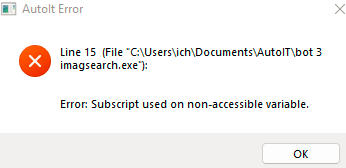
Alles anzeigen#Region ;**** Directives created by AutoIt3Wrapper_GUI **** #AutoIt3Wrapper_Compile_Both=y ;ist notwendig #AutoIt3Wrapper_UseX64=y ;ist notwendig #EndRegion ;**** Directives created by AutoIt3Wrapper_GUI **** #include "ImageSearch.au3" Global $fenster Global $active = 0 HotKeySet("p", "checkForImage") MsgBox(0,"Hinweis","ändert den File zum suchen und drück die Taste 'p' zum starten") global $y = 0, $x = 0 ;rückgabewerte für die Bildposition (sollten global sein!) $file = 'C:\Users\ich\Pictures\Test1_0001%.bmp' ;passt hier den dateipfad bzw die Datei an bmp geht am besten checkForImage() Func checkForImage() MsgBox(0,"Wir nehmen",$file) Local $search = _ImageSearchArea($file,1,0,0, @DesktopWidth, @DesktopHeight, $x, $y, 0,0) MsgBox(0,"Bildschirmgröße",@desktopwidth & " " & @desktopHeight) ;local $search = _ImageSearch($file, 1, $x, $y, 0) ; 900, 80, $x, $y, 0) If $search = 1 Then MsgBox(0, "Bild gefunden auf:", "x: " & $x & " y: " & $y) MouseMove($x, $y, 10) EndIf MsgBox(0,"Suchergebniss 1= gefunden 0= nicht gefunden",$search) EndFunc while 1 sleep(200) WEndDer Inhalt kann nicht angezeigt werden, da er nicht mehr verfügbar ist. -
Nach vielen Versuchen jetzt mein Tipp wie es gelingt. Ist zwar nicht sehr schön, aber so funktioniert es wenigstens.
1. 4k-Monitor vom Netz nehmen -> d.h. mit den anderen beiden Monitoren arbeiten.
2. Computer neu starten.
3. Anwendung Bankingprogramm öffnen.
4. Windowsanwendung "ausschneiden und skizzieren" den Bildschirmausschnitt wählen und in den Zwischenspeicher kopieren
5. Mit Gimp in eine *.bmp wandeln.
6. imagesearch.au3 verwenden.
So werden die Bildausschnitte sicher gefunden.
Fazit: Mit 4k geht es wohl nicht. Schade.
Danke trotzdem für die Unterstützung