

OK, leider ist das Einbinden des Graphen ncht sinnvoll. Dadurch wird die Geschwindigkeit total ausgebremst, von 86 MB/s bis runter auf 12 MB/s.
Schade.
OK, leider ist das Einbinden des Graphen ncht sinnvoll. Dadurch wird die Geschwindigkeit total ausgebremst, von 86 MB/s bis runter auf 12 MB/s.
Schade.

Ich würde sowas vorschlagen:
 Hey, das gefällt mir. Danke für die Lösung.
Ich wollte jetzt zu meiner Copy-Funktion auch eine Graph-Anzeige einbauen.
Soweit auch unproblematisch. Ich hatte vor Jahren, um mir den Umgang mit GDI zu vereinfachen, ja mal eine UDF dafür erstellt. Ist sicher für diese Anwendung overdressed, aber läuft.
Mein Problem liegt hier:
Beim Kopieren ist die Kopiergeschwindigkeit ja im Bereich von 0 bis ... MB/s.
Die zu zeichnenden Punkte sind immer als Prozentwerte anzugeben, max. Zeichenbereich = 100%. Nur auf welchen Wert soll ich die 100% referieren? Kopieren auf der Festplatte ist meist um die 80 MB/s, wenn ich da 150MB/s = 100% setze ist das übersichtlich. Auch wenn der Speed auf 10 MB/s absackt. Kopieren auf externe Datenträger kann aber deutlich langsamer sein, im KB-Bereich. Das würde dann gar nicht mehr angezeigt werden.
Ich würde jetzt den Speed auswerten und beim Erreichen von Schwellwerten eine neue Grenze für die 100% setzen.
Oder habt ihr andere Ideen?
Hier mal eine lauffähige Simulation. Die erforderliche "LivingGraph.au3" ist angehängt.
BTW: Random() ist schon sehr seltsam. Spätestens nach 3 Minuten sind die simulierten Werte nur noch am Maximum und bleiben dort hängen.
EDIT: Ich hab schon zu lang nicht mehr damit gearbeitet. Es sieht so aus, als ob 0 oben ist?! Was hab ich denn da vergurkt? GDI+ ist nicht wirklich meine Kernkompoetenz. 
Prozentwerte war Quatsch, Pixelposition wie üblich, nach unten größer werdend. - OK, das ist dann nur ein Umrechnungsproblem.
EDIT 2: Also die _RandomTransferSpeed() ist so nicht sehr sinnvoll, muss ich nochmal überdenken. - Ist aber nicht das Kernproblem.
EDIT 3: Die Funktion _RandomTransferSpeed() ist jetzt angepasst, aber läuft nach einiger Zeit gegen 0. Seltsam.
#include <ProgressConstants.au3>
#include <GuiStatusBar.au3>
#include <StaticConstants.au3>
#include 'LivingGraph.au3'

Global $hGui, $lbPercent, $lbSpeed, $lbFile, $lbRestFiles, $lbRestSize, $lbRestTime, $hStatus, $idProgress
Global $idGraph


_CreateCopyGui()
GUISetState(@SW_SHOW, $hGui)

Do
    _GraphCtrl_Draw($idGraph, _RandomTransferSpeed(95))
Until GUIGetMsg() = -3


Func _RandomTransferSpeed($_iMax)
    Local Static $100Percent = 85 ; Höhe Graph
    Local $1MBperSec = $_iMax / $100Percent

    Local Static $iMBPerSec = 50
    $iMBPerSec += (Random(-1,1,1) * Random(1,3,1) * ($iMBPerSec / 100))
    If $iMBPerSec >= $_iMax Then $iMBPerSec -= (3*($iMBPerSec / 100))
    If $iMBPerSec < 1 Then $iMBPerSec = 1

    Local $iShowPx = $100Percent - ($iMBPerSec / $1MBperSec)
    GUICtrlSetData($lbSpeed, Round($iMBPerSec) & ' MB')
    Return $iShowPx
EndFunc


Func _CreateCopyGui()
    $hGui = GUICreate('Copy with Progress', 400, 260)
    GUISetBkColor(0xF0F8FF)
    GUISetFont(10, 400, Default, 'Courier New')

    ; Prozent
    GUICtrlCreateLabel('Fortschritt:', 10, 10, 115, 17)
    $lbPercent = GUICtrlCreateLabel('0', 320, 10, 60, 17, BitOR($GUI_SS_DEFAULT_LABEL, $SS_RIGHT))
    GUICtrlSetColor(-1, 0x000080)
    GUICtrlCreateLabel('%', 380, 10, 10, 17, BitOR($GUI_SS_DEFAULT_LABEL, $SS_RIGHT))
    GUICtrlSetColor(-1, 0x000080)

    ; Speed
    GUICtrlCreateLabel('Geschwindigkeit:', 10, 32, 125, 17)
    $lbSpeed = GUICtrlCreateLabel('0 MB', 300, 32, 70, 17, BitOR($GUI_SS_DEFAULT_LABEL, $SS_RIGHT))
    GUICtrlSetColor(-1, 0x000080)
    GUICtrlCreateLabel('/s', 370, 32, 20, 17, BitOR($GUI_SS_DEFAULT_LABEL, $SS_RIGHT))
    GUICtrlSetColor(-1, 0x000080)

    ; akt. Datei
    GUICtrlCreateLabel('Name:', 10, 54, 40, 17)
    $lbFile = GUICtrlCreateLabel('', 55, 54, 335, 17, BitOR($GUI_SS_DEFAULT_LABEL, $SS_RIGHT))
    GUICtrlSetColor(-1, 0x000080)

    ; verbleibende Elemente
    GUICtrlCreateLabel('Verbleibende Elemente:', 10, 76, 180, 17)
    $lbRestFiles = GUICtrlCreateLabel('', 330, 76, 60, 17, BitOR($GUI_SS_DEFAULT_LABEL, $SS_RIGHT))
    GUICtrlSetColor(-1, 0x000080)

    ; verbleibende Größe
    GUICtrlCreateLabel('Verbleibende Größe:', 10, 98, 180, 17)
    $lbRestSize = GUICtrlCreateLabel('', 280, 98, 110, 17, BitOR($GUI_SS_DEFAULT_LABEL, $SS_RIGHT))
    GUICtrlSetColor(-1, 0x000080)

    ; verbleibende Zeit
    GUICtrlCreateLabel('Restdauer ungefähr:', 10, 120, 180, 17)
    $lbRestTime = GUICtrlCreateLabel('', 250, 120, 140, 17, BitOR($GUI_SS_DEFAULT_LABEL, $SS_RIGHT))
    GUICtrlSetColor(-1, 0x000080)

    ; Graph hellgrün: 0xF0F0F0, dunkelgrün: 0x05B024
    $idGraph = _GraphCtrl_Create($hGui, 10, 142, 380, 85, 20)
    _GraphCtrl_SetHelpline($idGraph, -1, '30,60')

    ; Statusbar
    $hStatus = _GUICtrlStatusBar_Create($hGui)
    _GUICtrlStatusBar_SetMinHeight($hStatus, 20)
    $idProgress = GUICtrlCreateProgress(0, 0, -1, -1, $PBS_SMOOTH)
    GUICtrlSetColor(-1, 0x008B00) ; grün
    _GUICtrlStatusBar_EmbedControl($hStatus, 0, GUICtrlGetHandle($idProgress))
EndFuncFehler behoben!
Ich hatte mir selbst ein Ei gelegt. Die Berechnung der Gesamtgröße aller Dateien hatte ich in einer Schleife mit der Prüfung auf Exclude-Attribute vereint. Aber falsch angeordnet, sodass die Dateigröße bei jedem Attribut ermittelt wurde: 2 Attribute = doppelte Größe. 
Die Korrektur der Anzeige direkt nach Feststellung vorhandener Datei im $FC_NOOVERWRITE fehlte auch, das brachte dann falsche Restzahl und -Zeit.
Nun ist es m.M. nach OK. Korrigiert im Startpost. Aber falls ihr noch Fehelr findet - bitte melden.

auf die Funktion kann ich ja wohl kein RunWAIT anwenden, oder?
Warum nicht? Dann wird das Array erst weiter abgearbeitet, wenn der vorige Eintrag verarbeitet wurde.
Außerdem würde ein mehrfacher Aufruf von Run (wie jetzt) parallele Format-Aktionen starten. Ich glaube, das gäbe ein Chaos.
Angeregt durch eine Anfrage im Forum habe ich mal eine FileCopy-Funktion mit GUI erstellt, die alle Infos des Window-Copy vereint: FileCopyProgress
Aber Bilder sagen mehr als Worte:
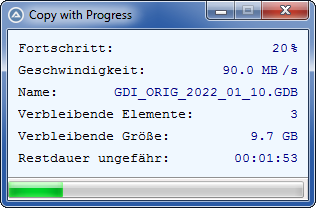
Wie mit FileCopy lassen sich einzelne Dateien oder Ordner kopieren. Die Verwendung von Wildcards ist möglich. Die Syntax ist also an diese Funktion angepasst.
Zusätzlich können Ausschluss-Attribute übergeben werden, standardmäßig sind das "SH".
Syntax: _FileCopyProgress($_sSourcePath, $_sDestinationFolder, $_vFlag, $_sAttribExclude)
Bei einem Fehler wird dieser angezeigt bzw. mit $FC_LOGCOPY in das Log geschrieben. Der Kopiervorgang für evtl. noch zu kopierende Dateien wird danach fortgesetzt.
Die Copy-Flags sind identisch zur FileCopy-Funktion. Aber es gibt auch zwei neue!
$FC_LOGCOPY, erstellt eine Datei "TARGET\FOLDER\progresscopy.log", überschreibt evtl. vorhandene ältere Logdateien
$FC_OPENLOG, ! setzt automatisch das $FC_LOGCOPY Flag ! - Öffnet die Logdatei (wenn erstellt) nach Beendigung des Kopiervorganges
[2022-09-02 09:51:31] Start Copy "C:\VM_SHARE\*.GDB" --> "C:\CODE\Test"
Anzahl Dateien: 5
Gesamtgröße: 6.0 GB
[SUCCESS] C:\CODE\Test\GDI.GDB                                                  1.2 GB
[SUCCESS] C:\CODE\Test\GDI_ORIG_2021_12_08.GDB                                  1.2 GB
[ERROR]   C:\CODE\Test\GDI_ORIG_2022_01_10.GDB                                  Die Datei ist bereits vorhanden.
[SUCCESS] C:\CODE\Test\GDI_ORIG_2022_02_28.GDB                                  1.2 GB
[ERROR]   C:\CODE\Test\GDI_ORIG_2022_08_03.GDB                                  Die Datei ist bereits vorhanden.
[2022-09-02 09:52:15] End Copy
ABER:
Irgendwo hat sich ein Fehler versteckt. Das Kopieren funktioniert tadellos, die Anzeige Restzeit, Restdateien, Fortschritt stimmt zum Ende hin jedoch nicht.
Hab ich vielleicht einen Denkfehler drin? Das passiert in der Funktion "_ProgressSetCopyData", Zeile 239.
Zum Testen braucht man aber große Dateien (> 1 GB), sonst geht alles zu schnell.
Bin für eure Hilfe dankbar. Erledigt, s. Post #2
;-- TIME_STAMP   2022-09-02 09:56:19   v 0.3

#include <Array.au3>
#include <File.au3>
#include <ProgressConstants.au3>
#include <GuiStatusBar.au3>
#include <StaticConstants.au3>
#include <WinAPIError.au3>
#include <WinAPIFiles.au3>

Opt('TrayAutoPause', 0)
OnAutoItExitRegister('_Exit')

; additional flag constants
Global Const $FC_LOGCOPY = 16   ; creates a file "TARGET\FOLDER\progresscopy.log", overwrites a possibly existing old log file
Global Const $FC_OPENLOG = 32   ; ! sets automatically the $FC_LOGCOPY flag ! - shows the logfile (if created) after the operation is finished

Global $hProgressProc = Null, $hGui, $lbPercent, $lbSpeed, $lbFile, $lbRestFiles, $lbRestSize, $lbRestTime, $hStatus, $idProgress
Global $iSumFileSize, $iTotalFileCount
Global $TransferSum = 0, $BytesTransLast = 0
Global $Transfered_halfSecond = 0
Global $TimerStart, $Timer05, $Timer1
Global $hLog = Null


; #FUNCTION# =======================================================================================
; Name ..........: _FileCopyProgress
; Description ...: Copies folders/files with graphical display
; Parameter(s)...: $_sSourcePath         The file(s)/folder to copy. Wildcards allowed.
; ...............: $_sDestinationFolder  The destination folder
; ....[optional].: $_vFlag               Copy flags, known from "FileCopy" (Default: $FC_NOOVERWRITE)
; ...............:                       NEW flags:
; ...............:                       $FC_LOGCOPY, creates a file "TARGET\FOLDER\progresscopy.log", overwrites a possibly existing old log file
; ...............:                       $FC_OPENLOG, ! sets automatically the $FC_LOGCOPY flag ! - shows the logfile (if created) after the operation is finished
; ....[optional].: $_sAttribExclude      Excludes files from copying by attribute (Default: 'SH')
; Return values .: Success               Value > 0
; ...............: Failure               0, set @error  1 - destination folder doesn't exist
; ...............:                                      2 - source file has exclude attribute
; ...............:                                      3 - source path includes none files
; Author ........: BugFix
; Remarks .......:
; ==================================================================================================
Func _FileCopyProgress($_sSourcePath, $_sDestinationFolder, $_vFlag=0, $_sAttribExclude='SH')
    Local $aExclude = StringSplit($_sAttribExclude, '', 2)

    If BitAND($_vFlag, $FC_OPENLOG) Then
        If Not BitAND($_vFlag, $FC_LOGCOPY) Then $_vFlag = BitOR($_vFlag,$FC_LOGCOPY)
    EndIf

    ; Zielordner?
    If Not FileExists($_sDestinationFolder) Then
        If BitAND($_vFlag, $FC_CREATEPATH) Then
            DirCreate($_sDestinationFolder)
        Else
            Return SetError(1,0,0)
        EndIf
    EndIf

    ; Log?
    If BitAND($_vFlag, $FC_LOGCOPY) Then
        If FileExists($_sDestinationFolder & '\progresscopy.log') Then FileDelete($_sDestinationFolder & '\progresscopy.log')
        $hLog = FileOpen($_sDestinationFolder & '\progresscopy.log', BitOR($FO_UTF8_NOBOM, $FO_APPEND))
        _Log($hLog, -1, StringFormat('[%4d-%02d-%02d %02d:%02d:%02d] Start Copy "%s" --> "%s"', @YEAR, @MON, @MDAY, @HOUR, @MIN, @SEC, $_sSourcePath, $_sDestinationFolder))
    EndIf

    ; Zusammenstellen Datei(en) für Copy
    Local $aFiles[2] = [1], $sAttrib = FileGetAttrib($_sSourcePath)
    If ($sAttrib <> '') And (Not StringInStr($sAttrib, 'D')) Then   ; is file or wildcard
        Local $posBS = StringInStr($_sSourcePath, '\', 0, -1)
        Local $sFileOrWildCard = StringTrimLeft($_sSourcePath, $posBS)
        If StringInStr($sFileOrWildCard, '*') Or StringInStr($sFileOrWildCard, '?') Then
            Local $sRoot = StringLeft($_sSourcePath, $posBS-1)
            $aFiles = _FileListToArray($sRoot, $sFileOrWildCard, $FLTA_FILES, True)
        Else
            For $i = 0 To UBound($aExclude) -1
                If StringInStr($sAttrib, $aExclude[$i]) Then Return SetError(2,0,0)
            Next
            $aFiles[1] = $_sSourcePath
        EndIf
    ElseIf ($sAttrib <> '') And (StringInStr($sAttrib, 'D')) Then   ; is directory
        $aFiles = _FileListToArray($_sSourcePath, '*', $FLTA_FILES, True)
    EndIf
    If $aFiles[0] = 0 Then Return SetError(3,0,0)

    ; Überprüfung und Entfernen Dateien mit Exclude-Attrib und Bestimmen Summe Dateigröße
    $iSumFileSize = 0
    Local $bDel
    For $i = $aFiles[0] To 1 Step -1
        $bDel = False
        For $j = 0 To UBound($aExclude) -1
            If StringInStr(FileGetAttrib($aFiles[$i]), $aExclude[$j]) Then
                _ArrayDelete($aFiles, $i)
                $aFiles[0] -= 1
                $bDel = True
                ExitLoop
            EndIf
        Next
        If Not $bDel Then $iSumFileSize += FileGetSize($aFiles[$i])
    Next
    $iTotalFileCount = $aFiles[0]
    If $iTotalFileCount = 0 Then Return SetError(3,0,0)

    If BitAND($_vFlag, $FC_LOGCOPY) Then
        _Log($hLog, -1, StringFormat('Anzahl Dateien: %d%sGesamtgröße: %s', $iTotalFileCount, @CRLF, _FormatByte($iSumFileSize, '', False, '1')))
    EndIf

    ; Erstellen GUI
    _CreateCopyGui()
    GUISetState(@SW_SHOW, $hGui)

    ; callback für progress
    ; https://docs.microsoft.com/en-us/windows/win32/api/winbase/nc-winbase-lpprogress_routine
    $hProgressProc = DllCallbackRegister('_ProgressProc', 'bool', 'uint64;uint64;uint64;uint64;dword;dword;handle;handle;ptr')

    ; Starte Kopieren
    GUICtrlSetData($lbRestSize, _FormatByte($iSumFileSize, '', False, '1'))
    GUICtrlSetData($lbRestFiles, $aFiles[0])
    $TimerStart = TimerInit()
    $Timer05 = TimerInit()
    $Timer1 = TimerInit()
    Local $sFileName
    For $i = 1 To $aFiles[0]
        $sFileName = StringTrimLeft($aFiles[$i], StringInStr($aFiles[$i], '\', 0, -1))
        GUICtrlSetData($lbFile, $sFileName)
        GUICtrlSetData($lbRestFiles, $aFiles[0] -($i-1))
        $BytesTransLast = 0
        If Not BitAND($_vFlag, $FC_OVERWRITE) Then
            If FileExists($_sDestinationFolder & '\' & $sFileName) Then
                If BitAND($_vFlag, $FC_LOGCOPY) Then
                    _Log($hLog, 0, $_sDestinationFolder & '\' & $sFileName, 'exists')
                EndIf
                ; Korrektur Anzeige
                $iSumFileSize -= FileGetSize($aFiles[$i])
                GUICtrlSetData($lbRestSize, _FormatByte(($iSumFileSize - $TransferSum), '', False, '1'))
                Local $iPercentTotal = Round($TransferSum / $iSumFileSize * 100)
                GUICtrlSetData($idProgress, $iPercentTotal)
                GUICtrlSetData($lbPercent, $iPercentTotal)
                Local $iTimeRemaining = (100 - $iPercentTotal) * ((TimerDiff($TimerStart) / 1000) / $iPercentTotal)
                GUICtrlSetData($lbRestTime, _FormatSeconds($iTimeRemaining))
                ContinueLoop
            EndIf
        EndIf
        If _Copy_w_Progress($aFiles[$i], $_sDestinationFolder & '\' & $sFileName, $_vFlag) Then
            If BitAND($_vFlag, $FC_LOGCOPY) Then
                _Log($hLog, 1, $_sDestinationFolder & '\' & $sFileName, _FormatByte(FileGetSize($aFiles[$i]) , '', False, '1'))
            EndIf
        EndIf
    Next
    If BitAND($_vFlag, $FC_LOGCOPY) Then
        _Log($hLog, -1, StringFormat('[%4d-%02d-%02d %02d:%02d:%02d] End Copy', @YEAR, @MON, @MDAY, @HOUR, @MIN, @SEC))
        FileClose($hLog)
        $hLog = Null
    EndIf
    GUICtrlSetData($lbFile, '')
    GUICtrlSetData($lbPercent, 100)
    GUICtrlSetData($lbSpeed, 0)
    GUICtrlSetData($lbRestFiles, 0)
    GUICtrlSetData($lbRestSize, 0)
    GUICtrlSetData($lbRestTime, 0)
    GUICtrlSetData($idProgress, 100)

    While True
        Switch GUIGetMsg()
            Case -3
                GUIDelete($hGui)
                If BitAND($_vFlag, $FC_OPENLOG) Then
                    Return ShellExecute($_sDestinationFolder & '\progresscopy.log')
                Else
                    Return 1
                EndIf
        EndSwitch
    WEnd
EndFunc


Func _Log($_hFile, $_iSucc=-1, $_sLeft='', $_sRight='')
    Local $sSucc = $_iSucc = 0 ? '[ERROR]   ' : ($_iSucc = -1 ? '' : '[SUCCESS] ')
    If $_sRight <> '' Then $_sLeft = StringFormat('%-70s', $_sLeft)
    If $_sRight = 'exists' Then $_sRight = 'Die Datei ist bereits vorhanden.'
    Return FileWrite($_hFile, $sSucc & $_sLeft & $_sRight & @CRLF)
EndFunc


Func _CreateCopyGui()
    $hGui = GUICreate('Copy with Progress', 300, 170)
    GUISetBkColor(0xF0F8FF)
    GUISetFont(10, 400, Default, 'Courier New')

    ; Prozent
    GUICtrlCreateLabel('Fortschritt:', 10, 10, 115, 17)
    $lbPercent = GUICtrlCreateLabel('0', 220, 10, 60, 17, BitOR($GUI_SS_DEFAULT_LABEL, $SS_RIGHT))
    GUICtrlSetColor(-1, 0x000080)
    GUICtrlCreateLabel('%', 280, 10, 10, 17, BitOR($GUI_SS_DEFAULT_LABEL, $SS_RIGHT))
    GUICtrlSetColor(-1, 0x000080)

    ; Speed
    GUICtrlCreateLabel('Geschwindigkeit:', 10, 32, 125, 17)
    $lbSpeed = GUICtrlCreateLabel('0 MB', 200, 32, 70, 17, BitOR($GUI_SS_DEFAULT_LABEL, $SS_RIGHT))
    GUICtrlSetColor(-1, 0x000080)
    GUICtrlCreateLabel('/s', 270, 32, 20, 17, BitOR($GUI_SS_DEFAULT_LABEL, $SS_RIGHT))
    GUICtrlSetColor(-1, 0x000080)

    ; akt. Datei
    GUICtrlCreateLabel('Name:', 10, 54, 40, 17)
    $lbFile = GUICtrlCreateLabel('', 55, 54, 235, 17, BitOR($GUI_SS_DEFAULT_LABEL, $SS_RIGHT))
    GUICtrlSetColor(-1, 0x000080)

    ; verbleibende Elemente
    GUICtrlCreateLabel('Verbleibende Elemente:', 10, 76, 180, 17)
    $lbRestFiles = GUICtrlCreateLabel('', 230, 76, 60, 17, BitOR($GUI_SS_DEFAULT_LABEL, $SS_RIGHT))
    GUICtrlSetColor(-1, 0x000080)

    ; verbleibende Größe
    GUICtrlCreateLabel('Verbleibende Größe:', 10, 98, 180, 17)
    $lbRestSize = GUICtrlCreateLabel('', 230, 98, 60, 17, BitOR($GUI_SS_DEFAULT_LABEL, $SS_RIGHT))
    GUICtrlSetColor(-1, 0x000080)

    ; verbleibende Zeit
    GUICtrlCreateLabel('Restdauer ungefähr:', 10, 120, 180, 17)
    $lbRestTime = GUICtrlCreateLabel('', 200, 120, 90, 17, BitOR($GUI_SS_DEFAULT_LABEL, $SS_RIGHT))
    GUICtrlSetColor(-1, 0x000080)

    ; Statusbar
    $hStatus = _GUICtrlStatusBar_Create($hGui)
    _GUICtrlStatusBar_SetMinHeight($hStatus, 20)
    $idProgress = GUICtrlCreateProgress(0, 0, -1, -1, $PBS_SMOOTH)
    GUICtrlSetColor(-1, 0x008B00) ; grün
    _GUICtrlStatusBar_EmbedControl($hStatus, 0, GUICtrlGetHandle($idProgress))
EndFunc


Func _Exit()
    If $hProgressProc <> Null Then DllCallbackFree($hProgressProc)
    If $hLog <> Null Then FileClose($hLog)
EndFunc


Func _Copy_w_Progress($_source, $_destination, $_vFlag)
    Local $flag = $COPY_FILE_FAIL_IF_EXISTS
    If BitAND($_vFlag, $FC_OVERWRITE) Then $flag = 0
    If Not _WinAPI_CopyFileEx($_source, $_destination, $flag, DllCallbackGetPtr($hProgressProc)) Then
        If BitAND($_vFlag, $FC_LOGCOPY) Then
            _Log($hLog, 0, $_source, _WinAPI_GetLastErrorMessage())
        Else
            _WinAPI_ShowLastError('Beim Kopieren der Datei "' & $_source & '" ist ein Fehler aufgetreten.')
        EndIf
        Return False
    EndIf
    Return True
EndFunc


Volatile Func _ProgressProc($iTotalFileSize, $iTotalBytesTransferred, $iStreamSize, $iStreamBytesTransferred, $iStreamNumber, $iCallbackReason, $hSourceFile, $hDestinationFile, $pData)
    #forceref $iStreamSize, $iStreamBytesTransferred, $iStreamNumber, $iCallbackReason, $hSourceFile, $hDestinationFile, $pData
    _ProgressSetCopyData($iTotalBytesTransferred)
    Sleep(10)
    Return $PROGRESS_CONTINUE
EndFunc


Func _ProgressSetCopyData($_BytesTrans=0)
    $TransferDiff = $_BytesTrans - $BytesTransLast
    $TransferSum += $TransferDiff
    $BytesTransLast = $_BytesTrans
    $Transfered_halfSecond += $TransferDiff

    If TimerDiff($Timer05) < 500 Then Return
    Local $iPercentTotal = Round($TransferSum / $iSumFileSize * 100)

    If TimerDiff($Timer05) >= 500 Then ; alle 1/2 Sekunde aktualisieren
        GUICtrlSetData($idProgress, $iPercentTotal)
        GUICtrlSetData($lbSpeed, _FormatByte($Transfered_halfSecond * 2, '', False, '1')) ; *2: Angabe pro Sekunde
        $Transfered_halfSecond = 0
        $Timer05 = TimerInit()
    EndIf

    ; andere Daten nur jede Sekunde aktualisieren
    If TimerDiff($Timer1) < 1000 Then Return
    GUICtrlSetData($lbPercent, $iPercentTotal)
    GUICtrlSetData($lbRestSize, _FormatByte($iSumFileSize - $TransferSum, '', False, '1'))
    ; Restzeit: Zeit für bisher kopierte Datenmenge prozentual auf Restdatenmenge anrechnen
    Local $iTimeTotal = TimerDiff($TimerStart) / 1000
    Local $iTimeRemaining = (100 - $iPercentTotal) * ($iTimeTotal / $iPercentTotal)
    GUICtrlSetData($lbRestTime, _FormatSeconds($iTimeRemaining))
    $Timer1 = TimerInit()
EndFunc


; #FUNCTION# ====================================================================================================================
; Name ..........: _FormatSeconds
; Description ...: Returns a given value of seconds in the format
; ...............:        <24h: "hh:mm:ss", >=24h: "x d / hh:mm:ss h"
; Syntax ........: _FormatSeconds($_sec)
; Parameters ....: $_sec                - The number of seconds.
; Return values .: The formatted string.
; Author ........: BugFix
; ===============================================================================================================================
Func _FormatSeconds($_sec)
    Return ( $_sec < 60 ? StringFormat('00:00:%02u', $_sec) : _
             $_sec < 60*60 ? StringFormat('00:%02u', Floor($_sec/60)) & ':' & _
                    StringFormat('%02u', Mod($_sec,60)) : _
             $_sec < 60*60*24 ? StringFormat('%02u', Floor($_sec/3600)) & ':' & _
                    StringFormat('%02u', Floor(Mod($_sec,3600)/60)) & ':' & _
                    StringFormat('%02u', Mod(Mod($_sec,3600),60)) : _
             ( $_sec = 86400 ? "24:00:00" : Floor($_sec/86400) & ' d / ' & _
                    StringFormat('%02u', Floor(Mod($_sec,86400)/3600)) & ':' & _
                    StringFormat('%02u', Floor(Mod(Mod($_sec,86400),3600)/60)) & ':' & _
                    StringFormat('%02u', Mod(Mod(Mod($_sec,86400),3600),60)) & ' h') )
EndFunc  ;==>_FormatSeconds


; #FUNCTION# ====================================================================================================================
; Name ..........: _FormatByte
; Description ...: Formats a given value of bytes with highest or given unit, optional as structure with all units
; Parameters ....: $_iByte    The value of bytes to format
; ...............: $_sUnit    (Default = '', unit of highest value) or count of given unit (TB, GB, MB, KB, Byte)
; ...............: $_bStruct  Returns a structure with .TB .GB .MB .KB .Byte (Default = False)
; ...............: $_sDigit   Number of decimal digits (Default = '3') as string!
; Return values .: The formatted string or the structure.
; Author ........: BugFix
; ===============================================================================================================================
Func _FormatByte($_iByte, $_sUnit='', $_bStruct=False, $_sDigit='3')
    Local Static $aByte[5][2] = [[0x10000000000],[0x40000000],[0x100000],[0x400],[0x1]]
    Local Static $tBytes = DllStructCreate('int TB;int GB;int MB;int KB;int Byte;')
    Local Static $aUnit[5] = ['TB','GB','MB','KB','Byte']
    Local $iModulo = $_iByte, $iHighest = 4
    For $i = 0 To 3
        $aByte[$i][1] = $iModulo >= $aByte[$i][0] ? Floor($iModulo/$aByte[$i][0]) : 0
        $iModulo = $aByte[$i][1] > 0 ? Mod($iModulo,$aByte[$i][0]) : $iModulo
        $iHighest = $aByte[$i][1] > 0 ? ($i < $iHighest ? $i : $iHighest) : $iHighest
    Next
    $aByte[4][1] = $iModulo
    If $_bStruct Then
        $tBytes.TB   = $aByte[0][1]
        $tBytes.GB   = $aByte[1][1]
        $tBytes.MB   = $aByte[2][1]
        $tBytes.KB   = $aByte[3][1]
        $tBytes.Byte = $aByte[4][1]
        Return $tBytes
    EndIf
    $_sUnit = StringInStr('TB GB MB KB Byte', $_sUnit) ? $_sUnit : ''
    $_sUnit = $_sUnit = '' ? $aUnit[$iHighest] : $_sUnit
    Local $iUserUnit = Floor(StringInStr('TB GB MB KB Byte', $_sUnit)/3)
    If Number($_sDigit) < 0 Then $_sDigit = '0'
    Local $sFormat = '%.' & $_sDigit & 'f %s'
    Return StringFormat($sFormat, $_iByte/$aByte[$iUserUnit][0], $aUnit[$iUserUnit])
EndFunc  ;==>_FormatByte
Ideal wäre natürlich, wenn man das ganze in eine Funktion packen könnte und gleich ein Flag wie bei FileCopy (Dateien überschreiben oder nicht) setzen könnte.
Den Sinn davon musst du mir erklären.
Das interne Copy-Modul setzt - wie du wolltest - auf Grafikanzeige. Das beinhaltet ebenso die Anfragen, wie mit bereits vorhandenen Zieldateien verfahren werden soll. Aus den 3 Auswahlmöglichkeiten dafür musst du dann manuell wählen. Dieses Fenster kannst du nicht per Option abwählen. Du kannst natürlich probieren dieses Fenster automatisiert anzusteuern. Bischen viel Aufwand, nur um das Windows-Copy-Fenster zu sehen.
EDIT:
Ohne OVERWRITE-Option könnte man das so lösen:
_ShellCopy("C:\DIE\ZU\KOPIERENDE\DATEI.xyz", "C:\ZIEL\ORDNER\NEU", 8)

Func _ShellCopy($_FullSourcePath, $_DestinationFolder, $_vOption=0) ; möglich: $FC_CREATEPATH=8
    Local Static $oShell = ObjCreate("Shell.Application")
    Local $oFolder = $oShell.NameSpace($_DestinationFolder)
    If Not IsObj($oFolder) Then ; Zielordner existiert nicht
        If $_vOption = 8 Then
            _CreateFolder($oShell, $_DestinationFolder)
            $oFolder = $oShell.NameSpace($_DestinationFolder)
        Else
            Return SetError(1,0,0)
        EndIf
    EndIf
    $oFolder.CopyHere($_FullSourcePath, 256)
    Return 1
EndFunc


Func _CreateFolder(ByRef $_oShell, $_Folder)
    Local $newDir = '', $pos
    Do
        $pos = StringInStr($_Folder, '\', 0, -1)
        $newDir = StringTrimLeft($_Folder, $pos) & '\' & $newDir
        $_Folder = StringLeft($_Folder, $pos-1)
    Until IsObj($_oShell.NameSpace($_Folder))
    $_oShell.NameSpace($_Folder).NewFolder(StringTrimRight($newDir, 1))
EndFuncDu hast ein grundsätzliches Design-Problem - das gehört alles in eine einzige Schleife.
Warum willst du in verschiedenen Schleifen GUIGetMsg abfragen?
1. Alle GUI erstellen
2. bei Bedarf mit GUISetState(@SW_SHOW, GUI-Handle) anzeigen lassen (verstecken mit @SW_HIDE)
3. In einer Schleife alle Events abfragen, ggf, GuiGetMsg mit Parameter nutzen (s. Hilfe)
so das beim kopieren das "Kopierfenster" von windows gezeigt wird?
Ja, über die Shell.Application
$oSh = ObjCreate("Shell.Application")
$oFolder = $oSh.NameSpace("C:\ZIEL\ORDNER")
$oFolder.CopyHere("C:\DIE\ZU\KOPIERENDE\DATEI.xyz", 256) ; Anzeige Status
Aber bei kleinen Dateien (unterer MB-Bereich) poppt das Fenster meist gar nicht erst auf, weil der Kopiervorgang so schnell ist.
Cool, das war genau das was ich gebraucht hatte, funktioniert super, danke noch mal
Kein Problem.
Und wenn du etwas mehr Comfort magst:
Eine Variante mit DL-Anzeige (Progress, Speed, Restzeit, Gesamtgröße, geladene Größe). Dazu brauchst du die "statusbar_small.au3" von mir - hänge ich an.
;-- TIME_STAMP   2022-08-30 11:14:22

#include <InetConstants.au3>
#include <ProgressConstants.au3>
#include 'statusbar_small.au3'

#RequireAdmin
Opt('TrayAutoPause', 0)

_DownloadUnzipProgress('https://download.teamviewer.com/download/TeamViewerPortable.zip', 'C:\TestFolder_4')


Func _DownloadUnzipProgress($_uri, $_sFolderUnzip)
    If Not IsAdmin() Then Exit MsgBox(16+65536, 'FEHLER', 'Admin-Rechte erforderlich!')
    Local $sFileDL = StringTrimLeft($_uri, StringInStr($_uri, '/', 0, -1))
    Local $sTMP = @TempDir & '\' & $sFileDL
    _DownloadFile($_uri, $sTMP)
    If Not @error Then
        ToolTip('"' & $sFileDL & '" wird entpackt.', Default, Default, 'UnZip', 1, 2+4)
        Local $oFSO = ObjCreate("Scripting.FileSystemObject")
        If Not FileExists($_sFolderUnzip) Then DirCreate($_sFolderUnzip)
        Local $oShell = ObjCreate("Shell.Application")
        Local $FilesInZip = $oShell.NameSpace($sTMP).items
        $oShell.NameSpace($_sFolderUnzip).CopyHere($FilesInZip, 16+256)
        FileDelete($sTMP)
        ToolTip('')
        MsgBox(64+65536, 'Download & Unzip', 'Vorgang abgeschlossen.')
    EndIf
EndFunc


; #FUNCTION# ====================================================================================================================
; Name ..........: _DownloadFile
; Description ...: Downloads a file from a given URL, shows: progress, speed and remaining time.
; Syntax ........: _DownloadFile($_sUrl, $_sFile[, $_sTitle = ''[, $_iWidth = -1[, $_iHeight = -1[, $_iX = -1[, $_iY = -1]]]]])
; Parameters ....: $_sUrl               - The web adress of the file to load.
; ...............: $_sFile              - The path to store this file.
; ..[optional]...: $_sTitle             - Title of the download window. Default is '', = 'Download'.
; ..[optional]...: $_iWidth             - Width of the download window. Default and minimum is -1, = 300.
; ..[optional]...: $_iHeight            - Height of the download window. Default is -1, = 75.
; ..[optional]...: $_iX                 - X position of the download window. Default is -1, centered. Other negative value: X px from right, postive values: X px absolute.
; ..[optional]...: $_iY                 - Y position of the download window. Default is -1, centered. Other negative value: Y px from bottom, postive values: Y px absolute.
; Return values .: Success              None
; ...............: Failure              1 and show message box - download has failed or was escaped.
; Note ..........: Requires "statusbar_small.au3"
; Author ........: BugFix
; ===============================================================================================================================
Func _DownloadFile($_sUrl, $_sFile, $_sTitle='', $_iWidth=-1, $_iHeight=-1, $_iX=-1, $_iY=-1) ; Pos: -1/-1 = center, -X/-Y = X px from right / Y px from bottom
    $_sTitle = $_sTitle = '' ? 'Download' : $_sTitle
    $_iWidth = $_iWidth = -1 ? 300 : ($_iWidth < 300 ? 300 : $_iWidth)
    $_iHeight = $_iHeight = -1 ? 75 : $_iHeight
    If FileExists($_sFile) Then FileMove($_sFile, $_sFile & '.bak', 1)

    ; Download im Hintergrund, warten bis DL kpl. - Anzeige in GUI
    Local $iBytesSize, $hDL = GUICreate($_sTitle, $_iWidth, $_iHeight, -1, -1, BitOR(0x00C00000,0x00080000)) ; WS_CAPTION,WS_SYSMENU
    Local $idDL_sum = GUICtrlCreateLabel('0,00 KB', 5, 5, $_iWidth-10, 30, 0x01) ; SS_CENTER
    GUICtrlSetFont(-1, 14, Default, Default, 'Verdana')
    Local $aParts[] = [-1,-1,-1]
    Local $aStatusbar = _StatusbarCreate($hDL, $aParts, '||', 'c|c|c', 'Courier New|9|0')
    _StatusbarSetColors($aStatusbar, -1, 0x000080, 0xF0FFFF)
    Local $idProgress = GUICtrlCreateProgress(1, $_iHeight-20-26, $_iWidth-2, 20, $PBS_SMOOTH)
    Local $iTimer = TimerInit()
    ; Fenstergröße absolut ermitteln und Fenster verschieben
    Local $aWin = WinGetPos($hDL)
    Select
        Case $_iX = -1
            $_iX = (@DesktopWidth - $aWin[2]) / 2
        Case $_iX < -1
            $_iX = @DesktopWidth - ($aWin[2] - $_iX)
    EndSelect
    Select
        Case $_iY = -1
            $_iY = (@DesktopHeight - $aWin[3]) / 2
        Case $_iY < -1
            $_iY = @DesktopHeight - ($aWin[3] - $_iY)
    EndSelect
    WinMove($hDL, '', $_iX, $_iY)
    GUISetState()

    Local $iSizeSource = InetGetSize($_sUrl)
    _StatusbarSetText($aStatusbar, 2, _FormatByte($iSizeSource, '', False, '2'))
    Local $hDownload = InetGet($_sUrl, $_sFile, $INET_FORCERELOAD, $INET_DOWNLOADBACKGROUND)

    Local $bEsc = False, $iDL_old = 0, $iDL_diff, $iTimeNeed
    Do
        If TimerDiff($iTimer) >= 1000 Then
            $iBytesSize = InetGetInfo($hDownload, $INET_DOWNLOADREAD)
            GUICtrlSetData($idDL_sum, StringReplace(_FormatByte($iBytesSize, '', False, '2'), '.', ','))
            GUICtrlSetData($idProgress, Int(($iBytesSize/$iSizeSource)*100))
            $iDL_diff = $iBytesSize - $iDL_old
            $iDL_old = $iBytesSize
            _StatusbarSetText($aStatusbar, 0, _FormatByte($iDL_diff, '', False, '0') & '/s')
            $iTimeNeed = ($iSizeSource - $iBytesSize) / $iDL_diff
            _StatusbarSetText($aStatusbar, 1, _FormatSeconds($iTimeNeed))
            $iTimer = TimerInit()
        EndIf
        If GUIGetMsg() = -3 Then
            $bEsc = True
            ExitLoop
        EndIf
    Until InetGetInfo($hDownload, $INET_DOWNLOADCOMPLETE)
    _StatusbarSetText($aStatusbar, 0, '')
    _StatusbarSetText($aStatusbar, 1, '')

    ; Infos über die Download Datei holen
    Local $aData = InetGetInfo($hDownload)
    If @error Or $bEsc Then
        FileDelete($_sFile)
        Local $sTmp = $bEsc ? 'abgebrochen' : 'fehlgeschlagen'
        GUICtrlSetData($idDL_sum, 'Download ' & $sTmp & '!')
        Return SetError(1,0,MsgBox(262192, 'Fehler', 'Der Download ist ' & $sTmp & '.'))
    Else
        GUICtrlSetData($idDL_sum, StringReplace(_FormatByte($iBytesSize), '.', ','))
        GUICtrlSetData($idProgress, 100)
        Sleep(500)
        GUICtrlSetData($idDL_sum, 'Download beendet.')
    EndIf
    InetClose($hDownload)
    GUIDelete($hDL)
EndFunc  ;==>_DownloadFile


; #FUNCTION# ====================================================================================================================
; Name ..........: _FormatSeconds
; Description ...: Returns a given value of seconds in the format
; ...............:        <24h: "hh:mm:ss", >=24h: "x d / hh:mm:ss h"
; Syntax ........: _FormatSeconds($_sec)
; Parameters ....: $_sec                - The number of seconds.
; Return values .: The formatted string.
; Author ........: BugFix
; ===============================================================================================================================
Func _FormatSeconds($_sec)
    Return ( $_sec < 60 ? StringFormat('00:00:%02u', $_sec) : _
             $_sec < 60*60 ? StringFormat('00:%02u', Floor($_sec/60)) & ':' & _
                    StringFormat('%02u', Mod($_sec,60)) : _
             $_sec < 60*60*24 ? StringFormat('%02u', Floor($_sec/3600)) & ':' & _
                    StringFormat('%02u', Floor(Mod($_sec,3600)/60)) & ':' & _
                    StringFormat('%02u', Mod(Mod($_sec,3600),60)) : _
             ( $_sec = 86400 ? "24:00:00" : Floor($_sec/86400) & ' d / ' & _
                    StringFormat('%02u', Floor(Mod($_sec,86400)/3600)) & ':' & _
                    StringFormat('%02u', Floor(Mod(Mod($_sec,86400),3600)/60)) & ':' & _
                    StringFormat('%02u', Mod(Mod(Mod($_sec,86400),3600),60)) & ' h') )
EndFunc  ;==>_FormatSeconds


; #FUNCTION# ====================================================================================================================
; Name ..........: _FormatByte
; Description ...: Formats a given value of bytes with highest or given unit, optional as structure with all units
; Parameters ....: $_iByte    The value of bytes to format
; ...............: $_sUnit    (Default = '', unit of highest value) or count of given unit (TB, GB, MB, KB, Byte)
; ...............: $_bStruct  Returns a structure with .TB .GB .MB .KB .Byte (Default = False)
; ...............: $_sDigit   Number of decimal digits (Default = '3') as string!
; Return values .: The formatted string or the structure.
; Author ........: BugFix
; ===============================================================================================================================
Func _FormatByte($_iByte, $_sUnit='', $_bStruct=False, $_sDigit='3')
    Local Static $aByte[5][2] = [[0x10000000000],[0x40000000],[0x100000],[0x400],[0x1]]
    Local Static $tBytes = DllStructCreate('int TB;int GB;int MB;int KB;int Byte;')
    Local Static $aUnit[5] = ['TB','GB','MB','KB','Byte']
    Local $iModulo = $_iByte, $iHighest = 4
    For $i = 0 To 3
        $aByte[$i][1] = $iModulo >= $aByte[$i][0] ? Floor($iModulo/$aByte[$i][0]) : 0
        $iModulo = $aByte[$i][1] > 0 ? Mod($iModulo,$aByte[$i][0]) : $iModulo
        $iHighest = $aByte[$i][1] > 0 ? ($i < $iHighest ? $i : $iHighest) : $iHighest
    Next
    $aByte[4][1] = $iModulo
    If $_bStruct Then
        $tBytes.TB   = $aByte[0][1]
        $tBytes.GB   = $aByte[1][1]
        $tBytes.MB   = $aByte[2][1]
        $tBytes.KB   = $aByte[3][1]
        $tBytes.Byte = $aByte[4][1]
        Return $tBytes
    EndIf
    $_sUnit = StringInStr('TB GB MB KB Byte', $_sUnit) ? $_sUnit : ''
    $_sUnit = $_sUnit = '' ? $aUnit[$iHighest] : $_sUnit
    Local $iUserUnit = Floor(StringInStr('TB GB MB KB Byte', $_sUnit)/3)
    If Number($_sDigit) < 0 Then $_sDigit = '0'
    Local $sFormat = '%.' & $_sDigit & 'f %s'
    Return StringFormat($sFormat, $_iByte/$aByte[$iUserUnit][0], $aUnit[$iUserUnit])
EndFunc ;==>_FormatByteHier mal noch eine Variante mit InetGet, Download, Verschieben in Zielordner und Unzip in einem Rutsch:
#RequireAdmin

ConsoleWrite(_Download_and_Unzip('https://download.teamviewer.com/download/TeamViewerPortable.zip', 'C:\TestFolder') & @CRLF)

Func _Download_and_Unzip($_uri, $_sFolderUnzip)
    Local $sFileDL = StringTrimLeft($_uri, StringInStr($_uri, '/', 0, -1))
    Local $sTMP = @TempDir & '\' & $sFileDL
    Local $hDownload = InetGet($_uri, $sTMP, 1, 1); $INET_FORCERELOAD=1, $INET_DOWNLOADBACKGROUND=1
    Do
        Sleep(250)
    Until InetGetInfo($hDownload, 2) ; $INET_DOWNLOADCOMPLETE=2
    InetClose($hDownload)
    Local $oFSO = ObjCreate("Scripting.FileSystemObject")
    If Not FileExists($_sFolderUnzip) Then DirCreate($_sFolderUnzip)
    Local $oShell = ObjCreate("Shell.Application")
    Local $FilesInZip = $oShell.NameSpace($sTMP).items
    $oShell.NameSpace($_sFolderUnzip).CopyHere($FilesInZip)
    FileDelete($sTMP)
    Return 'FERTIG'
EndFuncWie bereits erwähnt in C oder Programme kann er nicht speichern, trotz admin Rechten, dat ist leider blöd
Trick 17:
- auf erlaubtem Pfad speichern
- mit #RequireAdmin dann FileCopy an beliebigen Ort (das klappt)
aber wie kommt es dass es fürs Entpacken keinen Befehl gibt;)
Guckst du: ZIP - Packen / Entpacken mit Windows eigener Funktion


Auch der Ausschnitt lässt sich nicht hochladen.
Benutz doch einen File-Hoster, notfalls tut es auch dein Google-Account (ich vermute, du hast einen).
Ich hatte vor vielen Jahren mal eine Stoppuhr erstellt mit Rundenmessung (Anzeige Runde, Zeitmessung läuft weiter). Vielleicht für dich brauchbar.
#include<EditConstants.au3>
#include<GUIConstantsEx.au3>

Global $start, $UsedTime, $diff_Alt = 0
Global $SetTime = False, $Break = False, $Pause = False, $Run = True
Global $colBG = 0x000080, $colFont = 0xFFEA00


$GUI = GUICreate('Stoppuhr', 400, 100, -1, -1)
$Time = GUICtrlCreateInput('00:00:00,000', 100, 20, 200, 20, BitOR($ES_CENTER,$ES_READONLY))
GUICtrlSetBkColor(-1, $colBG)
GUICtrlSetColor(-1, $colFont)
$bStart = GUICtrlCreateButton('Start', 40, 60, 80, 20)
$bBreak = GUICtrlCreateButton('Unterbrechen', 160, 60, 80, 20)
GUICtrlSetState(-1, $GUI_DISABLE)
$bPause = GUICtrlCreateButton('Pause', 280, 60, 80, 20)
GUICtrlSetState(-1, $GUI_DISABLE)
GUISetState()


While True
    $msg = GUIGetMsg()
    If $SetTime Then $UsedTime = SetTime()
    Switch $msg
        Case $GUI_EVENT_CLOSE
            ExitLoop
        Case $bStart ; Start/Stop Messung absolut
            $Run = Not $Run
            If $Run Then
                $SetTime = False
                SetTime()
                GUICtrlSetData($bStart, 'Start')
                GUICtrlSetState($bBreak, $GUI_DISABLE)
                GUICtrlSetState($bPause, $GUI_DISABLE)
            Else
                GUICtrlSetData($Time, '00:00:00,000')
                $SetTime = True
                $start = TimerInit()
                GUICtrlSetData($bStart, 'Stop')
                GUICtrlSetState($bBreak, $GUI_ENABLE)
                GUICtrlSetState($bPause, $GUI_ENABLE)
            EndIf
        Case $bBreak ; nur Anzeige wird angehalten, Zeit läuft weiter (z.B. Rundenmessung)
            $Break = Not $Break
            If $Break Then
                $SetTime = False
                GUICtrlSetData($bBreak, 'Fortsetzen')
                GUICtrlSetState($bPause, $GUI_DISABLE)
            Else
                $SetTime = True
                GUICtrlSetData($bBreak, 'Unterbrechen')
                GUICtrlSetState($bPause, $GUI_ENABLE)
            EndIf
        Case $bPause ; Messung wird angehalten (Additionsmessung)
            $Pause = Not $Pause
            If $Pause Then
                $diff_Alt = $UsedTime ; abgelaufene Zeit aufaddieren
                $SetTime = False
                GUICtrlSetData($bPause, 'Weiter')
                GUICtrlSetState($bBreak, $GUI_DISABLE)
            Else
                $SetTime = True
                $start = TimerInit() ; Zeitmessung neu initialisieren
                GUICtrlSetData($bPause, 'Pause')
                GUICtrlSetState($bBreak, $GUI_ENABLE)
            EndIf
    EndSwitch
WEnd


Func SetTime()
    Local $diff = TimerDiff($start)/1000 + $diff_Alt
    Local $hour = 0
    Local $min = 0
    Local $sec = Floor($diff)
    Local $rest = ($diff-$sec)*1000
    Local $secShow, $minShow, $hourShow
    If $sec > 59 Then
        $min = Floor($sec/60)
        $secShow = Mod($sec, 60)
    ElseIf $sec > 3599 Then ; ???? testen
        $hourShow = Mod(Mod($sec,3600),60)
        $minShow = Floor(Mod($sec,3600)/60)
        $secShow = Floor($sec/3600)
    Else
        $secShow = $sec
        $minShow = $min
        $hourShow = $hour
    EndIf
    GUICtrlSetData($Time, StringFormat('%02u', $hourShow) & ':' & StringFormat('%02u', $minShow) & ':' & StringFormat('%02u', $secShow) & ',' & StringFormat('%03u', $rest))
    Return $diff ; gibt abgelaufene Zeit als absolute Differenz zurück
EndFuncDu könntest ja auch, wie wohl dein voriges Programm arbeitete, die Datei in einzelnen Bytes einlesen. Das ganze in einem 1-basiertem Array und du kannst zielgenau zugreifen.
Wobei ich ein Arbeiten mit FileSetPos / Read / Write / Flush bevorzugen würde, da dann in einem Aufwasch gelesen und geschrieben werden kann.

Aber ich habe das hier gefunden: https://www.autoitscript.com/forum/topic/18…comment=1347110
Das wollte ich gerade noch erwähnen, dass AspirinJunkie ja seine Array-UDF erweitert hat mit entsprechenden Sortierfunktionen: ArrayPlus-UDF - weitere Helferlein für den täglichen Umgang mit Arrays
Ich weiß aktuell keinen guten Workaround dafür.
$ver1 = "99.0.1234.741"
$ver2 = "105.0.1234.102"

ConsoleWrite('String, ver1 > ver2: ' & ($ver1 > $ver2) & @CRLF) ; Stringvergleich
ConsoleWrite('Number, ver1 > ver2: ' & (Number($ver1) > Number($ver2)) & @CRLF) ; Erzwinge nummerischen Vergleich
ConsoleWrite('Number, ver2 > ver1: ' & (Number($ver2) > Number($ver1)) & @CRLF) ; Erzwinge nummerischen Vergleich
Greift aber nur dann, wenn die ersten beiden Blöcke, die als Kommazahl interpretiert werden, sich unterscheiden.
Für eine genaue Unterscheidung die Blöcke splitten und nacheinander abgleichen.
EDIT:
Hier mal eine Vergleichsfunktion, die Versionsnummern können auch unterschiedlich lang sein.
$ver1 = "105.0.1234.102"
$ver2 = "105.0.1234.103"

; prüft ob ver2 > ver1
Func _CompareVersion($_sVer1, $_sVer2)
    Local $a1 = StringSplit($_sVer1, '.')
    Local $a2 = StringSplit($_sVer2, '.')
    If $a1[0] < $a2[0] Then
        ReDim $a1[$a2[0]+1]
        $a1[0] = $a2[0]
    EndIf
    If $a2[0] < $a1[0] Then
        ReDim $a2[$a1[0]+1]
        $a2[0] = $a1[0]
    EndIf
    For $i = 1 To $a1[0]
        If Number($a1[$i]) = Number($a2[$i]) Then ContinueLoop
        Return (Number($a2[$i]) > Number($a1[$i]))
    Next
EndFunc

ConsoleWrite(_CompareVersion($ver1, $ver2) & @CRLF)
Wobei überall wo möglich "Updates automatisch installieren" eingestellt ist - funktioniert einfach nicht.

Bei mir ist es genau umgekehrt. Ich versuche (meist ohne Erfolg) die automatische Updatefunktion dauerhaft zu deaktivieren. Ursache: Viele Updates verschlimmbessern das Programm, da warte ich lieber ab, bis die durch das Update hervorgerufenen Probleme behoben sind.

In deiner Haupt-Scheife solltest du ein Sleep einbauen, um Resourcen zu sparen.
Ich gehe mit allem konform, was du gesagt hast, aber hier irrst du.
GUIGetMsg erzeugt quasi ein Sleep von ca. 10 ms. - sofern ist ein weiteres Sleep nicht erforderlich.
Hmm...das Problem ist, dass da die Tastatureingaben der Gui abgefangen werden.
Ob und wie man das systemweit machen kann, weiß ich nicht.
Es ist sogar so, dass die Scandaten an ein anderes Fenster gesendet werden, wenn das gerade aktiv ist. Insofern nützt es wenig, die eigene Gui zu verstecken.
Sofern Pre- und Postzeichen gesendet werden, die auch definitiv im allgemeinen Datenverkehr niemals an das System gesendet werden, könnte ich mir vorstellen, dass ein systemweiter Keyboard-Hook auch ohne ein Fenster auskommt und somit die Daten einfängt. Ich habe nur keinen Scanner hier zum Testen.