1. Dashboard
  2. Mitglieder
    1. Letzte Aktivitäten
    2. Benutzer online
    3. Team
    4. Mitgliedersuche
  3. Forenregeln
  4. Forum
    1. Unerledigte Themen
  • Anmelden
  • Registrieren
  • Suche
Alles
  • Alles
  • Artikel
  • Seiten
  • Forum
  • Erweiterte Suche
  1. AutoIt.de - Das deutschsprachige Forum.
  2. Mitglieder
  3. UEZ

Beiträge von UEZ

  • GDI+, Kleiner Farbverlauf

    • UEZ
    • 6. März 2018 um 17:12

    Probiere es mal damit:

    AutoIt
    #include <GDIPlus.au3>
    #include <GUIConstantsEx.au3>
    
    Example()
    
    Func Example()
        _GDIPlus_Startup() ;initialize GDI+
        Local Const $iWidth = 600, $iHeight = 100, $iBgColor = 0x303030 ;$iBgColor format RRGGBB
    
        Local $hGUI = GUICreate("GDI+ Example (" & @ScriptName & ")", $iWidth, $iHeight) ;create a test GUI
        GUISetBkColor($iBgColor, $hGUI) ;set GUI background color
        GUISetState(@SW_SHOW)
    
        Local $hGraphics = _GDIPlus_GraphicsCreateFromHWND($hGUI) ;create a graphics object from a window handle
        _GDIPlus_GraphicsSetSmoothingMode($hGraphics, $GDIP_SMOOTHINGMODE_HIGHQUALITY) ;sets the graphics object rendering quality (antialiasing)
        Local $hBrush = _GDIPlus_LineBrushCreate($iWidth / 2, 0, $iWidth / 2, $iHeight / 2, 0xFF0000FF, 0xFFFFFFFF, 3) ;create linear gradient brush
    
        _GDIPlus_GraphicsFillRect($hGraphics, 0, 0, $iWidth, $iHeight, $hBrush)
    
        Do
        Until GUIGetMsg() = $GUI_EVENT_CLOSE
    
        ;cleanup GDI+ resources
        _GDIPlus_BrushDispose($hBrush)
        _GDIPlus_GraphicsDispose($hGraphics)
        _GDIPlus_Shutdown()
        GUIDelete($hGUI)
    EndFunc   ;==>Example
    Alles anzeigen
  • Hilfiker / MobaTime Schweizer Bahnhofsuhr build 2019-07-07

    • UEZ
    • 1. März 2018 um 18:52

    Kleines Update: v1.15 wird jetzt als Widget angezeigt.

  • 32bit oder 64bit

    • UEZ
    • 16. Februar 2018 um 22:37

    Ich habe bis jetzt keinen echten Geschwindigkeitsvorteil mit den nativen AutoIt Funktionen messen können. Ansonsten sehe ich auch keinen Nachteil x64 Programme zu erstellen.

    x32 läuft auch auf x64 BS, aber eben nicht umgekehrt.

    Bugs entstehen nicht, weil x64, sondern weil man nicht richtig getestet hat. :whistling:

  • Hilfiker / MobaTime Schweizer Bahnhofsuhr build 2019-07-07

    • UEZ
    • 15. Februar 2018 um 20:06

    alpines : yep, liegt an _GDIPlus_EffectCreate().

  • Hilfiker / MobaTime Schweizer Bahnhofsuhr build 2019-07-07

    • UEZ
    • 15. Februar 2018 um 18:12

    Anscheinend läuft das Skript als x64 nur mit der AutoIt Version v3.3.14.3! Muss mal prüfen, woran das liegt.

    Zitat von Tuxedo

    Für einen Laien leider schwer zu verstehen

    Ok, wenn du was nicht verstehst, dann einfach hier posten, und ich werde versuchen es zu erklären.

    Zitat von Oscar

    Allerdings läuft die Uhr schon beim Minutenbeginn um eine Sekunde zu schnell.

    Mein Verständnis ist, dass die Sekunden um genau 60/58.5 schneller laufen, so dass die Uhr quasi zur vollen Zeit um eine 1.5 Sekunde vorne liegt und in diesen 1.5 Sekunden die Minute umspringt.

    Ich habe das Skript jetzt aktualisiert.

  • Hilfiker / MobaTime Schweizer Bahnhofsuhr build 2019-07-07

    • UEZ
    • 15. Februar 2018 um 16:18

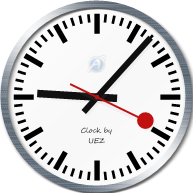
    Hier eine Implementierung der Schweizer Bahnhofsuhr gestaltet von Hans Hilfiker. Das ungewöhnlich an dieser Uhr ist, dass sie schneller läuft und zur vollen Minute eine 1,5 Sekunde wartet und dann erst der Minuten Zeiger weiter zieht (siehe Wikipedia).


    Danke an Eukalyptus für Funktion _CreateBrushedAluminum. :rock:

    Windows7+ wird benötigt und x64 läuft nur mit AutoIt Version 3.3.14.3, da sonst _GDIPlus_EffectCreate() abstürzt.

    Dateien

    GDI+ Swiss Railway Clock v1.1.au3 24,59 kB – 432 Downloads GDI+ Swiss Railway Clock v1.16 (Widget).au3 27,65 kB – 374 Downloads
  • Infinite Image Zoom Flight build 2018-01-10

    • UEZ
    • 9. Januar 2018 um 13:41

    Ich vermute, dass die Unterschiede in der Größe der Bilder entstehen:

    Code
    1364.21582682873 x 1023.16187012155
    682.107913414366 x 511.580935060774
    2755.03740268449 x 2066.27805201337
    1377.51870134225 x 1033.13902600669
    688.759350671124 x 516.569513003343
    2781.90259228807 x 2086.42694421605
    1390.95129614404 x 1043.21347210803
    695.475648072018 x 521.606736054013
    2809.02975235046 x 2106.77231426285
    1404.51487617523 x 1053.38615713142
    702.257438087616 x 526.693078565712
    2836.42143742358 x 2127.31607806768
    1418.21071871179 x 1063.65803903384
    709.105359355894 x 531.829019516921
    2864.08022696951 x 2148.06017022714
    1432.04011348476 x 1074.03008511357
    716.020056742378 x 537.015042556784
    2892.00872560348 x 2169.00654420261
    1446.00436280174 x 1084.5032721013
    723.002181400869 x 542.251636050652
    2920.20956333905 x 2190.15717250429
    1460.10478166952 x 1095.07858625214
    730.052390834762 x 547.539293126071
    2948.68539583585 x 2211.51404687689
    1474.34269791793 x 1105.75702343845
    737.171348958964 x 552.878511719223
    2977.43890464965 x 2233.07917848724
    1488.71945232483 x 1116.53958924362
    744.359726162413 x 558.26979462181
    3006.47279748484 x 2254.85459811363
    1503.23639874242 x 1127.42729905681
    751.61819937121 x 563.713649528407
    3035.78980844945 x 2276.84235633709
    1517.89490422473 x 1138.42117816855
    758.947452112364 x 569.210589084273
    3065.39269831263 x 2299.04452373447
    1532.69634915632 x 1149.52226186724
    766.348174578158 x 574.761130933618
    3095.28425476458 x 2321.46319107344
    1547.64212738229 x 1160.73159553672
    773.821063691146 x 580.36579776836
    3125.46729267913 x 2344.10046950935
    1562.73364633956 x 1172.05023475467
    781.366823169782 x 586.025117377337
    3155.94465437875 x 2366.95849078406
    1577.97232718938 x 1183.47924539203
    788.986163594688 x 591.739622696016
    3186.71920990227 x 2390.0394074267
    1593.35960495113 x 1195.01970371335
    796.679802475567 x 597.509851856675
    1608.89692863755 x 1206.67269647816
    804.448464318775 x 603.336348239081
    402.224232159388 x 301.668174119541
    1624.58576139109 x 1218.43932104332
    812.292880695544 x 609.219660521658
    406.146440347772 x 304.609830260829
    Alles anzeigen

    Btw, ich habe den Code aktualisiert. Nun kann man per Maus in beide Richtungen "fliegen".

  • Infinite Image Zoom Flight build 2018-01-10

    • UEZ
    • 8. Januar 2018 um 23:03
    Zitat von Oscar

    Genial! :):rock:

    Die neuen Versionen sind unglaublich schnell (auf meinem Rechner mit 2560x1440 px Auflösung, bei beiden ca. 120 fps).

    Und Deine Arkadia-Version gefällt mir besser als die JS-Version, weil sie nicht diesen Farbfilter darüberlegt. :klatschen:

    Du brauchst also nicht in die Hände spucken und eine schnelle ASM Version coden. ;)


    Zitat von Xenobiologist

    Sehr schön, aber das Angucken macht einen auf Dauer irgendwie wahnsinnig. :)

    Hmm, sollte noch einen Hinweis posten, dass das anschauen auf Dauer wahnsinnig machen kann, und ich dafür nicht haftbar gemacht werden kann. ;)

  • Infinite Image Zoom Flight build 2018-01-10

    • UEZ
    • 7. Januar 2018 um 23:34

    Ok, ich habe die Trippel Bilder Technik implementiert -> siehe Post #1.

  • Infinite Image Zoom Flight build 2018-01-10

    • UEZ
    • 7. Januar 2018 um 21:46

    Wer Lust hat den JS Code zu analysieren, um zu sehen, warum in JS die Animation jeweils beim nächsten Bild nicht so aussieht, wie es oben aussieht, kann hier reinschauen:

    https://codepen.io/Dunced/pen/ygNVeM

    Habe ich per Zufall entdeckt.

    Ich versuche gerade den Code zu verstehen...:/

    Edit: Krass, die zeichnen 3 Bilder parallel, sodass nicht beim Wechsel zum nächsten Bild dies sichtbar wird. Clever:!:Demnächst kommt das Update!

  • Infinite Image Zoom Flight build 2018-01-10

    • UEZ
    • 6. Januar 2018 um 17:41

    Alpha Blend kann man auch mit GDI+ hinbekommen.

    Ich muss mal den JS Code genauer anschauen, wie dort die Implementierung ist.

    xSunLighTx3 du kannst die Zeile

    AutoIt
    _WinAPI_SetStretchBltMode($hDC, $STRETCH_HALFTONE)

    auskommentieren, dann wird's schneller.

  • Infinite Image Zoom Flight build 2018-01-10

    • UEZ
    • 5. Januar 2018 um 21:28
    Zitat von Andy

    Das Stretchblt() ist, GDI+-typisch SCH***-langsam

    Stretchblt() ist GDI und nicht GDI+ (Klugshitting :P)

    Na dann schaue dir mal die GDI+ Variante an.

    Btw, ich habe die Source Codes ein bissl optimiert.

  • Infinite Image Zoom Flight build 2018-01-10

    • UEZ
    • 5. Januar 2018 um 16:16

    Danke Oscar!

    Ich habe noch ein zweites Beispiel hinzugefügt. Beide Scripte laufen jetzt im Vollbildmodus ab.

  • Infinite Image Zoom Flight build 2018-01-10

    • UEZ
    • 5. Januar 2018 um 14:26

    Hier zwei kleine Skripte zum Jahreswechsel! :)

    Zoomquilt:

    AutoIt
    ;coded by UEZ build 2018-01-10, idea and images taken from http://zoomquilt.org/
    ;thanks to spudw2k for the MouseZoom function
    
    #pragma compile(Icon, "c:\Program Files (x86)\AutoIt3\Icons\au3.ico")
    #AutoIt3Wrapper_Run_Au3Stripper=y
    #Au3Stripper_Parameters=/so /pe /rm
    #AutoIt3Wrapper_Run_After=del /f /q "%scriptdir%\%scriptfile%_stripped.au3"
    
    #include <GDIPlus.au3>
    #include <GuiConstantsEx.au3>
    #include <WindowsConstants.au3>
    
    _GDIPlus_Startup()
    Global $hGUI, $iFPS = 0, $iShowFPS = 0, $bExit, $iW, $iH
    Global Const $sTitle = "GDI Image Zoom v2.1.2 coded by UEZ"
    AutoItSetOption("GUIOnEventMode", 1)
    
    Downloader()
    GDIPlus_ZoomImage()
    
    AutoItSetOption("GUIOnEventMode", 0)
    _GDIPlus_Shutdown()
    
    
    Func GDIPlus_ZoomImage($bMultimonitor = False)
        $bExit = False
    
        Local $i, $aImages[46], $hImage, $hObj
        ConsoleWrite("Loading images from local disk..." & @CRLF)
        Local $fTimer = TimerInit()
    
        For $i = 0 To UBound($aImages) - 1
            $hImage = _GDIPlus_ImageLoadFromFile(@ScriptDir & "\Images\TheZoomquilt" & StringFormat("%02i.jpg", $i))
            $aImages[$i] = _GDIPlus_BitmapCreateHBITMAPFromBitmap($hImage)
            _GDIPlus_ImageDispose($hImage)
        Next
        ConsoleWrite(UBound($aImages) & " images loaded in " & TimerDiff($fTimer) & " ms" & @CRLF)
    
        Local $tDim = DllStructCreate($tagBITMAP)
        DllCall("GDI32.dll", 'int', 'GetObject', 'int', $aImages[0], 'int', DllStructGetSize($tDim), 'ptr', DllStructGetPtr($tDim))
        $iW = $tDim.bmWidth
        $iH = $tDim.bmHeight
    
        Local $hFullScreen = WinGetHandle("[TITLE:Program Manager;CLASS:Progman]"), $aFullScreen[4], $iW_Dt, $iH_Dt
        $aFullScreen = WinGetPos($hFullScreen)
    
        If $bMultimonitor Then
            $iW_Dt = $aFullScreen[2]
            $iH_Dt = $aFullScreen[3]
        Else
            $iW_Dt = @DesktopWidth
            $iH_Dt = @DesktopHeight
            $aFullScreen[0] = ""
            $aFullScreen[1] = ""
        EndIf
    
        $hGUI = GUICreate($sTitle, $iW_Dt, $iH_Dt, $aFullScreen[0], $aFullScreen[1], $WS_POPUP, $WS_EX_TOPMOST)
        GUISetState(@SW_SHOW, $hGUI)
        GUISetCursor(16, 1)
    
        ;create canvas elements
        Local Const $hDC = _WinAPI_GetDC($hGUI)
        Local Const $hHBitmap = _WinAPI_CreateCompatibleBitmap($hDC, $iW_Dt, $iH_Dt)
        Local Const $hDC_backbuffer = _WinAPI_CreateCompatibleDC($hDC)
        Local Const $DC_obj = _WinAPI_SelectObject($hDC_backbuffer, $hHBitmap)
        Local Const $hMemDC = _WinAPI_CreateCompatibleDC($hDC)
    
        _WinAPI_SetStretchBltMode($hDC_backbuffer, $STRETCH_DELETESCANS)
    
        Local Const $hCanvas = _GDIPlus_GraphicsCreateFromHDC($hDC_backbuffer)
        _GDIPlus_GraphicsSetSmoothingMode($hCanvas, $GDIP_SMOOTHINGMODE_HIGHQUALITY)
        _GDIPlus_GraphicsSetPixelOffsetMode($hCanvas, $GDIP_PIXELOFFSETMODE_HIGHQUALITY)
    
        Local Const $hBrush_Clr = _GDIPlus_BrushCreateSolid(0xFF000000), _
                    $hBrush_FPS = _GDIPlus_BrushCreateSolid(0xFFFFFFFF), _
                    $hFormat_FPS = _GDIPlus_StringFormatCreate(), _
                    $hFamily_FPS = _GDIPlus_FontFamilyCreate("Arial"), _
                    $hFont_FPS = _GDIPlus_FontCreate($hFamily_FPS, 8), _
                    $tLayout_FPS = _GDIPlus_RectFCreate(0, 0, 130, 16)
    
    
        $iFPS = 0
        GUISetOnEvent($GUI_EVENT_CLOSE, "_Exit_About")
        AdlibRegister("CalcFPS", 1000)
    
        Local $a[3], $b = 1, $c, $x, $e, $y, $w, $h, $w2 = $iW_Dt / 2, $h2 = $iH_Dt / 2, $q, $r
        If $iW_Dt > 1.5 * $iH_Dt Then
            $q = $iW_Dt
            $r = 0.75 * $iW_Dt
        Else
            $q = 1.5 * $iH_Dt
            $r = 0.75 * $iH_Dt
        EndIf
    
        Do
            For $e = 0 To 2
                $a[$e] = $aImages[Mod(Floor($b) + $e, UBound($aImages))]
            Next
            $c = 2^(Mod($b, 1))
    
            For $e = 0 To 2
                $x = $w2 - $q / 2 * $c
                $y = $h2 - $r / 2 * $c
                $w = $q * $c
                $h = $r * $c
                $hObj = _WinAPI_SelectObject($hMemDC, $a[$e])
                _WinAPI_StretchBlt($hDC_backbuffer, $x, $y, $w, $h, $hMemDC, 0, 0, $iW, $iH, $SRCCOPY)
                $c *= 0.5
            Next
             $b += MouseZoom()
            IF $b < 0 Then $b = UBound($aImages) - $b
    
            _GDIPlus_GraphicsDrawStringEx($hCanvas, "FPS: " & $iShowFPS  & " @ " & $iW_Dt & "x" & $iH_Dt & " px", $hFont_FPS, $tLayout_FPS, $hFormat_FPS, $hBrush_FPS)
            _WinAPI_BitBlt($hDC, 0, 0, $iW_Dt, $iH_Dt, $hDC_backbuffer, 0, 0, $SRCCOPY)
    
            $iFPS += 1
            If $bExit Then ExitLoop
        Until Not Sleep(0)
    
        AdlibUnRegister("CalcFPS")
    
        ;release resources
        _GDIPlus_FontDispose($hFont_FPS)
        _GDIPlus_FontFamilyDispose($hFamily_FPS)
        _GDIPlus_StringFormatDispose($hFormat_FPS)
        _GDIPlus_BrushDispose($hBrush_Clr)
        _GDIPlus_BrushDispose($hBrush_FPS)
        _GDIPlus_GraphicsDispose($hCanvas)
        _WinAPI_SelectObject($hMemDC, $hObj)
        _WinAPI_DeleteDC($hMemDC)
        _WinAPI_SelectObject($hDC_backbuffer, $DC_obj)
        _WinAPI_DeleteDC($hDC_backbuffer)
        _WinAPI_DeleteObject($hHBitmap)
        _WinAPI_ReleaseDC($hGUI, $hDC)
        For $i = 0 To UBound($aImages) - 1
            _WinAPI_DeleteObject($aImages[$i])
        Next
        GUIDelete($hGUI)
    EndFunc   ;==>GDIPlus_ZoomImage
    
    
    Func MouseZoom()
        ;https://www.arduino.cc/reference/en/language/functions/math/map/
        Local $iInput = MouseGetPos(1), $iInMin = 0, $iInMax = @DesktopHeight, $iOutMin = 1, $iOutMax = -1, $iStep = 0.025
        Return (($iInput - $iInMin) * ($iOutMax - $iOutMin) / ($iInMax - $iInMin) + $iOutMin) * $iStep
    EndFunc   ;MouseZoom()
    
    Func _Exit_About()
        $bExit = True
    EndFunc   ;==>_Exit_About
    
    Func CalcFPS() ;display FPS
        $iShowFPS = $iFPS
        $iFPS = 0
    EndFunc   ;==>CalcFPS
    
    Func Downloader()
        Local $i, $A = StringSplit("FUjD9hf gbHhxTR 8YyzJdR xP3aNkR 2Qi4fQr E6pW5Ky zmtWIBF Af7LtYp TuXy30d 3nKGLr2 hNoWscB mSBvv3K f4wJ70e mIt9XmM M4TkAyh P4L4qhd hNM6bTv VoT8JXM jqcGH0B DYVoN8n bOPQkOI NeaTfJ1 18ppMNr FZ3d8Jv HsoX2RP mjv4kzI 6rpJbef pySKauq WjNQYRV Ffooo8y Xei5XfD T5A415r LiV0VNB nGcwiO4 b1Gdjjy GE828iy eSQ7SLe 1mPyGgL GNtwJIr KxBlU7E aKXhms5 9Quu2wu Y07quDf r0yC5Qa 273fCkD 2wMyCUw FUjD9hf", " ", 2)
        Local $sURL
        For $i = 0 To UBound($A) - 1
            If Not FileExists(@ScriptDir & "\Images\TheZoomquilt" & StringFormat("%02i.jpg", $i)) Then
                If Not FileExists(@ScriptDir & "\Images") Then DirCreate(@ScriptDir & "\Images")
                $sURL = "http://imgur.com/" & $A[Mod(20 + $i, 46)] & ".jpg"
                ConsoleWrite("Downloading " & $sURL & ": " & InetGet($sURL, @ScriptDir & "\Images\TheZoomquilt" & StringFormat("%02i.jpg", $i), 8) & " bytes" & @CRLF)
                ToolTip("Downloading images...Please wait! -> " & $i + 1 & " / " & UBound($A), MouseGetPos(0), MouseGetPos(1))
            EndIf
        Next
        ToolTip("")
    EndFunc   ;==>Downloader
    Alles anzeigen

    Arkadia:

    AutoIt
    ;coded by UEZ build 2018-01-10, idea and images taken from http://arkadia.xyz
    ;thanks to spudw2k for the MouseZoom function
    
    #pragma compile(Icon, "c:\Program Files (x86)\AutoIt3\Icons\au3.ico")
    #AutoIt3Wrapper_Run_Au3Stripper=y
    #Au3Stripper_Parameters=/so /pe /rm
    #AutoIt3Wrapper_Run_After=del /f /q "%scriptdir%\%scriptfile%_stripped.au3"
    
    #include <GDIPlus.au3>
    #include <GuiConstantsEx.au3>
    #include <WindowsConstants.au3>
    
    _GDIPlus_Startup()
    Global $hGUI, $iFPS = 0, $iShowFPS = 0, $bExit, $iW, $iH
    Global Const $sTitle = "GDI Image Zoom v2.2.1 coded by UEZ"
    AutoItSetOption("GUIOnEventMode", 1)
    
    Downloader()
    GDIPlus_ZoomImage()
    
    AutoItSetOption("GUIOnEventMode", 0)
    _GDIPlus_Shutdown()
    
    
    Func GDIPlus_ZoomImage($bMultimonitor = False)
        $bExit = False
    
        Local $i, $aImages[49], $hImage, $hObj
        ConsoleWrite("Loading images from local disk..." & @CRLF)
        Local $fTimer = TimerInit()
    
        For $i = 0 To UBound($aImages) - 1
            $hImage = _GDIPlus_ImageLoadFromFile(@ScriptDir & "\Images\Arkadia" & $i & ".jpg")
            $aImages[$i] = _GDIPlus_BitmapCreateHBITMAPFromBitmap($hImage)
            _GDIPlus_ImageDispose($hImage)
        Next
        ConsoleWrite(UBound($aImages) & " images loaded in " & TimerDiff($fTimer) & " ms" & @CRLF)
    
        Local $tDim = DllStructCreate($tagBITMAP)
        DllCall("GDI32.dll", "int", "GetObject", "int", $aImages[0], "int", DllStructGetSize($tDim), "ptr", DllStructGetPtr($tDim))
        $iW = $tDim.bmWidth
        $iH = $tDim.bmHeight
    
        Local $hFullScreen = WinGetHandle("[TITLE:Program Manager;CLASS:Progman]"), $aFullScreen[4], $iW_Dt, $iH_Dt
        $aFullScreen = WinGetPos($hFullScreen)
    
        If $bMultimonitor Then
            $iW_Dt = $aFullScreen[2]
            $iH_Dt = $aFullScreen[3]
        Else
            $iW_Dt = @DesktopWidth
            $iH_Dt = @DesktopHeight
            $aFullScreen[0] = ""
            $aFullScreen[1] = ""
        EndIf
    
        $hGUI = GUICreate($sTitle, $iW_Dt, $iH_Dt, $aFullScreen[0], $aFullScreen[1], $WS_POPUP, $WS_EX_TOPMOST)
        GUISetState(@SW_SHOW, $hGUI)
        GUISetCursor(16, 1)
    
        ;create canvas elements
        Local Const $hDC = _WinAPI_GetDC($hGUI)
        Local Const $hHBitmap = _WinAPI_CreateCompatibleBitmap($hDC, $iW_Dt, $iH_Dt)
        Local Const $hDC_backbuffer = _WinAPI_CreateCompatibleDC($hDC)
        Local Const $DC_obj = _WinAPI_SelectObject($hDC_backbuffer, $hHBitmap)
        Local Const $hMemDC = _WinAPI_CreateCompatibleDC($hDC)
        _WinAPI_SetStretchBltMode($hDC_backbuffer, $STRETCH_DELETESCANS)
        Local Const $hCanvas = _GDIPlus_GraphicsCreateFromHDC($hDC_backbuffer)
        _GDIPlus_GraphicsSetSmoothingMode($hCanvas, $GDIP_SMOOTHINGMODE_HIGHQUALITY)
        _GDIPlus_GraphicsSetPixelOffsetMode($hCanvas, $GDIP_PIXELOFFSETMODE_HIGHQUALITY)
    
        Local Const $hBrush_Clr = _GDIPlus_BrushCreateSolid(0xFF000000), _
                    $hBrush_FPS = _GDIPlus_BrushCreateSolid(0xFFFFFFFF), _
                    $hFormat_FPS = _GDIPlus_StringFormatCreate(), _
                    $hFamily_FPS = _GDIPlus_FontFamilyCreate("Arial"), _
                    $hFont_FPS = _GDIPlus_FontCreate($hFamily_FPS, 8), _
                    $tLayout_FPS = _GDIPlus_RectFCreate(0, 0, 130, 16)
    
    
        $iFPS = 0
        GUISetOnEvent($GUI_EVENT_CLOSE, "_Exit_About")
        AdlibRegister("CalcFPS", 1000)
    
        Local $a[3], $b = 1, $c, $x, $e, $y, $w, $h, $w2 = $iW_Dt / 2, $h2 = $iH_Dt / 2, $q, $r
        If $iW_Dt > 1.5 * $iH_Dt Then
            $q = $iW_Dt
            $r = 0.75 * $iW_Dt
        Else
            $q = 1.5 * $iH_Dt
            $r = 0.75 * $iH_Dt
        EndIf
    
        Do
            For $e = 0 To 2
                $a[$e] = $aImages[Mod(Floor($b) + $e, UBound($aImages))]
            Next
            $c = 2^(Mod($b, 1))
    
            For $e = 0 To 2
                $x = $w2 - $q / 2 * $c
                $y = $h2 - $r / 2 * $c
                $w = $q * $c
                $h = $r * $c
                $hObj = _WinAPI_SelectObject($hMemDC, $a[$e])
                _WinAPI_StretchBlt($hDC_backbuffer, $x, $y, $w, $h, $hMemDC, 0, 0, $iW, $iH, $SRCCOPY)
                $c *= 0.5
            Next
             $b += MouseZoom()
            IF $b < 0 Then $b = UBound($aImages) - $b
    
            _GDIPlus_GraphicsDrawStringEx($hCanvas, "FPS: " & $iShowFPS  & " @ " & $iW_Dt & "x" & $iH_Dt & " px", $hFont_FPS, $tLayout_FPS, $hFormat_FPS, $hBrush_FPS)
            _WinAPI_BitBlt($hDC, 0, 0, $iW_Dt, $iH_Dt, $hDC_backbuffer, 0, 0, $SRCCOPY)
    
            $iFPS += 1
            If $bExit Then ExitLoop
        Until Not Sleep(0)
    
        AdlibUnRegister("CalcFPS")
    
        ;release resources
        _GDIPlus_FontDispose($hFont_FPS)
        _GDIPlus_FontFamilyDispose($hFamily_FPS)
        _GDIPlus_StringFormatDispose($hFormat_FPS)
        _GDIPlus_BrushDispose($hBrush_Clr)
        _GDIPlus_BrushDispose($hBrush_FPS)
        _GDIPlus_GraphicsDispose($hCanvas)
        _WinAPI_SelectObject($hMemDC, $hObj)
        _WinAPI_DeleteDC($hMemDC)
        _WinAPI_SelectObject($hDC_backbuffer, $DC_obj)
        _WinAPI_DeleteDC($hDC_backbuffer)
        _WinAPI_DeleteObject($hHBitmap)
        _WinAPI_ReleaseDC($hGUI, $hDC)
        For $i = 0 To UBound($aImages) - 1
            _WinAPI_DeleteObject($aImages[$i])
        Next
        GUIDelete($hGUI)
    EndFunc   ;==>GDIPlus_ZoomImage
    
    Func MouseZoom()
        ;https://www.arduino.cc/reference/en/language/functions/math/map/
        Local $iInput = MouseGetPos(1), $iInMin = 0, $iInMax = @DesktopHeight, $iOutMin = 1, $iOutMax = -1, $iStep = 0.025
        Return (($iInput - $iInMin) * ($iOutMax - $iOutMin) / ($iInMax - $iInMin) + $iOutMin) * $iStep
    EndFunc   ;MouseZoom()
    
    Func _Exit_About()
        $bExit = True
    EndFunc   ;==>_Exit_About
    
    Func CalcFPS() ;display FPS
        $iShowFPS = $iFPS
        $iFPS = 0
    EndFunc   ;==>CalcFPS
    
    Func Downloader()
        Local $sURL, $i
        For $i = 0 To 48
            If Not FileExists(@ScriptDir & "\Images\Arkadia" & $i & ".jpg") Then
                If Not FileExists(@ScriptDir & "\Images") Then DirCreate(@ScriptDir & "\Images")
                $sURL = "http://arkadia.xyz/images/arkadia" & $i & ".jpg"
                ConsoleWrite("Downloading " & $sURL & ": " & InetGet($sURL, @ScriptDir & "\Images\Arkadia" & $i & ".jpg", 8) & " bytes" & @CRLF)
                ToolTip("Downloading images...Please wait! -> " & $i + 1 & " / " & $i, MouseGetPos(0), MouseGetPos(1))
            EndIf
        Next
        ToolTip("")
    EndFunc   ;==>Downloader
    Alles anzeigen


    Quelle der Inspirationen / Bilder: http://zoomquilt.org/, http://arkadia.xyz


    Ist schon ziemlich krass, wie flüssig der Zoom im Browser läuft...


    PS: Zu Risiken und Nebenwirkungen lesen Sie die Packungsbeilage und fragen Sie Ihren Arzt oder Apotheker!

  • GetUniqueColors

    • UEZ
    • 15. Dezember 2017 um 22:31
    Zitat von chesstiger

    Andy Die MT-Variante mit bits steht ja irgendwo. Ist aber leider auch langsamer.

    Davon ab... Ich habe jetzt auch etwas rumprobiert. Eigentlich sollte RadixSort hier das mit Abstand schnellste sein. Im Durchschnittsfall (ist hier gegeben) hat QuickSort die Komplexitätsklasse O(n*log(n)), wie alle besseren vergleichenden Sortieralgorithmen. RadixSort liegt aber in O(n), ist also linear. Der Zeitbedarf steigt also linear mit jedem neuen zu sortierenden Objekt.

    Wobei RadixSort nur effizient ist, wenn die maximale Schlüssellänge eher klein ist. Wenn man das klassischs RadixSort nimmt, wird nach Dezimalstellen sortiert, bei einem Int sind das dann maximal 10 Stellen. Das Problem ist wie gemacht für diesen Sortieralgorithmus. Spätestens bei großen Datenmengen sollte er gewinnen. Tut er aber nicht... Ich hab nur noch nicht raus, warum.

    Bei mir kackt Radix Sort bei großen Bildern unter FreeBasic ab, da anscheinend FB den benutzten Speicher nicht richtig verwalten kann (Speicherschutzverletzung)!

    Ein 2D Array mit aBucket[w*h][10] und rekursivem Aufruf macht Probleme, aber bei kleinen Bildern ist Quick Sort immer noch schneller.

    Wer den FB Code testen möchte:

    VB.Net
    'coded by UEZ build 2017-12-15
    #define WIN_INCLUDEALL
    #include Once "windows.bi"
    #Include Once "win/gdiplus.bi"
    #include Once "string.bi"
    
    Using GDIPLUS
    
    Declare Function FileOpenDialog (Byref sTitle As String, Byref sDir As String = CurDir, sFilter As String = !"All Files (*.*)" + Chr(0) + "*.*" + Chr(0, 0)) As String
    Declare Function _GDIPlus_ImageCountColors32(himage as any Ptr) as uInteger
    Declare Function _GDIPlus_ImageCountColors24(himage as any Ptr) as UInteger
    Declare function _GDIPlus_ImageCountColorsAccurat(himage as any Ptr) as uInteger
    Declare function _GDIPlus_ImageCountColors24ASM(himage as any Ptr) as uInteger
    Declare Function _GDIPlus_ImageGetPixelFormat(hImage as any ptr) as UInteger
    Declare Sub Quicksort(Array() As uinteger, iStart As uinteger, iEnd As uinteger)
    Declare Sub RadixSortUInt32(a() as UInteger, pa as UByte = 1)
    
    Function _GDIPlus_ImageCountColors32(himage as any Ptr) as uInteger 'slower variant but full 32-bit support
       Dim As Single iW, iH, iPixel, iRowOffset
        GdipGetImageDimension(hImage, @iW, @iH)
       Dim As BitmapData tBitmapData
       Dim As Rect tRect = Type(0, 0, iW - 1, iH - 1)
       Dim as uinteger aColors(0 to iW * iH), c = 0, iX, iY
       ? "Image dimension: " & iW & "x" & iH
       ? "Counting all 32-bit colors"
       _GDIPlus_ImageGetPixelFormat(hImage)
       GdipBitmapLockBits(hImage, Cast(Any Ptr, @tRect), ImageLockModeRead, PixelFormat32bppARGB, @tBitmapData)
       
       For iY = 0 To iH - 1
          iRowOffset = iY * iW
          For iX = 0 To iW - 1 
               aColors(c) = Cast(uInteger Ptr, tBitmapData.Scan0)[iRowOffset + iX]
               c += 1
          Next
       Next
       
       GdipBitmapUnlockBits(hImage, @tBitmapData)
       
       ? "Sorting color array"
       RadixSortUInt32(aColors()) 
       ? "Counting unique colors"
       c = 0
       For iY = 0 to Ubound(aColors) - 2
          If aColors(iY) < aColors(iY + 1) Then c += 1
       Next
    
       Return c
    End Function
    
    Function _GDIPlus_ImageCountColors24(himage as any Ptr) as uInteger
       Dim As Single iW, iH, iPixel, iRowOffset
        GdipGetImageDimension(hImage, @iW, @iH)
       Dim As BitmapData tBitmapData
       Dim As Rect tRect = Type(0, 0, iW - 1, iH - 1)
       Dim as uInteger c = 0, iX, iY
       Dim as UlongInt iColor
       Dim as Ubyte aColors()
       Redim aColors(0 to 256^3 + 1) 
       ? "Image dimension: " & iW & "x" & iH
       ? "Counting all 24-bit colors"
       
       GdipBitmapLockBits(hImage, Cast(Any Ptr, @tRect), ImageLockModeRead, PixelFormat32bppRGB, @tBitmapData)
       
       For iY = 0 To iH - 1
          iRowOffset = iY * iW
          For iX = 0 To iW - 1 
                iColor = Cast(uInteger Ptr, tBitmapData.Scan0)[iRowOffset + iX] and &h00FFFFFF 'read and make color value 24-bit
                If aColors(iColor) = 0 Then
                   c += 1
                   aColors(iColor) = 1
                Endif
          Next
       Next
       
       GdipBitmapUnlockBits(hImage, @tBitmapData)
       
       Return c
    End Function
    
    function _GDIPlus_ImageCountColorsAccurat(himage as any Ptr) as uInteger 'very very slow!
       Dim As Single iW, iH, iPixel, iRowOffset
        GdipGetImageDimension(hImage, @iW, @iH)
       Dim As BitmapData tBitmapData
       Dim As Rect tRect = Type(0, 0, iW - 1, iH - 1)
       Dim as uinteger aColors(0 to iW * iH), iColor, c = 0, p = 0, iX, iY, iYY
       Dim as Boolean bFound
       ? "Image dimension: " & iW & "x" & iH
       ? "Counting all 32-bit colors"
       _GDIPlus_ImageGetPixelFormat(hImage)
       GdipBitmapLockBits(hImage, Cast(Any Ptr, @tRect), ImageLockModeRead, PixelFormat32bppARGB, @tBitmapData)
       
       For iY = 0 To iH - 1
          iRowOffset = iY * iW
          For iX = 0 To iW - 1 
                iColor = Cast(uInteger Ptr, tBitmapData.Scan0)[iRowOffset + iX]
                bFound = False
                For iYY = 0 to p
                   If iColor = aColors(iYY) Then
                      bFound = true
                      Exit For
                   End If
                Next
                If Not bFound then
                   aColors(p) = iColor
                   p += 1
                   c += 1
                End if
          Next
       Next
    
       GdipBitmapUnlockBits(hImage, @tBitmapData)
       
       Return c   
    End Function
    
    Function _GDIPlus_ImageCountColors24ASM(himage as any Ptr) as uInteger
       Dim As Single iW, iH, iPixel
        GdipGetImageDimension(hImage, @iW, @iH)
       Dim As BitmapData tBitmapData
       Dim As Rect tRect = Type(0, 0, iW - 1, iH - 1)
       Dim as uInteger c = 0, iX, iY, iPixels = iW * iH
       Dim as Byte aColors()
       Redim aColors(0 to 256^3 + 1) 
       
       ? "Image dimension: " & iW & "x" & iH
       ? "Counting all 24-bit colors"
       
       GdipBitmapLockBits(hImage, Cast(Any Ptr, @tRect), ImageLockModeRead, PixelFormat32bppARGB, @tBitmapData)
       
       Dim As Dword Ptr pBmp = Cast(Any Ptr, tBitmapData.scan0)
       Dim As Byte Ptr pColors = @aColors(0)
    
       Asm
          mov esi, [pBmp]
          mov ecx, [iPixels]
          mov edi, [pColors]
          Xor eax, eax
          _Pixel_Count:
             mov ebx, [esi]
             and ebx, &hFFFFFF
             cmp Byte Ptr [edi + ebx], 1
             je _Next
             add eax, 1
             mov Byte Ptr [edi + ebx], 1
          _Next:
             add esi, 4
             sub ecx, 1
             jnz _Pixel_Count
          mov [c], eax  
       End Asm
    
       GdipBitmapUnlockBits(hImage, @tBitmapData)
       Return c
    End Function
    
    Function _GDIPlus_ImageGetPixelFormat(hImage as any ptr) as UInteger
       Dim as UInteger iFormat
       GdipGetImagePixelFormat(hImage, @iFormat)
       Return iFormat
    End Function
    
    'https://en.wikibooks.org/wiki/Algorithm_Implementation/Sorting/Quicksort
    Sub Quicksort(Array() As uinteger, iStart As uinteger, iEnd As uinteger)
       Dim As uInteger i = iStart, j = iEnd, iPivot = Array((i + j) Shr 1)
       While i <= j
          While Array(i) > iPivot
             i += 1
          Wend
          While Array(j) < iPivot 
             j -= 1
          Wend
          If i <= j Then 
             Swap Array(i), Array(j)
             i += 1 
             j -= 1
          End if
       Wend
       If j > iStart Then Quicksort(Array(), iStart, j)
       If i < iEnd Then Quicksort(Array(), i, iEnd)
    End Sub
    
    Sub RadixSortUInt32(a() as UInteger, pa as UByte = 1)
       Dim as UInteger aBucket(0 to Ubound(a), 0 to 10), i, x, y
       Dim as UInteger aBucketPos(0 to 10)
       DIm as UInteger p
    
       For x = 0 to Ubound(a) - 1
          p = CUbyte((a(x) \ 10 ^ (pa - 1)) Mod 10)
          aBucket(aBucketPos(p), p) = a(x) 'hier stürzt es bei großen Bildern ab
          aBucketPos(p) += 1
       Next
    
       i = 0
       For x = 0 to Ubound(aBucketPos)
          If aBucketPos(x) > 0 Then
             For y = 0 to aBucketPos(x) - 1
                a(i) = aBucket(y, x)
                i += 1
             Next
          End If
       Next
      
       If pa < 10 Then
          ReDim aBucket(1, 1)
          RadixSortUInt32(a(), pa + 1)
       End If
    End Sub
    
    'code by KristopherWindsor -> https://www.freebasic.net/forum/viewtopic.php?f=7&t=10981&hilit=FileOpenDialog
    Function FileOpenDialog (Byref sTitle As String, Byref sDir As String = CurDir, sFilter As String = !"All Files (*.*)" + Chr(0) + "*.*" + Chr(0, 0)) As String
      Dim oFilename As OPENFILENAME
      Dim sFilename As Zstring * (MAX_PATH + 1)
      Dim Title As Zstring * 32 => sTitle
      Dim sInitialDir As Zstring * 256 => sDir
      
      With oFilename
        .lStructSize       = SizeOf(OPENFILENAME)
        .hwndOwner         = NULL
        .hInstance         = GetModuleHandle(NULL)
                            '"All Files, (*.*)"
                            '"*.*"
                            '"Bas Files, (*.BAS)"
                            '"*.bas"
        '.lpstrFilter       = Strptr(!"All Files, (*.*)\0*.*\0Bas Files, (*.BAS)\0*.bas\0\0")
        .lpstrFilter       = Strptr(sFilter)
        .lpstrCustomFilter = NULL
        .nMaxCustFilter    = 0
        .nFilterIndex      = 1
        .lpstrFile         = @sFilename
        .nMaxFile          = SizeOf(sFilename)
        .lpstrFileTitle    = NULL
        .nMaxFileTitle     = 0
        .lpstrInitialDir   = @sInitialDir
        .lpstrTitle        = @Title
        .Flags             = OFN_EXPLORER Or OFN_FILEMUSTEXIST Or OFN_PATHMUSTEXIST
        .nFileOffset       = 0
        .nFileExtension    = 0
        .lpstrDefExt       = NULL
        .lCustData         = 0
        .lpfnHook          = NULL
        .lpTemplateName    = NULL
      End With
    
      If (GetOpenFileName(@oFilename) = FALSE) Then Return ""
      Return sFilename
    End Function
    
    Dim GDIPlusStartupInput As GDIPLUSSTARTUPINPUT 
    Dim As ULONG_PTR GDIPlusToken 
    
    GDIPlusStartupInput.GdiplusVersion = 1 
    If (GdiplusStartup(@GDIPlusToken, @GDIPlusStartupInput, NULL) <> 0) Then 
       End 'FAILED TO INIT GDI+!
    EndIf
       
    Dim as String sImgFile
    
    sImgFile = FileOpenDialog("Select an image file to load...", "", "Image Files (*.bmp;*.jpg;*.png;*.gif)" + Chr(0) + "*.bmp;*.jpg;*.png;*.gif" + Chr(0))
    ? "Loading image"
    Dim As Integer iStatus
    Dim as any Ptr hImage
    iStatus = GdipLoadImageFromFile(sImgFile, @hImage)
    If iStatus <> 0 Then 
       GdiplusShutdown(GDIPlusToken)
       End
    End if
    
    Dim as Double fTimer 
    fTimer = Timer
    If (_GDIPlus_ImageGetPixelFormat(hImage) and PixelFormatAlpha) Then 'check if image has alpha channel
          ? "Unique color count: " & _GDIPlus_ImageCountColors32(hImage)
       Else
          ? "Unique color count: " & _GDIPlus_ImageCountColors24ASM(hImage)
    End If
    ? "Time: " & (Timer - fTimer) * 1000 & " ms"
    
    GdipDisposeImage(hImage)
    GdiplusShutdown(GDIPlusToken)
    Sleep
    Alles anzeigen

    Insertion Sort kann ich auch mal testen...

    Edit: Insertion Sort ist absolut langsam! Da ist Radix Sort um ein vielfaches schneller!

  • GetUniqueColors

    • UEZ
    • 14. Dezember 2017 um 19:33

    Hier meine Resultate von AspirinJunkie 's Version (#86)

    Code
    Multi-Thread-RadixSort-Version:
              Zeitbedarf:  1165.73 ms
           Anzahl Farben:  33177600
    
    Multi-Thread-RadixSort-Version 2:
              Zeitbedarf:   725.96 ms
           Anzahl Farben:  33177600
    
    Single-Thread-Quicksort-Version:
              Zeitbedarf:   663.56 ms
           Anzahl Farben:  33177600
    
    Multi-Thread-Quicksort-Version:
              Zeitbedarf:   406.47 ms
           Anzahl Farben:  33177600
    
    Single-Thread-Array-Version:
              Zeitbedarf:   148.16 ms
           Anzahl Farben:  16777216
    
    Multi-Thread-Array-Version:
              Zeitbedarf:   540.68 ms
           Anzahl Farben:  16777216
    
    Single-Thread-Set-Version:
              Zeitbedarf:  21179.23 ms
           Anzahl Farben:  33177600
    
    Multi-Thread-Set-Version:
              Zeitbedarf:  37024.35 ms
           Anzahl Farben:  33177600
    Alles anzeigen

    Als Testbild habe ich Oscar 's generiertes riesen Bild genommen.

    Die letzten zwei Funktionen sind extrem langsam...

  • GetUniqueColors

    • UEZ
    • 13. Dezember 2017 um 19:09

    Oscar Top! :thumbup::klatschen:

  • GetUniqueColors

    • UEZ
    • 29. November 2017 um 22:26
    Zitat von Oscar

    UEZ: Deine FB-Exe stürzt nach kurzer Laufzeit ab (nachdem das 8k-Testbild geladen wurde).

    Also bei mir läuft die Exe:

    Code
    Loading image
    Image dimension: 7680x4320
    Counting all 32-bit colors
    Sorting color array
    Counting unique colors
    Unique color count: 33177599
    Time: 8275.271474720455 ms

    Wenn ich nur die 24-Bit betrachte (Inline ASM):

    Code
    Loading image
    Image dimension: 7680x4320
    Counting all 24-bit colors
    Unique color count: 16777216
    Time: 701.3580921111782 ms

    Probiere bitte mal diese Exe.

    Dateien

    FB - _GDIPlus_ImageCountColors.zip 19,33 kB – 303 Downloads
  • GetUniqueColors

    • UEZ
    • 28. November 2017 um 21:11

    Hmm, kannst du bitte mal die FB Version checken? Die FB Version ist auf meiner Kiste ungefähr gleich schnell wie deine MT Version!

    Download: https://www.mediafire.com/file/8qansw4x5…CountColors.zip

    Ich habe auch das 36 MPixel Bild hinzugefügt!

    Danke.

    FB:

    Code
    Loading image
    Image dimension: 7360x4912
    Counting all 24-bit colors
    Unique color count: 402990
    321.7085356591269 ms

    Chesstiger's MT:

    Code
    Zeit: 318.318642564774 ms
    Anzahl der Farben: 402990
  • GetUniqueColors

    • UEZ
    • 26. November 2017 um 15:06

    1334608958_palette.png

    Wie viele Farben hat dieses 32-bit PNG Bild wirklich?

    IrfanView: 18276

    GIMP: 17894

    XnView: 17894

    Oscar's Variante: 18161

    Meine FB Variante: 19520

    GIMP und XnView scheint nur 24- bit zu zählen.

Spenden

Jeder Euro hilft uns, Euch zu helfen.

Download

AutoIt Tutorial
AutoIt Buch
Onlinehilfe
AutoIt Entwickler
  1. Datenschutzerklärung
  2. Impressum
  3. Shoutbox-Archiv
Community-Software: WoltLab Suite™