


Schau dir mal das Tool Control Spy von Microsoft an...
Edit: Sehe gerade, dass Microsoft das Tool nicht mehr zum Download bereitstellt... deshalb habe ich es hier in den Anhang gelegt.
Schau dir mal das Tool Control Spy von Microsoft an...
Edit: Sehe gerade, dass Microsoft das Tool nicht mehr zum Download bereitstellt... deshalb habe ich es hier in den Anhang gelegt.
Mich wundert vor allem, dass keiner ein Wort zu dieser Zeile in der Funktion _StringRegExpReplace_Simple gesagt hat:
StringReplace($sString, Chr(26), "'", 0, 2)
Die hatte ich eingebaut, weil der von mir verknüpfte Textstring nach der Ersetzungsaktion nicht mehr identisch war, was ich mir so aus dem Stehgreif aber auch nicht erklären konnte.
If $sReplace1 <> $sReplace2 Then
Heute bin ich der Sache auf den Grund gegangen und habe festgestellt, dass in einer der verknüpften Textdateien tatsächlich an allen Stellen, wo eigentlich ein "'" stehen sollte, ein "SUB" (Chr26)) stand. In dem Fall kann _StringRegExpReplace_Callback natürlich nicht wie erwartet funktionieren!
Da obige Zeile somit unnötig ist, sieht das Ergebnis dann so aus:

Bei 2 möglichen Treffern brauchst du gar nicht erst vergleichen, die gemessene Zeit reflektiert dann eher deine Raumtemperatur oder die Lautstärke der vorbeifahrenden Straßenbahn als die tatsächlich benötigte Zeit.
Hehe, sehr treffend formuliert!
Zuerst einmal: Hut ab für die Funktion von @Taz27 - hat er super gemacht! - In Zeile 9 (Post #4 von BugFix) fehlt meiner Meinung nach aber bei StringInStr() ein $STR_CASESENSE.
Ich bin jetzt mal hingegangen und habe einen kleinen Test geschrieben, der alle meine Textdateien zu einer Datei verknüpft und in dieser dann die Umlaute ersetzt.
So sieht das Ergebnis bei mir aus:
Anzahl der geladenen Textdateien     = 186
Länge der zusammengefügten Textdatei = 1650849 Bytes

_StringRegExpReplace_Simple    Substitutions =  2959  Time: 178.625131 ms
_StringRegExpReplace_Callback  Substitutions =  2959  Time: 315.959992 ms
Und nun?
;-- TIME_STAMP   2017-11-04 21:13:50   v 0.1

#Region ;************ Includes ************
#include <File.au3>
#EndRegion ;************ Includes ************

Global $g_iCount = 0, $g_bSaveDiff = False ; True = $sReplace1 und $sReplace2 speichern, wenn unterschiedlich

_Example()

Func _Example()
    Local $hFile, $iLen, $sString = '', $sSpacer = '************************************************************************', _
            $aFileList = _FileListToArray('f:\Eigene Dateien\TxT\', '*.txt', $FLTA_FILES, False)
    If @error Then Exit @error

    For $i = 1 To $aFileList[0] Step 1
        $sString &= StringFormat('%s\r%s\r%s\r\r', $sSpacer, 'f:\Eigene Dateien\TxT\' & $aFileList[$i], $sSpacer)
        $hFile = FileOpen('f:\Eigene Dateien\TxT\' & $aFileList[$i], $FO_ANSI)
        $sString &= FileRead($hFile) & @CRLF & @CRLF
        $iLen += @extended
        FileClose($hFile)
    Next

    Local $sReplace1 = $sString, $sReplace2 = $sString

    Local $hTimer1 = TimerInit()
    _StringRegExpReplace_Simple($sReplace1)
    Local $iCount = @extended
    Local $fDiff1 = TimerDiff($hTimer1)

    Local $hTimer2 = TimerInit()
    _StringRegExpReplace_Callback($sReplace2, '([äöüÄÖÜß])', '_MyCallbackReplace("$1")')
    Local $fDiff2 = TimerDiff($hTimer2)

    ConsoleWrite('Anzahl der geladenen Textdateien     = ' & $aFileList[0] & @CRLF)
    ConsoleWrite(StringFormat('Länge der zusammengefügten Textdatei = %i Bytes\r\r', $iLen))
    ConsoleWrite(StringFormat('_StringRegExpReplace_Simple    Substitutions = %5i  Time: %f ms\r', $iCount, $fDiff1))
    ConsoleWrite(StringFormat('_StringRegExpReplace_Callback  Substitutions = %5i  Time: %f ms\r', $g_iCount, $fDiff2))

;~     ConsoleWrite('$sReplace1 = ' & $sReplace1 & @CRLF)
;~     ConsoleWrite('$sReplace2 = ' & $sReplace2 & @CRLF & @CRLF)

    Local $bSave = False
    If $sReplace1 <> $sReplace2 Then
        ConsoleWrite('! Ops... Zeichen stimmen nicht mehr überein!' & @CRLF)
        $bSave = True
    ElseIf $iCount <> $g_iCount Then
        ConsoleWrite('! Ops... Länge stimmt nicht mehr überein!' & @CRLF)
        $bSave = True
    EndIf

    If $g_bSaveDiff And $bSave Then
        $hFile = FileOpen('m:\Replace1.txt', $FO_OVERWRITE + $FO_ANSI)
        FileWrite($hFile, $sReplace1)
        FileClose($hFile)
        $hFile = FileOpen('m:\Replace2.txt', $FO_OVERWRITE + $FO_ANSI)
        FileWrite($hFile, $sReplace2)
        FileClose($hFile)
    EndIf
EndFunc   ;==>_Example

Func _StringRegExpReplace_Simple(ByRef $sString)
    Local $iCount = 0
    Local $aReplace = [['Ä', 'Ae'], ['Ö', 'Oe'], ['Ü', 'Ue'], ['ä', 'ae'], ['ö', 'oe'], ['ü', 'ue'], ['ß', 'ss']]
    For $i = 0 To UBound($aReplace) - 1 Step 1
        $sString = StringRegExpReplace($sString, $aReplace[$i][0], $aReplace[$i][1])
        $iCount += @extended
    Next
    $sString = StringReplace($sString, Chr(26), "'", 0, 2)
    Return SetExtended($iCount)
EndFunc   ;==>_StringRegExpReplace_Simple

Func _MyCallbackReplace($_sMatch)
    Local Static $sReplace = 'äöüÄÖÜß' ; durchsuchen mit StringInStr -- Pos ist Index für Replace Array
    Local Static $aReplace = ['bleibt-leer', 'ae', 'oe', 'ue', 'Ae', 'Oe', 'Ue', 'ss'] ; Ersetzungen
    Local $iPos = StringInStr($sReplace, $_sMatch, $STR_CASESENSE) ; Hier fehlte das $STR_CASESENSE
    If $iPos = 0 Then Return $_sMatch ; kann eigentlich nicht passieren
    $g_iCount += 1
    Return $aReplace[$iPos]
EndFunc   ;==>_MyCallbackReplace

; #FUNCTION# ====================================================================================================================
; Name ..........: _StringRegExpReplace_Callback
; Description ...: Replaces ByRef all matches in a string by manipulation of the matches in a callback function
; Parameters ....: $sString    String to manipulate
; ...............: $sPattern   RegExp pattern for the match
; ...............: $sCallback  Callback function as string, i.e. "MyCallback('$1')" -- '$1' represents the match
; .....optional..: $sBefore    String to insert before the manipulated match
; .....optional..: $sAfter     String to insert after the manipulated match
; Return values .: Success     1
; ...............: Failure     0  set error = 1
; Author ........: Taz77
; ===============================================================================================================================
Func _StringRegExpReplace_Callback(ByRef $sString, $sPattern, $sCallback, $sBefore = '', $sAfter = '')
    $sString = Execute("'" & StringRegExpReplace(StringReplace($sString, "'", Chr(26), 0, 2), $sPattern, $sBefore & "'&" & $sCallback & "&'" & $sAfter) & "'")
    If @error Then
        ConsoleWrite('_StringRegExpReplace_Callback error! Pattern: "' & $sPattern & '", Callback: "' & $sCallback & '"' & @LF)
        Return SetError(1, 0, 0)
    EndIf
    $sString = StringReplace($sString, Chr(26), "'", 0, 2)
    Return 1
EndFunc ;==>_StringRegExpReplace_CallbackOder du nimmst _StringRegExpReplace_Callback von Taz77 , das ist sauschnell:
Hihi... wohl eher "schneckenlahm"... denn die Version von
@Musashi ist ca. 4x schneller! 
Auf dieser Seite wird sehr gut erklärt, nach welchen Regeln den verschiedenen Adaptern eine Metric zugewiesen wird.
Hier noch zwei Varianten, um die lokalen IPs zu ermitteln:
Local $iPID = Run('powershell.exe ipconfig | sls "ipv4"', '', @SW_HIDE, $STDOUT_CHILD)
ProcessWaitClose($iPID)
$aIP = StringRegExp(StdoutRead($iPID), '(?:.+:)(.+)', 3)
_ArrayDisplay($aIP, 'powershell - $aIP')

$iPID = Run('ipconfig.exe /all', '', @SW_HIDE, $STDOUT_CHILD)
ProcessWaitClose($iPID)
$aIP = StringRegExp(StdoutRead($iPID), '(?:IPv4.+: )(.+)(?:\(.+)', 3)
_ArrayDisplay($aIP, 'ipconfig - $aIP')
@IPAddress1
Das ist sehr unzuverlässig, denn diese Makros liefern die IP-Adressen der ersten vier vorhandenen Netzwerk-Adaper... welche davon dann die lokale IP ist, bleibt dann zu raten.
Deshalb mache ich es lieber so...

da steht weiter unten DNS-Server: 192.168.000.000
Das steht da garantiert nicht!
192.168.0.1 - ja, das kann...
Willst du tatsächlich den DNS-Server oder aber deine lokale IP haben? Dafür hätte ich ein Script.
MSDN hat mir auch schon sehr oft geholfen... vor allem bei WM_COMMAND und WM_NOTIFY.
Als ich mit diesem Problem zu kämpfen hatte und mein Script dann nach mehreren Stunden endlich lief, stolperte ich per Zufall über $EM_FMTLINES... mit der Erkenntnis, dass ich wieder mal viel Zeit verschwendet hatte, weil ich von den meisten Controls nur die am häufigsten verwendeten Möglichkeiten kenne.
Hier noch ein Beispiel...
;-- TIME_STAMP   2017-11-01 19:54:47   v 0.1

#Region    ;************ Includes ************
#Include <WindowsConstants.au3>
#Include <EditConstants.au3>
#include <GUIConstantsEx.au3>
#EndRegion ;************ Includes ************

FileDelete(@ScriptDir & '\Formated_Text.txt')

#Region - GUI Create
GUICreate('Format Text', 200, 200, -1, -1)
Local $idEdit = GUICtrlCreateEdit('', 0, 0, 200, 170, BitOR($GUI_SS_DEFAULT_EDIT, $ES_MULTILINE))
Local $idButton_Save = GUICtrlCreateButton('Save Text', 5, 173, 90, 20)
Local $idButton_Exit = GUICtrlCreateButton('Exit', 105, 173, 90, 20)
GUICtrlSetLimit($idEdit, 100000)
GUICtrlSetData($idEdit, FileRead(@ScriptFullPath))
GUISetState()
#EndRegion

#Region - GUI SwitchLoop
While True
    Switch GUIGetMsg()
        Case $GUI_EVENT_CLOSE
            ExitLoop
        Case $idButton_Save
            ; Some styles cannot be changed dynamically, check MSDN documentation. $CBS_UPPERCASE combo style is one example.
            Local $idEdit_FormatedText = GUICtrlCreateEdit('', 0, 0, 200, 200, $ES_MULTILINE)
            GUICtrlSetData($idEdit_FormatedText, GUICtrlRead($idEdit))

            GUICtrlSendMsg($idEdit_FormatedText, $EM_FMTLINES, True, 0) ; Das Edit soll die "weichen" Zeilenumbrüche mit CRCRLF markieren
            Local $sSoftBreakText = GUICtrlRead($idEdit_FormatedText) ; Nun holen wir uns den so präparierten Inhalt
            GUICtrlSendMsg($idEdit_FormatedText, $EM_FMTLINES, False, 0) ; Das Edit wieder auf die Default-Formatierung umgestellen
            Local $sFormatedText = StringReplace($sSoftBreakText, @CR & @CRLF, @CRLF) ; Die "weichen" Zeilenumbrüche nun durch echte ersetzen

            FileWrite(@ScriptDir & '\Formated_Text.txt', $sFormatedText) ; Formatierten Text in Datei speichern
            ShellExecute(@ScriptDir & '\Formated_Text.txt')
            ExitLoop
    EndSwitch
WEnd
#EndRegion;-- TIME_STAMP 2017-11-01 18:16:37 v 0.1
#Region ;************ Includes ************
#Include <GUIConstantsEx.au3>
#include <ComboConstants.au3>
#include <File.au3>
#include <WinAPIShPath.au3> ; _WinAPI_PathRenameExtension
#EndRegion ;************ Includes ************
_Example()
Func _Example()
Local $hForm1 = GUICreate("Ordner kopieren & Endung umbenennen ", 618, 180, 193, 125)
Local $idInput_Old = GUICtrlCreateInput("", 16, 16, 321, 21)
Local $idInput_New = GUICtrlCreateInput("", 16, 48, 321, 21)
Local $idButton_ChoseFolder = GUICtrlCreateButton("Ordner auswählen ", 352, 16, 257, 25, 0)
Local $idButton_DoIt = GUICtrlCreateButton("kopieren und Umwandeln ", 136, 88, 361, 41, 0)
Local $idButton_NewPath = GUICtrlCreateButton("Neuer Pfad", 352, 48, 257, 25, 0)
GUICtrlCreateLabel("Neue Endung", 520, 80, 80, 20, 1)
Local $idComboExt = GUICtrlCreateCombo("", 510, 100, 100, 50, BitOR($CBS_DROPDOWNLIST, $CBS_AUTOHSCROLL))
GUICtrlSetData($idComboExt, ".ABC|.DEF|", ".ABC")
GUICtrlSetCursor($idComboExt, 0)
GUISetState(@SW_SHOW, $hForm1)
Local $sPath, $sNewPath, $aFiles
While 1
Switch GUIGetMsg()
Case $GUI_EVENT_CLOSE
Exit
Case $idButton_ChoseFolder
Local $sPath = FileSelectFolder("Ordner auswählen", @ScriptDir)
GUICtrlSetData($idInput_Old, $sPath)
Case $idButton_DoIt
Local Static $aCtrls = [$idButton_DoIt, $idButton_ChoseFolder, $idButton_NewPath, $idButton_DoIt]
$aFiles = _FileListToArray($sPath, "*.*" , $FLTA_FILES) ; Return Files Only
If @error Then ContinueLoop
GUICtrlSetData($idButton_DoIt, "Wait...")
_SwitchCtrls($aCtrls, $GUI_DISABLE)
_Copy($sPath, $sNewPath, $aFiles, GUICtrlRead($idComboExt))
_SwitchCtrls($aCtrls, $GUI_ENABLE)
GUICtrlSetData($idButton_DoIt, "End of copy")
Case $idButton_NewPath
$sNewPath = FileSelectFolder("Ziel Ordner auswählen", @ScriptDir, 1)
GUICtrlSetData($idInput_New, $sNewPath)
EndSwitch
WEnd
EndFunc
Func _SwitchCtrls($aCtrls, $iMode)
For $i = 0 To UBound($aCtrls) -1 Step 1
GUICtrlSetState($aCtrls[$i], $iMode)
Next
EndFunc
Func _Copy($sPath, $sNewPath, $aFiles, $sReadExt) ; Copies All Files to The New Location With The Extension You Have Chosen.
Select
Case FileExists($sPath) = 0
Return SetError(1)
Case FileExists($sNewPath) = 0
Return SetError(2)
Case UBound($aFiles) = 0
Return SetError(3)
Case $sReadExt = ''
Return SetError(4)
Case Else
For $i = 1 To $aFiles[0]
Switch StringRegExpReplace($aFiles[$i], ".+\.(.+)$", '.\1') ; Extension extrahieren
Case $aFiles[$i], '.db', '.exe', '.bat' ; Diese Dateien nicht umbenennen!
ConsoleWrite('! Datei ' & $sPath & "\" & $aFiles[$i] & ' wird nicht umbenannt!' & @CRLF)
ContinueLoop
Case Else ; diese Dateien umbenennen!
ConsoleWrite('+ Copy ' & $sPath & "\" & $aFiles[$i] & ' to ' & $sNewPath & "\" & StringRegExpReplace($aFiles[$i], ".*\\|\.[^.](.+)", $sReadExt) & @CRLF)
FileCopy($sPath & "\" & $aFiles[$i], $sNewPath & "\" & StringRegExpReplace($aFiles[$i], ".*\\|\.[^.](.+)", $sReadExt))
;~ FileCopy($sPath & "\" & $aFiles[$i], _WinAPI_PathRenameExtension($sNewPath & "\" & $aFiles[$i], $sReadExt)) ; oder so...
EndSwitch
Next
EndSelect
EndFuncIch denke du suchst folgende Information:
; ...
GUICtrlSendMsg($idEdit, $EM_FMTLINES, True, 0) ; Das Edit soll die "weichen" Zeilenumbrüche mit CRCRLF markieren
Local $sSoftBreakText = GUICtrlRead($idEdit) ; Nun holen wir uns den so präparierten Inhalt
GUICtrlSendMsg($idEdit, $EM_FMTLINES, False, 0) ; Das Edit wieder auf die Default-Formatierung umgestellen
Local $sFormatedText = StringReplace($sSoftBreakText, @CR & @CRLF, @CRLF) ; Die "weichen" Zeilenumbrüche nun durch echte ersetzen

FileWrite(@ScriptDir & '\Formated_Text.txt', $sFormatedText) ; Formatierten Text in Datei speichern
; ...
Hier noch ein Example...
;-- TIME_STAMP   2017-11-01 18:47:51   v 0.1

#Region    ;************ Includes ************
#Include <EditConstants.au3>
#include <GUIConstantsEx.au3>
#EndRegion ;************ Includes ************

FileDelete(@ScriptDir & '\Formated_Text.txt')

#Region - GUI Create
GUICreate('Format Text', 200, 200, -1, -1)
$idEdit = GUICtrlCreateEdit(FileRead(@ScriptFullPath), 0, 0, 200, 200, $ES_MULTILINE)
GUISetState()
#EndRegion

#Region - GUI SwitchLoop
While True
    Switch GUIGetMsg()
        Case $GUI_EVENT_CLOSE
            ExitLoop
;~         Case
;~         Case
;~         Case
;~         Case Else
    EndSwitch
WEnd
#EndRegion

GUICtrlSendMsg($idEdit, $EM_FMTLINES, True, 0) ; Das Edit soll die "weichen" Zeilenumbrüche mit CRCRLF markieren
Local $sSoftBreakText = GUICtrlRead($idEdit) ; Nun holen wir uns den so präparierten Inhalt
GUICtrlSendMsg($idEdit, $EM_FMTLINES, False, 0) ; Das Edit wieder auf die Default-Formatierung umgestellen
Local $sFormatedText = StringReplace($sSoftBreakText, @CR & @CRLF, @CRLF) ; Die "weichen" Zeilenumbrüche nun durch echte ersetzen

FileWrite(@ScriptDir & '\Formated_Text.txt', $sFormatedText) ; Formatierten Text in Datei speichern
ShellExecute(@ScriptDir & '\Formated_Text.txt')_FileListToArrayRec, $FLTAR_RECUR)
Hust...
;-- TIME_STAMP   2017-10-28 04:55:26   v 0.1

#Region    ;************ Includes ************
#Include <AutoItConstants.au3>
;~ #include <Array.au3>
#include <WinAPIMisc.au3>
#EndRegion ;************ Includes ************

Reg_Export()

Func Reg_Export()
    Local $sIniFile = @ScriptDir & "\myBackup.ini", $sOutput, $sCMD, $iPID, $aArray = IniReadSection($sIniFile, "Registry")
    If @error Then Return SetError(1, 0, False)
;~     _ArrayDisplay($aArray, '$aArray')

    For $i = 1 To $aArray[0][0]
        $sCMD = StringFormat('reg.exe EXPORT %s "%s.reg" /y ', $aArray[$i][1], $aArray[$i][0])
        $iPID = Run($sCMD, @ScriptDir & "\Regkeys", @SW_HIDE, $STDERR_CHILD + $STDOUT_CHILD)
        $sOutput = ""
        Do
            $sOutput &= StderrRead($iPID)
        Until @error
        If $sOutput Then
            ConsoleWrite('- $sCMD = ' & $sCMD & @CRLF & '!' & @TAB & '  #Stderr Read: ' & _WinAPI_OemToChar($sOutput))
        Else
            ConsoleWrite('+ $sCMD = ' & $sCMD & @CRLF)
        EndIf
    Next
EndFunc ;==>Reg_ExportHier dasselbe noch mal mit der ADO.au3 UDF 2.1.15 BETA
Dazu muss dann die Datei "ADO_Example_Excel.xls" in das Scriptverzeichnis kopieren und das "ADO_EXAMPLE.au3" ein wenig geändert werden.
;-- TIME_STAMP   2017-10-27 22:51:24   v 0.1

;~ #AutoIt3Wrapper_UseX64=Y

#Region    ;************ Includes ************
#Include <File.au3>
#include "ADO.au3"
;~ #include <Array.au3>;~~~
;~ #include <MsgBoxConstants.au3>;~~~
;~ #include <AutoItConstants.au3>;~~~
#EndRegion ;************ Includes ************

#Tidy_Parameters=/sort_funcs /reel
#AutoIt3Wrapper_Run_AU3Check=Y
#AutoIt3Wrapper_Au3Check_Parameters=-d -w 1 -w 2 -w 3 -w- 4 -w 5 -w 6 -w 7

#AutoIt3Wrapper_Run_Au3Stripper=Y
#Au3Stripper_Parameters=/RM

;~ ***********************************************************************************************************************************************
;~ Download and Install: Microsoft Access Database Engine 2010 Redistributable
;~ https://www.microsoft.com/de-DE/download/details.aspx?id=13255
;~ ==>> HKCR\CLSID\{3BE786A0-0366-4F5C-9434-25CF162E475E}|Microsoft.ACE.OLEDB.12.0|Microsoft Office 12.0 Access Database Engine OLE DB Provider

;~ Zur Kontrolle lassen wir und alle auffindbaren "Provider" einmalig anzeigen... und speichern die Liste dann auch gleich ab.
If Not FileExists(@ScriptDir & '\Provider.lst') Then
    Local $aProvidersList = _ADO_GetProvidersList()
    _FileWriteFromArray(@ScriptDir & '\Provider.lst', $aProvidersList)
    _ArrayDisplay($aProvidersList, '$aProvidersList') ; Im Array sollte nun der Provider, wie er in Zeile 23 zu sehen ist, angezeigt werden.
EndIf
;~ ***********************************************************************************************************************************************

_ADO_EVENTS_SetUp(True)

; SetUP internal ADO.au3 UDF COMError Handler
_ADO_ComErrorHandler_UserFunction(_ADO_COMErrorHandler)

; You can use your own COMErrorHandler instead internal ADO.au3 UDF COMError Handler
;~ _ADO_ComErrorHandler_UserFunction(_ErrFunc)

; Uncomment one of the following examples
;
;~ _Example_MSAccess()
_Example_MSExcel()
;~ _Example_MSSQL()
;~ _Example_MSSQL_COMMAND_StoredProcedure()
;~ _Example_MySQL()
;~ _Example_PostgreSQL()
;~ _Example_Firebird

Func _Example_MSAccess()

    Local $sMDB_FileFullPath = Default ;'Here put FileFullPath to your Access File'
    Local $sDriver = Default
    Local $sUser = Default
    Local $sPassword = Default

;~     Local $sConnectionString = 'Driver={' & $sDriver & '};Dbq="' & $sFileFullPath & '";' & $sUser & $sPassword
;~     Local $sConnectionString = 'Driver={' & $sDriver & '};Dbq="' & $sMDB_FileFullPath & '";' & $sUser & $sPassword

    Local $sConnectionString = _ADO_ConnectionString_Access($sMDB_FileFullPath, $sUser, $sPassword, $sDriver)

    _Example_1_RecordsetToConsole($sConnectionString, "Select * from SOME_TABLE")
    _Example_2_RecordsetDisplay($sConnectionString, "Select * from SOME_TABLE")
    _Example_3_ConnectionProperties($sConnectionString)

EndFunc   ;==>_Example_MSAccess

Func _Example_MSExcel()

;~     Local $sFileFullPath = Default ; Here put FileFullPath to your Excel File or use Default to open FileOpenDialog
;~     Local $sProvider = Default
;~     Local $sExtProperties = Default
;~     Local $HDR = Default
;~     Local $IMEX = Default

    Local $sFileFullPath = @ScriptDir & "\ADO_Example_Excel.xls"
    Local $sProvider = 'Microsoft.ACE.OLEDB.12.0'
    Local $sExtProperties = Default
    Local $HDR = 'No'
    Local $IMEX = Default

    Local $sConnectionString = _ADO_ConnectionString_Excel($sFileFullPath, $sProvider, $sExtProperties, $HDR, $IMEX)

    _Example_1_RecordsetToConsole($sConnectionString, "select * from [Sheet1$]")
    _Example_2_RecordsetDisplay($sConnectionString, "select * from [Sheet1$]")
    _Example_3_ConnectionProperties($sConnectionString)

EndFunc   ;==>_Example_MSExcel

Func _Example_MSSQL()

    Local $sDriver = 'SQL Server'
    Local $sDatabase = 'YourBASENAME' ; change this string to YourDatabaseName
    Local $sServer = 'localhost\SQLExpress' ; change this string to YourServerLocation
    Local $sUser = 'AutoIt' ; change this string to YourUserName
    Local $sPassword = 'AutoIt' ; change this string to YourPassword

    Local $sConnectionString = 'DRIVER={' & $sDriver & '};SERVER=' & $sServer & ';DATABASE=' & $sDatabase & ';UID=' & $sUser & ';PWD=' & $sPassword & ';'

    _Example_1_RecordsetToConsole($sConnectionString, "Select * from SOME_TABLE")
    _Example_2_RecordsetDisplay($sConnectionString, "Select * from SOME_TABLE")
    _Example_3_ConnectionProperties($sConnectionString)

    _Example_4_MSSQL($sServer, $sDatabase, $sUser, $sPassword, "Select * from SOME_TABLE")

EndFunc   ;==>_Example_MSSQL

Func _Example_MSSQL_COMMAND_StoredProcedure()
    Local $oCOMERRHander = ObjEvent("AutoIt.Error", _ADO_COMErrorHandler)
    #forceref $oCOMERRHander

    Local $sDriver = 'SQL Server'
    Local $sDatabase = 'baza' ; change this string to YourDatabaseName
    Local $sServer = 'localhost\SQLExpress' ; change this string to YourServerLocation
    Local $sUser = 'sa' ; change this string to YourUserName
    Local $sPassword = 'AutoIt' ; change this string to YourPassword

    Local $sConnectionString = 'DRIVER={' & $sDriver & '};SERVER=' & $sServer & ';DATABASE=' & $sDatabase & ';UID=' & $sUser & ';PWD=' & $sPassword & ';'

    ; Create connection object
    Local $oConnection = _ADO_Connection_Create()

    ; Open connection with $sConnectionString
    _ADO_Connection_OpenConString($oConnection, $sConnectionString)
    If @error Then Return SetError(@error, @extended, $ADO_RET_FAILURE)

    Local $oCommand = _ADO_Command_Create($oConnection, $ADO_adCmdStoredProc)
    If @error Then Return SetError(@error, @extended, $ADO_RET_FAILURE)

    ; Create procedure (local temp procedure    )
    ; https://msdn.microsoft.com/pl-pl/library/ms188655(v=sql.110).aspx
    Local $sQUERY1 = _
            "CREATE PROCEDURE #testing1 @Param1 varchar(1), @Result1 varchar(1000) OUTPUT" & @CRLF & _
            "AS" & @CRLF & _
            "    SET @Param1 =1" & @CRLF & _
            "    SET @Result1 = 'Starting @@TRANCOUNT=' +  CAST(@@TRANCOUNT AS VARCHAR(10)) + CHAR(10)" & @CRLF & _
            "IF @Param1 = 1" & @CRLF & _
            "BEGIN" & @CRLF & _
            "    SET @Result1 = @Result1 + '@Param1 = ' + @Param1 + CHAR(10)" & @CRLF & _
            "END" & @CRLF & _
            ""
    _ADO_Execute($oConnection, $sQUERY1)

    _ADO_Command_CreateParameter($oCommand, '@Param1', 1, 1, $ADO_adChar, $ADO_adParamInput)
    If @error Then MsgBox($MB_ICONERROR, '@Param1', _
            '@error = ' & @error & @CRLF & '@extended = ' & @extended)

    _ADO_Command_CreateParameter($oCommand, '@Result1', 1000, Default, $ADO_adChar, $ADO_adParamOutput)
    If @error Then MsgBox($MB_ICONERROR, '@Result1', _
            '@error = ' & @error & @CRLF & '@extended = ' & @extended)

    Local $oParameters_coll = $oCommand.parameters
    If @error Then MsgBox($MB_ICONERROR, 'Parameters', '@error = ' & @error & @CRLF & '@extended = ' & @extended)

    ; Enumerate parameters to check if are properly added
    ; Local $iParam_count = $oParameters_coll.count
    For $oParameter In $oParameters_coll
        ConsoleWrite($oParameter.name & @CRLF)
    Next

    Local $oRecordset = _ADO_Command_Execute($oCommand, "#testing1")

    MsgBox($MB_ICONINFORMATION, '@Result1', $oCommand.Parameters.Item("@Result1").Value)

    Return $oRecordset

EndFunc   ;==>_Example_MSSQL_COMMAND_StoredProcedure

Func _Example_MySQL()
    ; Link to Windows MySQL ODBC drivers
    ; https://dev.mysql.com/downloads/connector/odbc/

    Local $sDriver = 'MySQL ODBC 5.3 ANSI Driver' ; 'MySQL ODBC 5.3 UNICODE Driver'
    Local $sServer = 'localhost' ; change this string to YourServerLocation
    Local $sDatabase = 'world' ; change this string to YourDatabaseName
    Local $sPort = '3306' ; change this string to If your Server use non standard PORT
    Local $sUser = 'AutoIt' ; change this string to YourUserName
    Local $sPassword = 'AutoIt' ; change this string to YourPassword

    ; Local $sConnectionString = 'Driver={' & $sDriver & '};SERVER=' & $sServer & ';PORT=' & $sPort & ';DATABASE=' & $sDatabase & ';User=' & $sUser & ';Passwd=' & $sPassword & ';'
    Local $sConnectionString = _ADO_ConnectionString_MySQL($sUser, $sPassword, $sDatabase, $sDriver, $sServer, $sPort)

;~     _Example_1_RecordsetToConsole($sConnectionString, "SELECT * FROM city")
;~     _Example_2_RecordsetDisplay($sConnectionString, "SELECT * FROM country WHERE `region` LIKE '%Europe%'")
    _Example_2_RecordsetDisplay($sConnectionString, "SELECT Name , CountryCode , District , Population FROM city WHERE name='Cary'")
    _Example_3_ConnectionProperties($sConnectionString)

EndFunc   ;==>_Example_MySQL

Func _Example_PostgreSQL()
    ; http://www.tutorialspoint.com/postgresql/index.htm

;~     Local $sDriver = 'PostgreSQL ODBC Driver(ANSI)'
    Local $sDriver = 'PostgreSQL ANSI'
    Local $sDatabase = 'postgres' ; change this string to YourDatabaseName
    Local $sServer = 'localhost' ; change this string to YourServerLocation
    Local $sPort = '5432' ; change this string to If your Server use non standard PORT
    Local $sUser = 'postgres' ; change this string to YourUserName
    Local $sPassword = 'AutoIt' ; change this string to YourPassword

    #CS
        Local $sDSN = 'PostgreSQL35W'
        Local $sConnectionString = 'DSN=' & $sDSN & ';DATABASE=' & $sDatabase & ';SERVER=' & $sServer & ';PORT=' & $sPort & ';UID=' & $sUser & ';PWD=' & $sPassword & ';'
    #CE
    Local $sConnectionString = 'Driver={' & $sDriver & '};DATABASE=' & $sDatabase & ';SERVER=' & $sServer & ';PORT=' & $sPort & ';UID=' & $sUser & ';PWD=' & $sPassword & ';'

    Local $oConnection = _ADO_Connection_Create()
    _ADO_Connection_OpenConString($oConnection, $sConnectionString)
    Local $aSchema_Catalogs = _ADO_Schema_GetAllCatalogs($oConnection)
    _ADO_Recordset_Display($aSchema_Catalogs, '$aSchema_Catalogs')

    Local $oRecordset_Tables = _ADO_OpenSchema_Tables($oConnection, 'postgres')
    _ADO_Recordset_Display($oRecordset_Tables)
    If @error Then MsgBox($MB_ICONERROR, '_ADO_Recordset_Display OpenSchema_Tables', _
            '@error = ' & @error & @CRLF & '@extended = ' & @extended)

    _Example_1_RecordsetToConsole($sConnectionString, 'Select * from "SOME_TABLE"')
    _Example_2_RecordsetDisplay($sConnectionString, 'Select * from "SOME OTHER TABLE"')
    _Example_3_ConnectionProperties($sConnectionString)

EndFunc   ;==>_Example_PostgreSQL

Func _Example_Firebird()

    ; http://firebirdsql.org/pdfmanual/Firebird-2.5-QuickStart.pdf
    ; https://www.autoitscript.com/forum/topic/180850-adoau3-udf-beta-support-topic/?do=findComment&comment=1319831

    Local $sDSN = 'Firebird' ; Default
    Local $sDatabase = @ScriptDir & '\firebird\showDB_ado.fdb' ; db name
    Local $sServer = 'localhost' ; Server IP
    Local $sPort = '3050' ; Port
    Local $sUser = 'sysdba' ; DEFAULT Username
    Local $sPassword = 'masterkey' ; DEFAULT Password

    Local $sConnectionString = 'DSN=' & $sDSN & ';DATABASE=' & $sDatabase & ';SERVER=' & $sServer & ';PORT=' & $sPort & ';UID=' & $sUser & ';PWD=' & $sPassword & ';'

    ConsoleWrite("_Example_Firebird " & $sConnectionString & @CRLF)
;   _ADO_Execute("create database " & $sDatabase & " page_size 8192 " & $sUser & $sPassword)
    _Example_3_ConnectionProperties($sConnectionString)

EndFunc   ;==>_Example_Firebird

#Region Common / internal
Func _Example_1_RecordsetToConsole($sConnectionString, $sQUERY)

    ; Create connection object
    Local $oConnection = _ADO_Connection_Create()

    ; Open connection with $sConnectionString
    _ADO_Connection_OpenConString($oConnection, $sConnectionString)
    If @error Then Return SetError(@error, @extended, $ADO_RET_FAILURE)

    ; Executing some query
    Local $oRecordset = _ADO_Execute($oConnection, $sQUERY)

    ; Get recordset to array of arrays (Conent and ColumnNames)
    Local $aRecordsetAsArray = _ADO_Recordset_ToArray($oRecordset, False)

    ; Get inner array - only conent of Recordset
    Local $aRecordsetContent = _ADO_RecordsetArray_GetContent($aRecordsetAsArray)

    ; Go through the array variable (Recorset Conent)
    Local $iColumn_count = UBound($aRecordsetContent, $UBOUND_COLUMNS)
    For $iRecord_idx = 0 To UBound($aRecordsetContent) - 1
        ConsoleWrite('==================================================================' & @CRLF)
        For $iColumn_idx = 0 To $iColumn_count - 1
            ConsoleWrite($aRecordsetContent[$iRecord_idx][$iColumn_idx] & @CRLF)
        Next
    Next

    ; Clean Up
    $oRecordset = Null
    _ADO_Connection_Close($oConnection)
    $oConnection = Null

EndFunc   ;==>_Example_1_RecordsetToConsole

Func _Example_2_RecordsetDisplay($sConnectionString, $sQUERY)

    ; Create connection object
    Local $oConnection = _ADO_Connection_Create()

    ; Open connection with $sConnectionString
    _ADO_Connection_OpenConString($oConnection, $sConnectionString)
    If @error Then Return SetError(@error, @extended, $ADO_RET_FAILURE)

    ; Executing some query directly to Array of Arrays (instead to $oRecordset)
    Local $aRecordset = _ADO_Execute($oConnection, $sQUERY, True)

    ; Clean Up
    _ADO_Connection_Close($oConnection)
    $oConnection = Null

    ; Display Array Content with column names as headers
    _ADO_Recordset_Display($aRecordset, 'Recordset content')

EndFunc   ;==>_Example_2_RecordsetDisplay

Func _Example_3_ConnectionProperties($sConnectionString)

    ; Create connection object
    Local $oConnection = _ADO_Connection_Create()

    ; Open connection with $sConnectionString
    _ADO_Connection_OpenConString($oConnection, $sConnectionString)
    If @error Then Return SetError(@error, @extended, $ADO_RET_FAILURE)

    ; Get all connection properties to Array
    Local $aProperties = _ADO_Connection_PropertiesToArray($oConnection)

    ; Clean Up
    _ADO_Connection_Close($oConnection)
    $oConnection = Null

    ; Show connection properties
    _ArrayDisplay($aProperties, "ADO connection - List of properties", "", 0, Default, "Name|Type|Value|Attributes")

EndFunc   ;==>_Example_3_ConnectionProperties

Func _Example_4_MSSQL($sServer, $sDatabase, $sUser, $sPassword, $sQUERY)

    ; Create connection object
    Local $oConnection = _ADO_Connection_Create()

    ; Open connection with $sConnectionString
    _ADO_Connection_OpenMSSQL($oConnection, $sServer, $sDatabase, $sUser, $sPassword, 'YourAppName', @ComputerName & '_' & 'YourProgram_UID')
    If @error Then Return SetError(@error, @extended, $ADO_RET_FAILURE)

    ; Executing some query directly to Array of Arrays (instead to $oRecordset)
    Local $aRecordset = _ADO_Execute($oConnection, $sQUERY, True)

    ; Clean Up
    _ADO_Connection_Close($oConnection)
    $oConnection = Null

    ; Display Array Content with column names as headers
    _ADO_Recordset_Display($aRecordset, 'Recordset content')

EndFunc   ;==>_Example_4_MSSQL
#EndRegion Common / internal

Func _ErrDescription($sDescription = Default)
    Local Static $sDescription_static = ''
    If $sDescription <> Default Then $sDescription_static = $sDescription
    Return $sDescription_static
EndFunc   ;==>_ErrDescription

Func _ErrFunc($oError)
    ConsoleWrite( _
            @ScriptName & " (" & $oError.scriptline & ") : ==> COM Error intercepted !" & _
            "$oError.description is: " & @TAB & $oError.description & @CRLF & _
            "$oError.windescription: " & @TAB & $oError.windescription & @CRLF & _
            "$oError.number is: " & @TAB & Hex($oError.number, 8) & @CRLF & _
            "$oError.lastdllerror is: " & @TAB & $oError.lastdllerror & @CRLF & _
            "$oError.scriptline is: " & @TAB & $oError.scriptline & @CRLF & _
            "$oError.source is : " & @TAB & $oError.source & @CRLF & _
            "$oError.helpfile is: " & @TAB & $oError.helpfile & @CRLF & _
            "$oError.helpcontext is: " & @TAB & $oError.helpcontext & @CRLF _
            )
    _ErrDescription($oError.description) ; store description to use it outsided UDF in your own function
EndFunc ;==>_ErrFuncSo funktioniert es bei mir:
Download and Install: Microsoft Access Database Engine 2010 Redistributable
==>> HKCR\CLSID\{3BE786A0-0366-4F5C-9434-25CF162E475E}|Microsoft.ACE.OLEDB.12.0|Microsoft Office 12.0 Access Database Engine OLE DB Provider
Siehe Zeile 14...
;~ Global $sADOConnectionString = 'Provider=Microsoft.Jet.OLEDB.4.0;Data Source=' & $sFilename & ';Extended Properties="Excel 8.0;HDR=No"'
Global $sADOConnectionString = 'Provider=Microsoft.ACE.OLEDB.12.0;Data Source=' & $sFilename & ';Extended Properties="Excel 8.0;HDR=No"';-- TIME_STAMP 2017-10-27 21:08:35 v 0.1
#Region ;**** Directives created by AutoIt3Wrapper_GUI ****
#AutoIt3Wrapper_UseX64=n
#EndRegion ;**** Directives created by AutoIt3Wrapper_GUI ****
Global Const $iCursorType = 0 ; adOpenForwardOnly
Global Const $iLockType = 1 ; adLockReadOnly
Global Const $iOptions = 512 ; adCmdTableDirect - Return all rows from the specified table
Global $oADOConnection = ObjCreate("ADODB.Connection") ; Create a connection object
Global $oADORecordset = ObjCreate("ADODB.Recordset") ; Create a recordset object
Global $sFilename = @ScriptDir & "\ADO_Example_Excel.xls"
;~ Global $sADOConnectionString = 'Provider=Microsoft.Jet.OLEDB.4.0;Data Source=' & $sFilename & ';Extended Properties="Excel 8.0;HDR=No"'
Global $sADOConnectionString = 'Provider=Microsoft.ACE.OLEDB.12.0;Data Source=' & $sFilename & ';Extended Properties="Excel 8.0;HDR=No"'
$oADOConnection.Open($sADOConnectionString) ; Open the connection
Global $sADOSQL = "Select F1,F2 FROM [Sheet1$A1:B2]" ; Select all records and all fields
$oADORecordset.Open($sADOSQL, $oADOConnection, $iCursorType, $iLockType, $iOptions) ; Issue the SQL query
With $oADORecordset
While Not .EOF ; repeat until End-Of-File (EOF) is reached
; Write the content of all fields to the console separated by | by processing the fields collection
ConsoleWrite("Process the fields collection: ")
For $oField In .Fields
ConsoleWrite($oField.Value & "|")
Next
ConsoleWrite(@CR)
; Write a second line by accessing all fields of the collection by name or item number
ConsoleWrite("Process the fields by name/item number: " & .Fields("F1").Value & "|" & .Fields(1).Value & "|" & @CR)
.MoveNext ; Move To the Next record
WEnd
EndWith
$oADORecordset.Close ; Close the recordset
$oADORecordset = 0 ; Release the recordset object
$oADOConnection.Close ; Close the connection
$oADOConnection = 0 ; Release the connection objectWenn ich $bt1 oder $bt4 (zu einem ungünstigen Zeitpunkt?) anklicke, hängt sich AutoIt in ~ 3/5 Fällen auf!
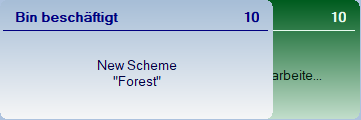
Wenn in allen relevanten Funktionen überprüft wird, ob ein gültiges Window-Handle übergeben wurde und andernfalls direkt wieder mit Return SetError(1, ...) rausgesprungen wird, können alle BusyCtrl's in beliebiger Reihenfolge mit einem Linksklick geschlossen werden, insofern sie nicht bereits durch ein gesetztes TimeOut gekillt wurden. Nachdem alle BusyCtrl's geschlossen wurden (das letzte mit Linksklick), werden zwei weitere BusyCtrl's erstellt... die sich dann auch wieder mit Linksklick schließen lassen... oder via TimeOut... bis der Arzt kommt.

Kurz:
Super!
Hier noch ein paar Dinge, die mir aufgefallen sind:
Wenn für ein BusyCtrl ein Icon gesetzt wurde, wird es - auch wenn es nicht geändert wurde - bei jedem CallBackInterval neu geladen.
Du prüfst in deinen Funktionen nicht, ob ein gültiges Window-Handle übergeben wurde... was z. B. dazu führt, dass nachdem $hBusy7 (in deinem Example) durch mein hinzugefügtes Event (s. w. unten) geschlossen wurde, durch einen Klick auf den Button $bt4 zwei neue BusyCtrl's erzeugt werden. 
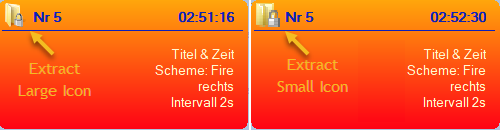
Icons auch aus 'exe' und 'icl' extrahieren...
__WinAPI_IconFromDll
Hier solltest du den Pointer für Large Icons setzen...
;~ Local $iIcons = _WinAPI_ExtractIconEx($_sDll, $_iIconID, $tIcons, 0, 1) ; Small Icons
Local $iIcons = _WinAPI_ExtractIconEx($_sDll, $_iIconID, 0, $tIcons, 1) ; Large Icons
Und eine Frage hätte ich noch... testweise habe ich mal für das Busy7 ein Event gesetzt.
$hBusy7 = _GuiCtrlBusy_Create('Nr 7', 'Titel && Zeit\nScheme: Orange\nund eine Zeile #3\nund auch noch eine Zeile #4', -1, 100, 550, 0, 2, 'orange', True)
GUISetOnEvent($GUI_EVENT_PRIMARYDOWN, '_CloseBusy')

Func _CloseBusy()
    _GuiCtrlBusy_Close(@GUI_WinHandle)
EndFunc
Ist es "normal", dass ich die Maustaste ca. 1 Sekunde lang drücken, damit dieses Event ausgelöst wird?
@Musashi
Falls ein "Normaler User" die Funktion ändern möchte und damit nicht klar kommt, kann er ja hier im Forum um Hilfe bitten. Konstruktive Kritik an mir oder meinen Scripten ist immer willkommen! Wenn du dir meine letzte Version anschaust, wirst du auch sehen, dass ich deinen Hinweis bezüglich des "Design-Problems" umgesetzt habe. Generell denke ich, dass Scripte von helfenden Usern (vor allem in der Rubrik "Hilfe & Unterstützung") nicht als Endlösung, sondern als Vorlage und Inspiration angesehen werden sollten.
Die Funktion von Oscar (hier fehlt noch die Auswertung der Arrays und eine Korrektur für den Wert ".CurrentLanguage") und AspirinJunkie (wieder was gelernt!) sind beide sehr schön, letztere ist allerdings ohne Error-Handler...
; Row|Col 0|Col 1
; [0]|BiosCharacteristics|{Array}
; [1]|BIOSVersion|{Array}
; [13]|ListOfLanguages|{Array}
".CurrentLanguage" liefert bei mir mehrere Werte, die mit einem "|" getrennt sind - identisch mit dem Inhalt des Arrays ".ListOfLanguages". Die Funktion _StringSplit2D gibt davon nur den ersten Wert zurück.