1. Dashboard
  2. Mitglieder
    1. Letzte Aktivitäten
    2. Benutzer online
    3. Team
    4. Mitgliedersuche
  3. Forenregeln
  4. Forum
    1. Unerledigte Themen
  • Anmelden
  • Registrieren
  • Suche
Alles
  • Alles
  • Artikel
  • Seiten
  • Forum
  • Erweiterte Suche
  1. AutoIt.de - Das deutschsprachige Forum.
  2. Mitglieder
  3. Bitnugger

Beiträge von Bitnugger

  • Verzeichnisangabe bei Consolen-Programm-Ende anzeigen

    • Bitnugger
    • 29. September 2020 um 06:57
    Zitat von hipfzwirgel

    Wenn nun das Programm fertig ist, dann blinkt da nur der Cursor(wie der Unterstrich oben).

    Ob ein Script/Programm fertig ist, erkennst du daran, das der Prompt wieder angezeigt wird. Ist dies nicht der Fall, dann läuft da irgendwas schief... wenn du uns dein Script zeigst, können wir dir sicher auch sagen, woran es liegt.

  • Möglich oder nicht? Zeitwert aus einem Programm im Hintergrund auslesen und in ein neues Script schreiben

    • Bitnugger
    • 27. September 2020 um 15:39
    Zitat von mikush

    Das Problem ist, dass die Antwort auf einem anderen Port erfolgt und ich auf diesen nicht zugreifen kann. Der wird nämlich nur geöffnet, wenn ich auch das Modellbahnsteuerungsprogramm dieses Anbieters nutze.

    Zugreifen kannst du jederzeit auf jeden Port... die Frage ist nur, ob du eine Antwort bekommst... gibt es von dem Modellbahnsteuerungsprogramm eine Demo-Version?

    Zitat von mikush

    Deshalb ja mein Anliegen die Uhrzeit im Programmfenster abzufragen oder aus dem öffentlichen Datenstrom zu lesen.

    Was in aller Welt ist ein öffentlicher Datenstrom? :/8)

  • Möglich oder nicht? Zeitwert aus einem Programm im Hintergrund auslesen und in ein neues Script schreiben

    • Bitnugger
    • 26. September 2020 um 17:09
    Zitat von mikush

    Ich werde mal mit UDPRecv versuchen ob ich irgendwas entlocken kann, was sich mit AutoIt verarbeiten lässt.

    Dazu musst du vorab sicher einen "Befehl" mit UDPSend verschicken, um mit UDPRecv eine Antwort darauf zu empfangen und diese auszuwerten zu können... wenn du das wüsstest, wäre dieser Thread hier überflüssig. ;)

  • Visible Tray Icon

    • Bitnugger
    • 24. September 2020 um 01:13

    Hier mal ein kleines Script, mit dem man sich Infos zu dem Fenster anzeigen lassen kann, das sich unter dem Cursor befindet:

    AutoIt: ShowWindowFromPointInfo.au3
    ;-- TIME_STAMP   2020-09-24 01:08:21   v 0.1
    
    Opt('MustDeclareVars', 1)
    
    #include <WindowsConstants.au3>
    #include <Process.au3>
    #include <WinAPIProc.au3>
    #include <WinAPISysWin.au3>
    
    Global $sShow = '{F2}', $sHide = '!{F2}', $sToClip = '!{F3}', $sESC = '{ESC}'
    Global $bShow = False, $sLastPoint
    
    _SetHotKey($sShow, '_HotKeyPressed')
    _SetHotKey($sHide, '_HotKeyPressed')
    _SetHotKey($sESC, '_HotKeyPressed')
    
    Global $g_tStruct = DllStructCreate($tagPOINT) ; Create a structure that defines the point to be checked.
    Global $hGUI = GUICreate(@ScriptName & ' - Show = ' & $sShow & ', Hide = ' & $sHide & ', Exit = ' & $sESC, @DesktopWidth - 20, 240)
    Global $aClientSize = WinGetClientSize($hGUI)
    Global $idEdit = GUICtrlCreateEdit('', 0, 0, $aClientSize[0], $aClientSize[1])
    GUICtrlSetFont(-1, 10, 800, 0, 'Courier New')
    GUISetState(@SW_SHOWMINIMIZED)
    
    SplashTextOn('', 'Press '&$sShow&' um Infos zu dem Fenster unter dem Cursor anzuzeigen, '&@CRLF&$sHide&' um die Info auszublenden, oder '&@CRLF&$sESC&' um das Script zu beenden.', $aClientSize[0] - 150, 90)
    AdlibRegister('_SplashOff', 2000)
    
    Do
    Until GUIGetMsg() = -3
    Exit
    
    Func _SetHotKey($_sKey, $_sFuncName)
        If Not HotKeySet($_sKey, $_sFuncName) Then Exit MsgBox(16, @ScriptName, 'HotKey ' &$_sKey& ' konnte nicht gesetzt werden!')
        Return True
    EndFunc
    
    Func _HotKeyPressed()
        Local Static $hParentOld, $hChildOld
        Local $aMousePos, $hRootOwner, $hParent, $hChild, $aChilds, $sLine, $sChilds, $iPID, $sProcessFileName, $sProcessName, $sText
        Switch @HotKeyPressed ; The last hotkey pressed.
            Case $sShow
                $bShow = True
                If _WinAPI_IsIconic($hGUI) Then GUISetState(@SW_RESTORE)
                While $bShow
                    If GUIGetMsg() = -3 Then Exit
                    $aMousePos = MouseGetPos()
                    DllStructSetData($g_tStruct, "x", $aMousePos[0])
                    DllStructSetData($g_tStruct, "y", $aMousePos[1])
                    $hChild = _WinAPI_WindowFromPoint($g_tStruct)
                    $hParent = _WinAPI_GetAncestor($hChild, $GA_ROOT)
                    If ($hParent <> $hParentOld) Or ($hChild <> $hChildOld) Then
                        $hParentOld = $hParent
                        $hChildOld = $hChild
                        $hRootOwner = _WinAPI_GetAncestor($hChild, $GA_ROOTOWNER)
                        $aChilds = _WinAPI_EnumChildWindows($hParent, False)
    
                        $sChilds = ''
                        $sLine = ''
                        If Not @error And $aChilds[0][0] Then
                            $sChilds = '> $aChilds (from $hParent)  ==>> '
                            For $i = 1 To $aChilds[0][0] Step 1
                                $sLine &= StringFormat('[%s, %s]', $aChilds[$i][0], $aChilds[$i][1]) ; Handle, ClassName
                                If StringLen($sLine) > 160 Then
                                    $sChilds &= $sLine & @CRLF & '>                           ==>> '
                                    $sLine = ''
                                EndIf
                            Next
                            If StringRight($sChilds, 5) = '==>> ' Then $sChilds = StringTrimRight($sChilds, 33)
                        EndIf
    
                        $iPID = WinGetProcess($hParent)
                        $sProcessFileName = _WinAPI_GetProcessFileName($iPID)
                        $sProcessName     = _ProcessGetName($iPID)
    
                        $sText = ''
    
                        If $hChild Then $sText &= '> $hChild (WindowFromPoint) ==>> ' & $hChild & ' (CLASS = ' & _WinAPI_GetClassName($hChild) & ')' & @CRLF
                        $sText &= '> $hRootOwner               ==>> ' & $hRootOwner & ' (CLASS = ' & _WinAPI_GetClassName($hRootOwner) & ') ( Title = ' & WinGetTitle($hRootOwner) & ')' & @CRLF
                        $sText &= '> $hParent                  ==>> ' & $hParent & ' (CLASS = ' & _WinAPI_GetClassName($hParent) & ') ( Title = ' & WinGetTitle($hParent) & ')' & @CRLF
                        $sText &= '> $iPID (from $hParent)     ==>> ' & $iPID & @CRLF
                        $sText &= '> $sProcessFileName         ==>> ' & $sProcessFileName & @CRLF
                        $sText &= '> $sProcessName             ==>> ' & $sProcessName & @CRLF
                        If $sChilds Then $sText &= $sChilds & @CRLF
                        GUICtrlSetData($idEdit, $sText)
                        $sLastPoint = $sText
                    EndIf
                WEnd
            Case $sHide
                $bShow = False
                If Not _WinAPI_IsIconic($hGUI) Then GUISetState(@SW_MINIMIZE)
            Case $sToClip
                If $sLastPoint Then ClipPut($sLastPoint)
            Case $sESC
                Exit
        EndSwitch
    EndFunc
    
    Func _SplashOff()
        AdlibRegister('_SplashOff')
        SplashOff()
    EndFunc
    Alles anzeigen

    ShowWindowFromPointInfo.pngWenn ich wieder etwas Zeit habe, erweitere ich es noch etwas... die Instance mache ich aber heute noch rein.

  • Visible Tray Icon

    • Bitnugger
    • 23. September 2020 um 23:17
    Zitat von tommii

    das Trayfenster selber ist dann class:NotifyIconOverflowWindow

    NotifyIconOverflowWindow ist das Fenster, in dem sich die nicht sichtbaren Icons befinden.

  • Wie wiederhole ich einen Teil eines Programmablaufs, wenn eine nachfolgende Prüfung ein negatives Ergebnis auswirft?

    • Bitnugger
    • 22. September 2020 um 22:22
    Zitat von Andy

    ich würde ja wenigstens ein Sleep(100) in die Schleife packen, bei mir "pingt" das Script sonst bei nicht verbundenem Netz mit 8500 Schleifendurchläufen pro Sekunde

    Hihi... bei mir sind es nur schlappe 7034... 8o

    AutoIt
    Local $iRTT, $iCount = 0
    Do
        $iCount += Sleep(100) ; Das Sleep keinen Rückgabewert liefert, ist übrigens gelogen! ;-)
        $iRTT = Ping("www.google.de")
    Until Not @error Or $iCount = 10
    ConsoleWrite('$iCount = ' & $iCount & '  $iRTT = ' & $iRTT & ' @error = ' & @error & @CRLF)
  • Array als variablen Array-Namen deklarieren

    • Bitnugger
    • 22. September 2020 um 21:30
    Zitat von Speedy86

    ich möchte eigentlich nur das eine Array zu einen anderen Arraynamen umbenannt wird wenn es zutritt.

    zutritt?

    Dein Bsp. funktioniert übrigens eh nicht, weil die Größe des Arrays $arTest vor dem Kopieren erst mit ReDim angepasst werden muss. Zudem prüfst du nur in dem If-Zweig auf "$arList1", im Else-Zweig nimmst du ohne Prüfung "$arList2"... und das mag zwar (jetzt noch) einfach für dich erscheinen, ist aber tatsächlich umständlich und fehlerträchtig. Das macht wohl niemand so... na ja... ausser dir evtl..

    Anstatt dann die Werte alle einzeln aus dem Array zu kopieren:

    AutoIt
    If $arDeviceList[0][5] = "$arList1" Then
        $arTest = $arList1
    ElseIf $arDeviceList[0][5] = "$arList2" Then
        $arTest = $arList2
    Else
        $arTest = ""
    EndIf
    
    ; oder so...
    Switch $arDeviceList[0][5]
        Case "$arList1"
            $arTest = $arList1
        Case "$arList2"
            $arTest = $arList2
        Case Else
            $arTest = ""
    EndSwitch
    Alles anzeigen

    Und nein, es ist nicht möglich eine Variable umzubenennen.

  • _OL_Wrapper_SendMail gibt den Fehler 6002 aus

    • Bitnugger
    • 21. September 2020 um 17:06

    Auf deinen Code in Post #10 werde ich jetzt mal besser nicht eingehen... nur 1 Syntax-Error, das ist für einen blutigen Anfänger schon eine ziemlich gute Leistung. Was dir fehlt, sind die Grundlagen zu AutoIt und ohne die geht es nun mal nicht! Ich Programmiere übrigens auch nur, weil ich es gerne mache. ;)

    Zitat von Daniel

    _OL_Wrapper_SendMail($oOutlook, $sCurrentUser)

    Auch schon damit bekomm ich meinen schönen Fehler...

    Damit ist doch schon alles gesagt... wenn das nicht geht, liegt es definitiv an deinem MS-Office 365! Um das zu Testen, lässt man den ganzen anderen Rotz einfach weg... so hat man dann auch mehr Durchblick.

    water hat seiner UDF bereits ein Bsp. dafür beigelegt:

    AutoIt: _OL_Wrapper_SendMail.au3
    #include <OutlookEX.au3>
    
    ; *****************************************************************************
    ; Connect to Outlook
    ; *****************************************************************************
    Global $oOutlook = _OL_Open()
    If @error <> 0 Then Exit MsgBox(16, "OutlookEX UDF", "Error creating a connection to Outlook. @error = " & @error & ", @extended = " & @extended)
    
    ; *****************************************************************************
    ; Example 1
    ; Send a html mail to the current user.
    ; Add an attachment and set importance to high.
    ; *****************************************************************************
    Global $sCurrentUser = $oOutlook.GetNameSpace("MAPI").CurrentUser.Name
    _OL_Wrapper_SendMail($oOutlook, $sCurrentUser, "", "", "TestSubject", "Body<br><b>fett</b> normal.", @ScriptDir & "\_OL_Wrapper_SendMail.au3", $olFormatHTML, $olImportanceHigh)
    If @error <> 0 Then Exit MsgBox(16, "OutlookEX UDF: _OutlookSendMail Wrapper Script", "Error sending mail. @error = " & @error & ", @extended: " & @extended)
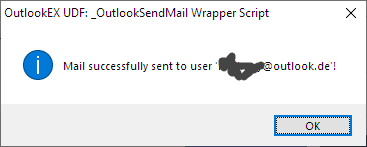
    MsgBox(64, "OutlookEX UDF: _OutlookSendMail Wrapper Script", "Mail successfully sent to user '" & $sCurrentUser & "'!")
    
    _OL_Close($oOutlook)
    Alles anzeigen

    Wenn das nicht funktioniert, liegt es definitiv nicht an dir... sondern an Outlook.

    Hier das Script, mit dem ich meine Mails via AutoIt versende:

    AutoIt: _INetSmtpMailCom.au3
    ;-- TIME_STAMP   2020-09-21 16:57:53   v 0.1
    
    #include <File.au3>
    
    Opt('MustDeclareVars', 1)
    
    #cs
        $SmtpServer  = "MailServer"              ; address for the smtp-server to use - REQUIRED
        $FromName    = "Name"                    ; name from who the email was sent
        $FromAddress = "your@Email.Address.com"  ; address from where the mail should come
        $ToAddress   = "your@Email.Address.com"  ; destination address of the email - REQUIRED
        $Subject     = "Userinfo"                ; subject from the email - can be anything you want it to be
        $Body        = ""                        ; the messagebody from the mail - can be left blank but then you get a blank mail
        $AttachFiles = ""                        ; the file(s) you want to attach seperated with a ; (Semicolon) - leave blank if not needed
        $CcAddress   = "CCadress1@test.com"      ; address for cc - leave blank if not needed
        $BccAddress  = "BCCadress1@test.com"     ; address for bcc - leave blank if not needed
        $Importance  = "Normal"                  ; Send message priority: "High", "Normal", "Low"
        $Username    = "******"                  ; username for the account used from where the mail gets sent - REQUIRED
        $Password    = "********"                ; password for the account used from where the mail gets sent - REQUIRED
        $Port        = 25                        ; port used for sending the mail
        $SSL         = 0                         ; enables/disables secure socket layer sending - put to 1 if using https
    ;~     $Port     = 465                       ; GMAIL port used for sending the mail
    ;~     $SSL      = 1                         ; GMAIL enables/disables secure socket layer sending - put to 1 if using https
    #ce
    
    ; - - - - - - - - - - - - - - - - - - - - - - - - - - - - - - - - - - - - - - - - - - - - - -
    ; Hier noch ein konkretes Bsp.: Max Mustermann sendet seiner Frau Ilse Mustermann eine Mail.
    ; - - - - - - - - - - - - - - - - - - - - - - - - - - - - - - - - - - - - - - - - - - - - - -
    Global $SmtpServer  = "securesmtp.t-online.de"
    Global $FromName    = "Max Mustermann <MaxMustermann@t-online.de>"
    Global $FromAddress = "MaxMustermann@t-online.de"
    Global $ToAddress   = "Ilse.Mustermann@gmx.de"
    Global $Subject     = "Bin unterwegs..."
    Global $Body        = "Hallo Schatz, was gibt es heute leckeres zu Essen?"
    Global $AttachFiles = ""
    Global $CcAddress   = ""
    Global $BccAddress  = ""
    Global $Importance  = "Normal"
    Global $Username    = "MaxMustermann@t-online.de"
    Global $Password    = "Max@0815!ez"
    Global $Port        = 465
    Global $SSL         = 1
    
    Global $aErrRet[2], $oMyError = ObjEvent("AutoIt.Error", "MyErrFunc")
    Global $sSend = _INetSmtpMailCom($SmtpServer, $FromName, $FromAddress, $ToAddress, $Subject, $Body, $AttachFiles, $CcAddress, $BccAddress, $Importance, $Username, $Password, $Port, $SSL)
    If @error Then MsgBox(0, "Error sending message", "Error code:" & @error & "  Description:" & $sSend)
    
    
    Func _INetSmtpMailCom($s_SmtpServer, $s_FromName, $s_FromAddress, $s_ToAddress, $s_Subject = "", $s_Body = "", $s_AttachFiles = "", $s_CcAddress = "", $s_BccAddress = "", $s_Importance = "Normal", $s_Username = "", $s_Password = "", $_iPort = 25, $_iSSL = 0)
    
        Local $objEmail = ObjCreate("CDO.Message")
    
        $objEmail.From = '"' & $s_FromName & '" <' & $s_FromAddress & '>'
        $objEmail.To = $s_ToAddress
        If $s_CcAddress <> "" Then $objEmail.Cc = $s_CcAddress
        If $s_BccAddress <> "" Then $objEmail.Bcc = $s_BccAddress
        $objEmail.Subject = $s_Subject
        If StringInStr($s_Body, "<") And StringInStr($s_Body, ">") Then
            $objEmail.HTMLBody = $s_Body
        Else
            $objEmail.Textbody = $s_Body & @CRLF
        EndIf
        If $s_AttachFiles <> "" Then
            Local $a_Files2Attach = StringSplit($s_AttachFiles, ";")
            For $x = 1 To $a_Files2Attach[0]
                $a_Files2Attach[$x] = _PathFull($a_Files2Attach[$x])
                If FileExists($a_Files2Attach[$x]) Then
                    ConsoleWrite('+> File attachment added: ' & $a_Files2Attach[$x] & @LF)
                    $objEmail.AddAttachment($a_Files2Attach[$x])
                Else
                    Return SetError(1, 0, '!> File not found to attach: ' & $a_Files2Attach[$x])
                EndIf
            Next
        EndIf
        $objEmail.Configuration.Fields.Item("http://schemas.microsoft.com/cdo/configuration/sendusing") = 2
        $objEmail.Configuration.Fields.Item("http://schemas.microsoft.com/cdo/configuration/smtpserver") = $s_SmtpServer
        If Number($_iPort) = 0 Then $_iPort = 25
        $objEmail.Configuration.Fields.Item("http://schemas.microsoft.com/cdo/configuration/smtpserverport") = $_iPort
    
        ; Authenticated SMTP
        If $s_Username <> "" Then
            $objEmail.Configuration.Fields.Item("http://schemas.microsoft.com/cdo/configuration/smtpauthenticate") = 1
            $objEmail.Configuration.Fields.Item("http://schemas.microsoft.com/cdo/configuration/sendusername") = $s_Username
            $objEmail.Configuration.Fields.Item("http://schemas.microsoft.com/cdo/configuration/sendpassword") = $s_Password
        EndIf
        If $_iSSL Then
            $objEmail.Configuration.Fields.Item("http://schemas.microsoft.com/cdo/configuration/smtpusessl") = True
        EndIf
    
        ; Update settings
        $objEmail.Configuration.Fields.Update
    
        ; Set Email Importance
        Switch $s_Importance
            Case "High", "Low", "Normal"
                ; Nope
            Case Else
                $s_Importance = "Normal"
        EndSwitch
        $objEmail.Fields.Item("urn:schemas:mailheader:Importance") = $s_Importance
    
        ; Update settings
        $objEmail.Fields.Update
    
        ; Sent the Message
        $objEmail.Send
        If @error Then Return SetError(2, 0, $aErrRet[1])
    EndFunc   ;==>_INetSmtpMailCom
    
    ; COM ERROR HANDLER
    Func MyErrFunc()
        Local $sHexNumber = Hex($oMyError.number, 8)
        $aErrRet[0] = $sHexNumber
        $aErrRet[1] = StringStripWS($oMyError.description, 3)
        ConsoleWrite("### COM Error !  Number: 0x" & $sHexNumber & "   ScriptLine: " & $oMyError.scriptline & "   Description: " & $aErrRet[1] & @LF)
        Return SetError(1) ; something to check for when this function returns
    EndFunc   ;==>MyErrFunc
    Alles anzeigen

    Bei EntryID klingelt auch bei mir etwas...

  • _OL_Wrapper_SendMail gibt den Fehler 6002 aus

    • Bitnugger
    • 21. September 2020 um 09:31

    Geht es dir nur darum, Mails via AutoIt zu versenden? Dann hätte ich evtl. eine funktionierende Alternative, mit der ich es mache...

  • Kommunikation zw AutoIt und PSPad's VBScript

    • Bitnugger
    • 21. September 2020 um 09:28
    Zitat von alpines

    Und wie kriege ich das bei SciTE hin ohne weitere Skripte zu installieren?

    Nicht das wir aneinander vorbeireden...

    Damit in SciTE für eigene Funktionen ein CallTip angezeigt wird, müssen diese lediglich mit dem CallTip-Manager eingepflegt werden. Der CallTip-Manager wird in der SciteConfig.au3 gestartet, in der dann die Funktion CallTipManager() aufgerufen wird, die sich in UCTMan.au3 versteckt, welche mit #include "UCTMan.au3" geladen wird. Diese Sachen sind aber alle bereits in SciTE4AutoIt3 enthalten.

    Ansonsten gib mal ein Beispiel...

  • Kommunikation zw AutoIt und PSPad's VBScript

    • Bitnugger
    • 21. September 2020 um 08:07
    Zitat von BugFix

    Dann benutzt du nicht SciTE4AutoIt?

    Die gesamte Funktionalität dort wird mit Lua-Skripten realisiert.

    Im "normalen" SciTE doch auch, oder?

    Ich habe mindestens 20 Lua-Scripte für mein SciTE... gut die Hälfte von BugFix ...einige werden per Hotkey gestartet, andere wenn ein Event ausgelöst wird, z.B. wenn ein Script gespeichert wird.

    Disabling Lua

    Lua is currently loaded just-in-time, before it is first used. The ways that Lua can become are through the ext.lua.startup.script property, by naming a lua file named in the extension.filepattern property, or by using the extension mechanism to define tool commands (i.e. subsystem 3). If you do not do any of these things, the Lua scripting engine is not loaded, and for all practical purposes, SciTE should behave as it did before Lua was added.

    Nevertheless, it is still possible to build SciTE without the Lua support. To do this, simply define the variable NO_LUA when you build it, e.g. for MSVC, nmake -f scite.mak -DNO_LUA; or with GNU tools, make NO_LUA=1.

  • Visible Tray Icon

    • Bitnugger
    • 21. September 2020 um 07:14
    Zitat von tommii

    die Variable $sText gibt mir den "Namen" meines Netzwerkadapters an, waws bedeuten würde, dass wir ein Symbol in der Leiste zu weit rechts sind...

    Tja... bei mir ist es die Suchleiste... wozu man auch im hinterkopf behalten muss, dass die Taskleiste ja kein fixes Konstrukt ist, sondern doch schon recht freizügig anpassbar ist. Doch vor allem muss klar ein, dass sie aus mehreren Bereichen besteht, und auf die sehr unterschiedlich zugegriffen werden muss, weil die Controls ja nicht vom selben Typ sind.

    Wenn du in dem AutoIt-Info-Tool im Menü Options den Haken bei Freeze raus nimmst (danach auf eine leere Stelle auf dem Desktop klicken), die Taskleiste dann nicht automatisch ausblenden lässt, kannst du mit der Maus über die Taskleiste fahren und siehst dann in dem AutoIt-Info-Tool welche Handles du wofür brauchst.

    SysTray.png

    SysTray_2.png

    Freeze.png

  • Kommunikation zw AutoIt und PSPad's VBScript

    • Bitnugger
    • 21. September 2020 um 06:15
    OffTopic
    Zitat von Professor Bernd

    Das glaube ich nicht. Zeig mal einen Screenshot, wo SciTE das auch kann.

    In Post #9 das zweite Bild... und hier noch mal mit anderen Farben... experimentiere noch:

    SciTE_CallTip_2.png

    SciTE_CallTip_3.png

    Zitat von Professor Bernd

    Was nun fehlt ist eine Möglichkeit, mit der das XY.au3 die Funktion GetCharAtCaretPos() aufrufen kann, damit die gewünschten Informatioen ans XY.au3 gesendet werden.

    Verstehe... genau das wird in SciTe mit Lua und dem Director Interface ermöglicht.

    Wenn PSPad keine solche Mechanismen zur Verfügung stellt, muss es ja wohl oder übel eines deiner VBScripte machen, dass dafür dann einen (Timer-)Event braucht, oder in einer Endlosschleife laufen muss, um das zu händeln.

    Endlosschleife fällt ja weg, weil PSPad damit verständlicherweise nicht klar kommt... wie sieht es also mit Events aus... gibt es da irgendwas verwertbares?

  • Kommunikation zw AutoIt und PSPad's VBScript

    • Bitnugger
    • 21. September 2020 um 04:17
    Zitat von Professor Bernd

    Wenn dir das schon gefallen hat, probier mal den von alpines genannten CallTipViewer für OUDFs.

    Habe ich soeben gemacht... ok... SciTE kann das ja auch... bei deinem wird der CallTip allerdings nicht auf demselben Monitor angezeigt.

    Zitat von Professor Bernd

    Aber ohne eine Kommunikation, mit der im laufenden PSPad eine VBScript Funktion aufgerufen werden kann, ist bald das Ende der Fahnenstange erreicht.

    Erkläre das bitte mal anhand eines konkreten Beispiels... ich raffe das nicht so ganz... und wie würdest du es denn z.B. mit AutoIt machen?

    PSPad_CallTip.png    SciTE_CallTip.png

    PS: $hWndOwnder ist übrigens ausnahmsweise mal nicht mein Fehler, denn es ist bereits in der originalen Funktion _ChooseColor falsch geschrieben... werde es bei mir aber korrigieren.

  • Kommunikation zw AutoIt und PSPad's VBScript

    • Bitnugger
    • 20. September 2020 um 22:26

    Ja ok... jetzt funktioniert es... aber da muss schon ein achtes Weltwunder passieren, damit ich von SciTE4AutoIt3 nach PSPad wechsle... allein schon wegen Lua...

    Ich habe es aber auf Anhieb geschafft ein Script zu starten/kompilieren. ;)

    AutoIt: _ChooseColorEx.au3
    ;-- TIME_STAMP   2020-09-21 05:24:10   v 0.1
    
    Opt('MustDeclareVars', 1)
    
    #include <_ChooseColorEx.au3>
    
    _Example()
    
    Func _Example()
        Local $aCustcolors = [0x002B36, 0x073642, 0x586E75, 0x657B83, 0x839496, 0x93A1A1, 0xEEE8D5, 0xFDF6E3, 0xB58900, 0xCB4B16, 0xDC322F, 0xD33682, 0x6C71C4, 0x268BD2, 0x2AA198, 0x859900]
        Local $iReturnType = 2, $iColorRef = 0x859900, $iRefType = 0, $hWndOwner = 0, $iColor
        $iColor = _ChooseColorEx($iReturnType, $iColorRef, $iRefType, $hWndOwner, $aCustcolors)
        If @error Then
            ConsoleWrite("$iColor = " & $iColor & @LF & "!@ " & @TAB & "#Error: " & @error & @TAB & "#Extended: " & @extended & @LF)
        Else
            ConsoleWrite('Selected color: 0x' & Hex($iColor, 6) & @CRLF)
        EndIf
    EndFunc   ;==>_Example
    
    
    ; #FUNCTION# ====================================================================================================================
    ; Name ..........: _ChooseColorEx
    ; Description ...: Extended _ChooseColor with up to 16 custom colors
    ; Syntax ........: _ChooseColorEx([$iReturnType = 0[, $iColorRef = 0[, $iRefType = 0[, $hWndOwner = 0[, $aCustcolors = 0]]]]])
    ; Parameters ....: $iReturnType     [optional] Determines return type, valid values:
    ;                                              0 - COLORREF rgbcolor
    ;                                              1 - BGR hex
    ;                                              2 - RGB hex
    ;                  $iColorRef       [optional] Default selected Color
    ;                  $iRefType        [optional] Type of $iColorRef passed in, valid values:
    ;                                              0 - COLORREF rgbcolor
    ;                                              1 - BGR hex
    ;                                              2 - RGB hex
    ;                  $hWndOwner      [optional] Handle to the window that owns the dialog box
    ;                  $aCustcolors     [optional] Array with up to 16 custom colors
    ; Return values .: Success: Color returned
    ;                  Failure: -1
    ; Author ........: Bitnugger
    ; Modified ......:
    ; Remarks .......:
    ; Related .......: _ChooseColor
    ; Link ..........:
    ; Example .......: Yes
    ; ===============================================================================================================================
    Func _ChooseColorEx($iReturnType = 0, $iColorRef = 0, $iRefType = 0, $hWndOwner = 0, $aCustcolors = 0)
        Local Const $__MISCCONSTANT_CC_ANYCOLOR = 0x0100
        Local Const $__MISCCONSTANT_CC_FULLOPEN = 0x0002
        Local Const $__MISCCONSTANT_CC_RGBINIT  = 0x0001
    
        Local Const $tagCHOOSECOLOR = "dword Size;hwnd hWndOwnder;handle hInstance;dword rgbResult;ptr CustColors;dword Flags;lparam lCustData;" & _
                "ptr lpfnHook;ptr lpTemplateName"
    
        Local Const $tagCustcolors = "dword[16]"
    
        Local $tChoose = DllStructCreate($tagCHOOSECOLOR)
        If UBound($aCustcolors) > 16 Then Return SetError(1, 0, -1)
        Local $tCc = DllStructCreate($tagCustcolors)
        If UBound($aCustcolors) Then
            For $i = 0 To UBound($aCustcolors) - 1 Step 1
                DllStructSetData($tCc, 1, $aCustcolors[$i], $i + 1)
            Next
        EndIf
    
        If $iRefType = 1 Then ; BGR hex color to colorref
            $iColorRef = Int($iColorRef)
        ElseIf $iRefType = 2 Then ; RGB hex color to colorref
            $iColorRef = Hex(String($iColorRef), 6)
            $iColorRef = '0x' & StringMid($iColorRef, 5, 2) & StringMid($iColorRef, 3, 2) & StringMid($iColorRef, 1, 2)
        EndIf
    
        DllStructSetData($tChoose, "Size", DllStructGetSize($tChoose))
        DllStructSetData($tChoose, "hWndOwnder", $hWndOwner)
        DllStructSetData($tChoose, "rgbResult", $iColorRef)
        DllStructSetData($tChoose, "CustColors", DllStructGetPtr($tCc))
        DllStructSetData($tChoose, "Flags", BitOR($__MISCCONSTANT_CC_ANYCOLOR, $__MISCCONSTANT_CC_FULLOPEN, $__MISCCONSTANT_CC_RGBINIT))
    
        Local $aResult = DllCall("comdlg32.dll", "bool", "ChooseColor", "struct*", $tChoose)
        If @error Then Return SetError(@error, @extended, -1)
        If $aResult[0] = 0 Then Return SetError(-3, -3, -1) ; user selected cancel or struct settings incorrect
    
        Local $sColor_picked = DllStructGetData($tChoose, "rgbResult")
    
        If $iReturnType = 1 Then ; return Hex BGR Color
            Return '0x' & Hex(String($sColor_picked), 6)
        ElseIf $iReturnType = 2 Then ; return Hex RGB Color
            $sColor_picked = Hex(String($sColor_picked), 6)
            Return '0x' & StringMid($sColor_picked, 5, 2) & StringMid($sColor_picked, 3, 2) & StringMid($sColor_picked, 1, 2)
        ElseIf $iReturnType = 0 Then ; return RGB COLORREF
            Return $sColor_picked
        Else
            Return SetError(-4, -4, -1)
        EndIf
    EndFunc   ;==>_ChooseColorEx
    Alles anzeigen
  • Visible Tray Icon

    • Bitnugger
    • 20. September 2020 um 16:11

    Test das hier mal:

    AutoIt
    ;-- TIME_STAMP   2020-09-20 16:08:03   v 0.1
    
    Opt('MustDeclareVars', 1)
    
    #include <Array.au3>
    #include <GuiToolBar.au3>
    #include <WinAPI.au3>
    #NoTrayIcon
    
    Global $g_hSysTray, $g_iSystray_ButtonNumber
    
    Global $g_sToolTipTitle = "Hardware sicher entfernen und Medium auswerfen" ; <<== Eindeutiger Teil des Tooltip-Textes des gesuchten Icons... z.B. "Hardware sicher entfernen"
    
    _Example()
    
    Func _Example()
        $g_iSystray_ButtonNumber = Get_Systray_Index($g_sToolTipTitle)
        If @error Then Exit MsgBox(16, "Error", "Icon not found in system tray")
    
        Local $hTrayWnd = WinGetHandle('[Class:Shell_TrayWnd]')
        Local $aPos = WinGetPos($hTrayWnd), $bVisible = BitAND(WinGetState($hTrayWnd), $WIN_STATE_VISIBLE)
        If Not $bVisible Then _TrayVisible(True)
        ConsoleWrite(@CRLF)
        ConsoleWrite('> $bVisible                = ' & $bVisible & @CRLF)
        ConsoleWrite('> @DesktopHeight           = ' & @DesktopHeight & @CRLF)
        ConsoleWrite('> $aPos                    = ' & _ArrayToString($aPos, ', ') & @CRLF)
        If $aPos[1] > @DesktopHeight - 3 Then
            MouseMove($aPos[0], @DesktopHeight, 0)
            While WinGetPos($hTrayWnd)[1] > @DesktopHeight - $aPos[3]
                Sleep(500)
            WEnd
        EndIf
        Sleep(100) ; evtl. etwas erhöhen!
        _GUICtrlToolbar_ClickButton($g_hSysTray, $g_iSystray_ButtonNumber, "right", True)
    ;~     If Not $bVisible Then _TrayVisible(False)
    EndFunc   ;==>_Example
    
    Func Get_Systray_Index($g_sToolTipTitle)
        ; Find systray handle
    
        ; linke Seite, Ausgeführte Anwendungen
        ; $g_hSysTray = ControlGetHandle('[CLASS:Shell_TrayWnd]', '', '[CLASS:MSTaskListWClass; INSTANCE:1]')
        ; ...
        ; Sys.Process("Explorer").Window("Shell_TrayWnd").Window("ReBarWindow32").Window("MSTaskSwWClass", "Running applications").ToolBar("Running applications").Button("Microsoft Office Word 2007").Click()
    
        ; rechte Seite, Infobereich des Benutzers
        $g_hSysTray = ControlGetHandle('[CLASS:Shell_TrayWnd]', '', '[CLASS:ToolbarWindow32; INSTANCE:3]')
        If @error Then Exit MsgBox(16, "Error", "System tray not found")
    
        ; Get systray item count
        Local $iSystray_ButtonCount = _GUICtrlToolbar_ButtonCount($g_hSysTray), $sText
        If $iSystray_ButtonCount = 0 Then Exit MsgBox(16, "Error", "No items found in system tray")
        ConsoleWrite("> $iSystray_ButtonCount    = " & $iSystray_ButtonCount & @LF)
    
        ; Look for wanted tooltip
        For $g_iSystray_ButtonNumber = 0 To $iSystray_ButtonCount
            $sText = _GUICtrlToolbar_GetButtonText($g_hSysTray, $g_iSystray_ButtonNumber)
            ConsoleWrite(@CRLF)
            ConsoleWrite('> $sText                   = ' & $sText & @CRLF)
    ;~         ConsoleWrite('- String                   = ' & _GUICtrlToolbar_GetString($g_hSysTray, $g_iSystray_ButtonNumber) & @CRLF)
            ConsoleWrite('! Command                  = ' & _GUICtrlToolbar_IndexToCommand($g_hSysTray, $g_iSystray_ButtonNumber) & @CRLF)
            ConsoleWrite('! Index                    = ' & _GUICtrlToolbar_CommandToIndex($g_hSysTray, $g_iSystray_ButtonNumber) & @CRLF)
            ConsoleWrite('! $g_iSystray_ButtonNumber = ' & $g_iSystray_ButtonNumber & @CRLF)
    
            If StringInStr($sText, $g_sToolTipTitle) Then
    ;~             MsgBox(0,$iSystray_ButtonCount, $g_iSystray_ButtonNumber, 2)
                Return $g_iSystray_ButtonNumber ; Found
            EndIf
        Next
        SetError(1) ; Not found
    EndFunc   ;==>Get_Systray_Index
    
    Func _TrayVisible($_fVisible) ; True/False
        ConsoleWrite('! _TrayVisible(' & $_fVisible & ')' & @CRLF)
        Local Const $SWP_SHOWWINDOW = 0x40
        Local Const $SWP_HIDEWINDOW = 0x80
        Local $hTray = _WinAPI_FindWindow("Shell_TrayWnd", "")
        Local $iFlag = $_fVisible ? $SWP_SHOWWINDOW : $SWP_HIDEWINDOW
        _WinAPI_SetWindowPos($hTray, 0, 0, 0, 0, 0, $iFlag)
    EndFunc   ;==>_TrayVisible
    Alles anzeigen
  • Kommunikation zw AutoIt und PSPad's VBScript

    • Bitnugger
    • 20. September 2020 um 11:17

    pspad_minimum.png

    Tja... ist dann wohl doch nix mit testen...

    SciTE - bzw. lediglich die SciTE.exe, da der Rest aktuell ist - wird bei mir erst dann aktualisiert, wenn die neue Version wieder den Prozedureinsprungpunkt luaL_register enthält, da sonst einige Lua-Scripts bei mir nicht mehr laufen... hauptsächlich weil shell = require "shell" dann nicht mehr funktioniert.

    Von wem und wofür kommt die Meldung wegen Internet?

    SciTE-Prozedur-Einsprungpunkte
    Code
    Row    |SciTE.exe 3.7.5       |SciTE.exe 4.2.0
    Row   0|                      |lua_absindex
    Row   1|                      |lua_arith
    Row   2|lua_atpanic           |lua_atpanic
    Row   3|lua_call              |
    Row   4|                      |lua_callk
    Row   5|lua_checkstack        |lua_checkstack
    Row   6|lua_close             |lua_close
    Row   7|                      |lua_compare
    Row   8|lua_concat            |lua_concat
    Row   9|                      |lua_copy
    Row  10|lua_cpcall            |
    Row  11|lua_createtable       |lua_createtable
    Row  12|lua_dump              |lua_dump
    Row  13|lua_equal             |
    Row  14|lua_error             |lua_error
    Row  15|lua_gc                |lua_gc
    Row  16|lua_getallocf         |lua_getallocf
    Row  17|lua_getfenv           |
    Row  18|lua_getfield          |lua_getfield
    Row  19|                      |lua_getglobal
    Row  20|lua_gethook           |lua_gethook
    Row  21|lua_gethookcount      |lua_gethookcount
    Row  22|lua_gethookmask       |lua_gethookmask
    Row  23|                      |lua_geti
    Row  24|lua_getinfo           |lua_getinfo
    Row  25|lua_getlocal          |lua_getlocal
    Row  26|lua_getmetatable      |lua_getmetatable
    Row  27|lua_getstack          |lua_getstack
    Row  28|lua_gettable          |lua_gettable
    Row  29|lua_gettop            |lua_gettop
    Row  30|lua_getupvalue        |lua_getupvalue
    Row  31|                      |lua_getuservalue
    Row  32|lua_insert            |
    Row  33|lua_iscfunction       |lua_iscfunction
    Row  34|                      |lua_isinteger
    Row  35|lua_isnumber          |lua_isnumber
    Row  36|lua_isstring          |lua_isstring
    Row  37|lua_isuserdata        |lua_isuserdata
    Row  38|                      |lua_isyieldable
    Row  39|                      |lua_len
    Row  40|lua_lessthan          |
    Row  41|lua_load              |lua_load
    Row  42|lua_newstate          |lua_newstate
    Row  43|lua_newthread         |lua_newthread
    Row  44|lua_newuserdata       |lua_newuserdata
    Row  45|lua_next              |lua_next
    Row  46|lua_objlen            |
    Row  47|lua_pcall             |
    Row  48|                      |lua_pcallk
    Row  49|lua_pushboolean       |lua_pushboolean
    Row  50|lua_pushcclosure      |lua_pushcclosure
    Row  51|lua_pushfstring       |lua_pushfstring
    Row  52|lua_pushinteger       |lua_pushinteger
    Row  53|lua_pushlightuserdata |lua_pushlightuserdata
    Row  54|lua_pushlstring       |lua_pushlstring
    Row  55|lua_pushnil           |lua_pushnil
    Row  56|lua_pushnumber        |lua_pushnumber
    Row  57|lua_pushstring        |lua_pushstring
    Row  58|lua_pushthread        |lua_pushthread
    Row  59|lua_pushvalue         |lua_pushvalue
    Row  60|lua_pushvfstring      |lua_pushvfstring
    Row  61|lua_rawequal          |lua_rawequal
    Row  62|lua_rawget            |lua_rawget
    Row  63|lua_rawgeti           |lua_rawgeti
    Row  64|                      |lua_rawgetp
    Row  65|                      |lua_rawlen
    Row  66|lua_rawset            |lua_rawset
    Row  67|lua_rawseti           |lua_rawseti
    Row  68|                      |lua_rawsetp
    Row  69|lua_remove            |
    Row  70|lua_replace           |
    Row  71|lua_resume            |lua_resume
    Row  72|                      |lua_rotate
    Row  73|lua_setallocf         |lua_setallocf
    Row  74|lua_setfenv           |
    Row  75|lua_setfield          |lua_setfield
    Row  76|                      |lua_setglobal
    Row  77|lua_sethook           |lua_sethook
    Row  78|                      |lua_seti
    Row  79|lua_setlevel          |
    Row  80|lua_setlocal          |lua_setlocal
    Row  81|lua_setmetatable      |lua_setmetatable
    Row  82|lua_settable          |lua_settable
    Row  83|lua_settop            |lua_settop
    Row  84|lua_setupvalue        |lua_setupvalue
    Row  85|                      |lua_setuservalue
    Row  86|lua_status            |lua_status
    Row  87|                      |lua_stringtonumber
    Row  88|lua_toboolean         |lua_toboolean
    Row  89|lua_tocfunction       |lua_tocfunction
    Row  90|lua_tointeger         |
    Row  91|                      |lua_tointegerx
    Row  92|lua_tolstring         |lua_tolstring
    Row  93|lua_tonumber          |
    Row  94|                      |lua_tonumberx
    Row  95|lua_topointer         |lua_topointer
    Row  96|lua_tothread          |lua_tothread
    Row  97|lua_touserdata        |lua_touserdata
    Row  98|lua_type              |lua_type
    Row  99|lua_typename          |lua_typename
    Row 100|                      |lua_upvalueid
    Row 101|                      |lua_upvaluejoin
    Row 102|                      |lua_version
    Row 103|lua_xmove             |lua_xmove
    Row 104|lua_yield             |
    Row 105|                      |lua_yieldk
    Row 106|luaL_addlstring       |luaL_addlstring
    Row 107|luaL_addstring        |luaL_addstring
    Row 108|luaL_addvalue         |luaL_addvalue
    Row 109|luaL_argerror         |luaL_argerror
    Row 110|luaL_buffinit         |luaL_buffinit
    Row 111|                      |luaL_buffinitsize
    Row 112|luaL_callmeta         |luaL_callmeta
    Row 113|luaL_checkany         |luaL_checkany
    Row 114|luaL_checkinteger     |luaL_checkinteger
    Row 115|luaL_checklstring     |luaL_checklstring
    Row 116|luaL_checknumber      |luaL_checknumber
    Row 117|luaL_checkoption      |luaL_checkoption
    Row 118|luaL_checkstack       |luaL_checkstack
    Row 119|luaL_checktype        |luaL_checktype
    Row 120|luaL_checkudata       |luaL_checkudata
    Row 121|                      |luaL_checkversion_
    Row 122|luaL_error            |luaL_error
    Row 123|                      |luaL_execresult
    Row 124|                      |luaL_fileresult
    Row 125|luaL_findtable        |
    Row 126|luaL_getmetafield     |luaL_getmetafield
    Row 127|                      |luaL_getsubtable
    Row 128|luaL_gsub             |luaL_gsub
    Row 129|                      |luaL_len
    Row 130|luaL_loadbuffer       |
    Row 131|                      |luaL_loadbufferx
    Row 132|luaL_loadfile         |
    Row 133|                      |luaL_loadfilex
    Row 134|luaL_loadstring       |luaL_loadstring
    Row 135|luaL_newmetatable     |luaL_newmetatable
    Row 136|luaL_newstate         |luaL_newstate
    Row 137|luaL_openlib          |
    Row 138|luaL_openlibs         |luaL_openlibs
    Row 139|luaL_optinteger       |luaL_optinteger
    Row 140|luaL_optlstring       |luaL_optlstring
    Row 141|luaL_optnumber        |luaL_optnumber
    Row 142|luaL_prepbuffer       |
    Row 143|                      |luaL_prepbuffsize
    Row 144|luaL_pushresult       |luaL_pushresult
    Row 145|                      |luaL_pushresultsize
    Row 146|luaL_ref              |luaL_ref
    Row 147|luaL_register        *|
    Row 148|                      |luaL_requiref
    Row 149|                      |luaL_setfuncs
    Row 150|                      |luaL_setmetatable
    Row 151|                      |luaL_testudata
    Row 152|                      |luaL_tolstring
    Row 153|                      |luaL_traceback
    Row 154|luaL_typerror         |
    Row 155|luaL_unref            |luaL_unref
    Row 156|luaL_where            |luaL_where
    Row 157|luaopen_base          |luaopen_base
    Row 158|                      |luaopen_bit32
    Row 159|                      |luaopen_coroutine
    Row 160|luaopen_debug         |luaopen_debug
    Row 161|luaopen_io            |luaopen_io
    Row 162|luaopen_math          |luaopen_math
    Row 163|luaopen_os            |luaopen_os
    Row 164|luaopen_package       |luaopen_package
    Row 165|luaopen_string        |luaopen_string
    Row 166|luaopen_table         |luaopen_table
    Row 167|                      |luaopen_utf8
    Alles anzeigen
  • Kommunikation zw AutoIt und PSPad's VBScript

    • Bitnugger
    • 20. September 2020 um 05:06

    Vielleicht hilft dir das:

    https://stackoverflow.com/questions/1094…-using-vbscript

    https://social.msdn.microsoft.com/Forums/en-US/f…pt?forum=isvvba

    oder das:

    https://www.example-code.com/vbscript/socket_connect.asp

    Zitat von Professor Bernd

    Eine solcher Kommunikation

    2:1 for me ;)

  • Such Hilfe zu Win 10 Problem - Potplayer "Benachrichtigung" nervt

    • Bitnugger
    • 19. September 2020 um 23:36

    Ich habe es an allen Stellen geändert...

  • Visible Tray Icon

    • Bitnugger
    • 19. September 2020 um 07:37

    Hast du es schon so versucht?

    AutoIt
    Local $hWnd = HWnd(0x00030362)
    ControlClick($hWnd, '', '', 'right')

Spenden

Jeder Euro hilft uns, Euch zu helfen.

Download

AutoIt Tutorial
AutoIt Buch
Onlinehilfe
AutoIt Entwickler
  1. Datenschutzerklärung
  2. Impressum
  3. Shoutbox-Archiv
Community-Software: WoltLab Suite™